
You know that feeling when you're answering the same question for the third time this week? That's the sound of an undocumented process. A basic SOP template is the simplest, most effective cure for this, turning scattered tribal knowledge into a reliable source of truth for your entire team.
Why Smart Teams Run on Standard Operating Procedures
Let's be real—Standard Operating Procedures (SOPs) aren't just more corporate paperwork to fill out and forget. In any growing business, undocumented processes are serious roadblocks, not minor annoyances.
When critical information lives inside one person's head, you've created a knowledge silo. The whole team becomes vulnerable if that person calls in sick, goes on vacation, or moves on. This chaos leads directly to inconsistent work quality and the same preventable errors popping up again and again, which absolutely kills efficiency and morale.
New hire onboarding turns into a game of telephone, with each person getting a slightly different version of "how we do things here." That inconsistency is expensive. It means longer ramp-up times and costly mistakes that a simple checklist could have avoided.
A good SOP isn't about crushing creativity; it’s about building a reliable foundation so your team can stop sweating the small stuff and focus on work that actually matters.
Building a Foundation for Scalable Growth
Think of a basic SOP template as the blueprint for consistency. It ensures that every time a task gets done, it's done the right way, safely, and to the same standard. That's the bedrock of any operation that's built to scale.
Once your processes are clearly defined, things just click. You'll find it's suddenly much easier to:
- Onboard new team members faster: They get a clear guide to follow from day one instead of having to constantly tap someone on the shoulder.
- Delegate tasks with confidence: You know the work will be completed to a set standard, without you having to micromanage.
- Spot areas for improvement: It's hard to improve a process you haven't written down. A documented process is a measurable one.
- Slash costly errors: Clear, step-by-step instructions just leave less room for mistakes.
An SOP is more than a document; it's an agreement your team makes to uphold quality and efficiency. It empowers people by giving them the autonomy to execute tasks correctly without constant supervision, which builds a culture of accountability and excellence.
Moving to documented procedures isn't just a good idea; it's a major business trend. The global market for SOP Software saw a 53% increase from 2021 to 2025, jumping from $1.27 billion to $1.94 billion. That’s a lot of companies realizing the massive value in standardizing how they work.
By starting with a simple template, you’re not just writing things down. You’re building a more resilient, efficient, and scalable business. To get the full picture, check out our guide on the importance of SOPs.
Breaking Down Your Free SOP Template
A good template is the backbone of any SOP that actually gets used. It gives you a consistent framework, turning what could be a dense wall of text into a clear, scannable guide your team can rely on.
Let's walk through the essential parts of our basic SOP template. I want you to see the "why" behind each section so you can fill it out with total confidence.
Think of the header as the SOP's ID card. In a single glance, it tells everyone what the document is, who's in charge of it, and if it's the latest version. This simple section prevents a world of confusion down the road.
Your header absolutely needs these three things:
- Document Title: Keep it obvious and direct. Something like "How to Process Customer Refunds" or "Daily Social Media Checklist" works perfectly.
- Version Number: A simple v1.0, v1.1, v2.0 system is all you need to make sure everyone is on the same page.
- Owner: This is the person or role responsible for keeping the document accurate. It assigns clear accountability.
The Core of an Effective SOP
Right below the header, you get into the real meat of the SOP. Each part has a specific job, guiding the user from understanding the purpose of the task to mastering how to do it.
We designed these sections to be lean and focused. No bureaucratic bloat or corporate fluff that makes most internal documents completely useless. If you want to go even deeper into the writing process, check out our complete guide on how to write a standard operating procedure.
Here’s what you’ll find in the template:
- Purpose: This is your "why." Just a sentence or two explaining the reason this procedure exists. For example: "To ensure all customer refunds are processed accurately and within 24 hours to maintain high customer satisfaction."
- Scope: This is a big one. It clearly defines who the SOP is for ("All Tier 1 Customer Support Agents") and when they should use it ("When a customer requests a refund via email"). This stops people from applying the process in the wrong situations.
- Procedure: This is the heart of the document—the step-by-step instructions. Use simple language, short sentences, and a numbered list so it's easy to follow, even under pressure.
- Resources/Tools: A quick-reference list of anything needed to get the job done. Think links, software, or specific materials, like "Access to our Stripe dashboard" or "Customer ticketing system login."
The goal isn't to write a novel. It's to give someone the clearest, most direct path to completing a task correctly. Every single word should serve that mission.
An SOP that gets used is one that’s lean, focused, and built for the end-user. The alternative is a long, overly-detailed document that just collects digital dust.
The difference between a helpful SOP and a useless one is stark.
Streamlined SOPs vs Bloated Documents
This table shows exactly what separates an SOP that gets used from one that gets ignored.
| Element | The Effective Approach | The Ineffective Trap |
|---|---|---|
| Language | Simple, direct, and actionable. | Filled with corporate jargon and passive voice. |
| Length | As long as needed, but as short as possible. | Excessively long with unnecessary background info. |
| Focus | Centered on the end-user performing the task. | Written for compliance or management review. |
| Accessibility | Easy to find, scan, and use on the job. | Buried in a shared drive, hard to navigate. |
By keeping these core ideas in mind, you'll be able to turn a simple template into a powerful tool that empowers your team, rather than another document lost in a folder somewhere.
A great basic SOP template is a starting line, not a finish line. Its real power comes from its flexibility.
Think of it less as a rigid set of rules and more as a strong foundation you can build on to fit any process in your business, from marketing to HR to the warehouse floor.
The key to making it work is to always think about the end-user. Who is this document for? What do they already know? Your goal is to eliminate any guesswork and build their confidence, turning a blank template into a genuinely useful guide.
After all, the best SOP is the one your team actually uses, and that kind of adoption only comes from smart customization.
Start with the End User in Mind
Before you write a single word, picture the person who will be performing the task. Are they a brand-new hire, or a seasoned veteran who just needs a quick refresher? This distinction changes everything.
For New Hires: Assume they know nothing. You’ll want to spell out every acronym, define key terms, and pack it with screenshots. For example, instead of just saying "Update the CRM," you’d write, "Log into Salesforce, navigate to the 'Contacts' tab, and update the 'Status' field to 'Contacted'."
For Experienced Staff: You can often get straight to the point with a checklist-style format. These folks don't need the detailed explanations, but they'll appreciate a simple list to make sure no critical steps get missed, especially for high-stakes or complex processes.
This user-centric approach makes sure the SOP provides clarity where it's needed most, rather than overwhelming a senior employee or leaving a junior one confused.
Making It Real: An Example SOP
Let's breathe some life into our basic SOP template by adapting it for a super common task: Processing a Customer Refund.
Imagine our template has these core sections: Title, Purpose, Scope, and Procedure. Here’s how we’d fill it out for this specific job.
Title: We’ll make it specific and easy to find:
SOP-CS-003: Processing Customer Refunds in StripePurpose: The "why" is crucial for getting buy-in. We’ll write: "To ensure all customer refunds are processed accurately and consistently within 24 hours, maintaining customer trust and accurate financial records."
Scope: This sets clear boundaries. We’ll define it as: "This procedure applies to all Tier 1 Customer Support agents when a refund request is received via email or our support ticketing system."
Procedure: This is where we break down the action. Instead of dense paragraphs, we'll use a clear, numbered list with some helpful callouts.
- Locate the Customer Order: Open the Stripe Dashboard. Use the customer's email address from the support ticket to search for their original payment.
- Verify Refund Eligibility: Check the purchase date. The customer must be within the 30-day return window as stated in our company policy.
- Initiate the Refund: Click the "Refund" button on the payment details page.
- IMPORTANT: Select "Full Refund" unless a partial refund has been approved by a manager.
- In the "Reason" dropdown, select "Customer Request."
- Confirm and Communicate: Once the refund is processed, take a screenshot of the confirmation. Paste it into the customer support ticket and reply using the "Refund Processed" email template.
By adding specific details like "Stripe," the "30-day return window," and referencing other internal documents, we've turned a generic template into an actionable tool tailored to a specific business function.
This simple customization process is what gives your SOPs life. It’s how they go from being abstract ideas to becoming the trusted, go-to resource your team relies on every single day.
Real-World SOP Examples You Can Steal
A template is just theory until you see it in action. To show you how a simple framework can adapt to pretty much any business need, let's walk through a few practical examples using our basic SOP template.
These aren't abstract ideas; they're tangible workflows you can borrow and tweak for your own teams right away.
The real beauty of a good basic SOP template is how it brings clarity to completely different functions. Whether you're welcoming a new hire or handling a full-blown crisis, the core structure stays the same. This gives your team a consistent and predictable format they can actually follow.
HR Example: Onboarding Checklist
Onboarding can easily turn into chaos, but a simple checklist-style SOP ensures no crucial first-day steps get missed. It’s all about creating a consistent, positive experience for every new hire, setting them up for success from the minute they walk in the door.
- SOP Title: First-Day Workstation Setup
- Version: 1.0
- Owner: HR Coordinator
- Purpose: To ensure every new employee has a fully functional and secure workstation on their first day.
- Scope: This procedure applies to all new hires and is executed by the HR Coordinator and IT Support.
- Procedure:
- HR: Confirm the employee's start date three business days in advance.
- IT: Provision a new laptop and install the standard software suite (like Slack, Office 365, etc.).
- IT: Create user accounts and grant initial permissions.
- HR: Prepare the welcome kit, including company swag, ID badge, and a welcome letter.
- HR: Place the laptop and welcome kit at the employee's assigned desk before 9:00 AM on their start date.
What makes this SOP so effective is its simplicity and crystal-clear role assignment. There's no grey area about who does what, which is absolutely critical for any process that involves cross-departmental handoffs.
IT Example: Initial Server Outage Response
When things go sideways, having a clear, immediate action plan is non-negotiable. This SOP is designed for pure speed and accuracy, helping the IT team diagnose and communicate a critical issue without wasting a single precious minute.
- SOP Title: Initial Server Outage Response
- Version: 2.1
- Owner: Lead Systems Administrator
- Purpose: To provide a clear, immediate action plan for responding to a critical server outage to minimize downtime.
- Scope: This SOP is for all on-call IT personnel and is triggered by a "Server Down" alert.
- Procedure:
- Acknowledge Alert: Immediately acknowledge the alert in the PagerDuty system.
- Initial Diagnosis: Attempt to ping the server. If no response, attempt a remote reboot.
- Communicate Status: Post an initial "Investigating" message in the #it-status Slack channel.
- Escalate if Necessary: If the server remains offline 10 minutes after the initial alert, escalate to the Lead Systems Administrator.
The secret sauce here is the time-bound escalation trigger. It removes the need for judgment calls when you're under pressure and guarantees that more help is pulled in before the problem spirals out of control.
Operations Example: Fulfilling a Customer Order
For any e-commerce or logistics business, order fulfillment is the daily grind. This SOP uses a straightforward, step-by-step format to make sure every single order is picked, packed, and shipped with the same level of accuracy and care.
- SOP Title: Fulfilling a Standard Customer Order
- Version: 1.3
- Owner: Warehouse Manager
- Purpose: To accurately and efficiently pick, pack, and ship customer orders from the warehouse.
- Scope: Applies to all Warehouse Associates for orders processed through our Shopify dashboard.
- Procedure:
- Print the packing slip from the "Unfulfilled Orders" queue.
- Use the slip to locate the item(s) in the designated bin locations.
- Scan the item's barcode to confirm it matches the order.
- Pack items securely in the appropriate box size with packaging materials.
- Weigh the package, generate a shipping label, and attach it firmly to the box.
- Place the sealed package in the "Ready for Pickup" area.
The strength of this operational SOP lies in its visual and tactile cues. Referencing physical items like a packing slip, bin locations, and a specific pickup area makes the process dead simple for anyone on the warehouse floor to follow. If you're looking to expand beyond these basics, reviewing essential workplace policy examples can offer some great, concrete inspiration for other business functions.
The need for this kind of documented precision is a major driver of the SOP solutions market, especially in North America. The region's tough regulatory demands in sectors like manufacturing and IT force organizations to adopt comprehensive procedures just to maintain compliance and quality. You can read more about these market trends on cognitivemarketresearch.com.
Managing Your SOPs Without the Headaches
Getting your SOPs written down is a huge first step, but honestly, that’s only half the battle. The real challenge—and where I see so many teams drop the ball—is keeping them alive, relevant, and actually used. A basic SOP template only becomes a powerhouse for your business when it’s managed properly. Otherwise, it's just another forgotten document in a dusty corner of your shared drive.
Think about it. Without a solid management strategy, your carefully written procedures start getting stale almost immediately. Processes change, new tools get rolled out, and team members come and go. An SOP from last year might be totally wrong today, leading to confusion, costly mistakes, and a whole lot of frustration.
This is exactly why giving every SOP a clear "owner" is non-negotiable. This person isn't just a name at the top of a document; they are the go-to expert responsible for making sure the procedure reflects what's happening on the ground. To keep things straight, you'll also need a dead-simple versioning system.
Keep Your Documents Current and Relevant
A simple versioning system—like v1.0, v1.1, v2.0—is a lifesaver. It instantly tells everyone if they’re looking at the latest and greatest info. When you make a small tweak, like updating a link or clarifying a sentence, you can bump the version from v1.0 to v1.1. But for a major process overhaul? That becomes v2.0. This tiny detail can prevent massive headaches.
Along with versioning, setting up a regular review schedule is critical. You have to be proactive. Scheduling quarterly or biannual check-ins for each SOP ensures they never go stale. It’s one of the cornerstones of effective process management. If you’re not sure how to kick this off, you can learn more about how to review your SOPs and build a cycle that actually works.
This flow shows just how interconnected SOPs are across a business, with each one needing its own management and review cycle.
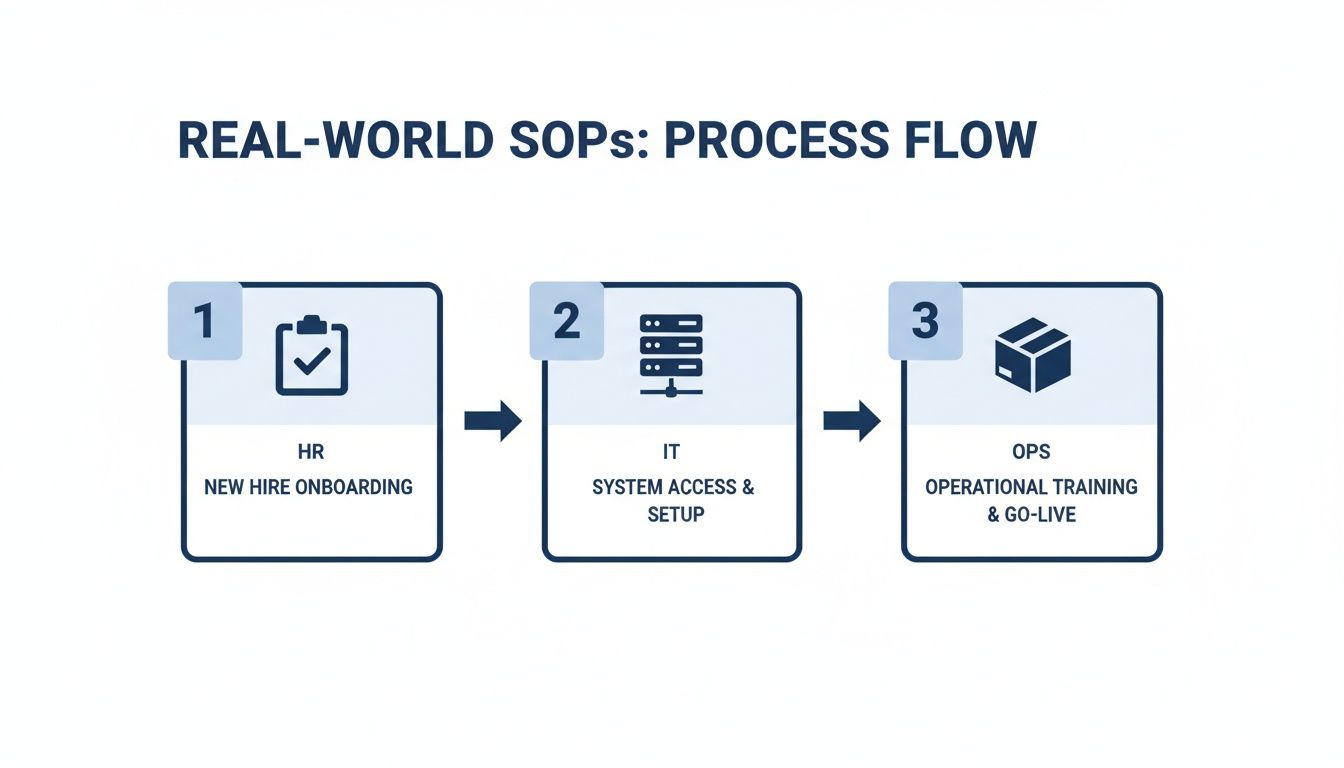
As you can see, processes often cross between teams like HR, IT, and Operations. This makes clear ownership and up-to-date docs even more vital for a smooth handoff.
Using Modern Tools for Effortless Management
Let’s be real: manually tracking owners, versions, and review dates across a chaotic shared drive is a recipe for disaster. It’s tedious, prone to error, and just doesn't scale. Thankfully, this is a solved problem. Modern knowledge platforms like Whale are built to handle exactly this.
Centralizing your SOPs in one dedicated platform instantly kills the "which version is the right one?" debate. Everyone knows exactly where to find the single source of truth.
These tools turn SOP management from a boring administrative chore into an automated, strategic advantage. Here’s a quick look at how:
- Automated Review Cycles: You can assign an owner and a review period (say, every 90 days), and the system automatically nudges them when it's time for an update. No more chasing people down.
- Built-in Version History: Every single change is tracked. You can easily see what was updated, when, and by whom, giving you a full audit trail.
- Integrated Feedback Loops: Team members can suggest improvements right on the SOP itself. This ensures your procedures are constantly getting refined by the people who actually use them every day.
If you want to ditch the administrative headaches for good, it's worth exploring the world of automating business processes. It’s a shift that lets you focus on actually improving your operations instead of just managing documents.
Your Top Questions About SOP Templates, Answered
Even with the perfect template, jumping from theory to practice always brings up a few questions. We get it. Let's walk through some of the most common things we hear from teams who are just starting to standardize how they work.
Hopefully, these answers will clear up any confusion and get you moving forward.
How Long Should My SOP Actually Be?
This is the classic "how long is a piece of string?" question. The real answer? An SOP should be as long as it needs to be clear, but as short as humanly possible.
For a super simple task, like logging into a new software for the first time, a single page with a few screenshots is probably all you need. But for something more complex, like closing out the books at the end of the month, it's naturally going to be longer.
The key is to focus on usability, not word count. If you feel like an SOP is getting ridiculously long, that's a huge red flag. It usually means you're trying to cram an entire, massive process into one document instead of focusing on a single, specific task.
Pro Tip: If your document is creeping past three or four pages, it’s time to break it up. Instead of one massive “New Client Onboarding” SOP, think smaller. Create separate guides for “Creating a Client Project in Asana” and “Sending the Welcome Kit.”
This micro-SOP approach makes each procedure much easier for your team to find, follow, and actually remember.
Who Should Be in Charge of Writing and Updating SOPs?
The best person to write the first draft is always the person who actually does the task. No question. They’re the ones in the trenches who know the real-world steps, the annoying little quirks, and the potential pitfalls. Their hands-on experience is gold.
However, a manager or team lead should always have the final say. They need to review it, give it the official stamp of approval, and "own" the document. This makes sure the procedure fits with the team's bigger goals and that someone is clearly accountable for keeping it current.
This is where a platform like Whale really shines. You can officially assign owners to each SOP, and the system will automatically nudge them with reminders to review and update their documents. This simple step prevents your SOPs from gathering digital dust and becoming useless.
What’s the Real Difference Between a Process and an SOP?
This is a fantastic question and one that trips up a lot of people. It’s actually pretty simple when you think about it this way:
- A Process is the big picture—the high-level view of what you're trying to achieve. Think: “New Client Onboarding.”
- An SOP is the granular, step-by-step instruction manual for a single task within that process. For example: “How to Set Up a New Client Folder in Google Drive.”
Basically, a process is the "what," and the SOP is the "how." You'll often have one main process that's supported by five or six (or more!) individual SOPs, each one detailing a specific action needed to keep things moving.