All features
Faster, easier and
better documentation.
How the best teams document processes and train their teams
- 4.8/5 on G2
- SOC 2 certified

Here’s how to submit an expense report:







Document
Reduce the time spent creating process docs by 84% with Whale’s documentation tools.
Step Recorder
Record once. Get a finished SOP.
Step Recorder captures every click as you work. You get a video of the process, annotated screenshots, and a written step-by-step guide. Teams document 84% faster with Step Recorder.
Learn about Step RecorderVideo Screen Recorder
Hours of writing. Minutes of recording.
Record your screen and narrate as you go. Coral, Whale’s AI assistant, turns it into a written step-by-step guide straight away. Time spent equals time to do the process.
Learn about Screen RecorderAI Writing Assistant
Draft a full SOP in seconds, not an afternoon
Give Coral, Whale’s AI assistant, a short prompt. Get back a structured SOP draft, ready to review, refine, and publish.
Learn about Writing AssistantPDF and Word Import
Turn years of PDFs and Word docs into structured SOPs
Upload your existing Word files, PDFs, and PowerPoints. Coral, Whale’s AI assistant, parses each document and returns a structured SOP with headings, sections, and steps intact.
Learn about Docs ImportVideo to SOP
Turn any video into a written SOP
Upload any video. Coral, Whale’s AI assistant, pulls the spoken steps into a numbered, written SOP. The video stays embedded, so your team can read or watch.
Learn about Video to SOPSOP Process Templates
Start every SOP from a structure that works
Pick a template for onboarding, client handoffs, safety, or any repeatable process. Whale fills in the sections, prompts, and worked examples so you are drafting, not staring at a blank page.
Learn about Process Templates
Share
Offer your team the answers they need, right where they work, and eliminate repetitive questions with 94%.

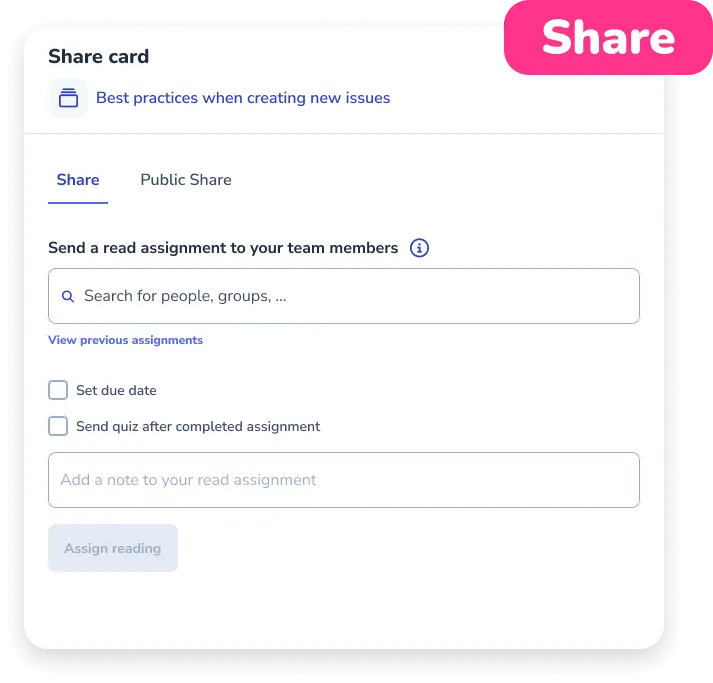
Read Assignments
Assign the exact card, playbook, or guide. See who has read it.
Send any card, playbook, or guide to a person, a role, or a user group with a due date. Whale delivers it to their inbox, nudges on the due date, and tracks completion per step in a live dashboard.
Learn about Read AssignmentsAI Chat
Elevate your team in the blink of AI
Whale AI speeds up the creation of SOPs, trains your team more efficiently, and gives everyone the answers they need to do their best work.
Learn about Coral AIShare as QR code
Put an SOP on the wall. Let the phone do the rest.
Generate a QR code for any Whale SOP. Print it, stick it at the station, and any team member scans it on their phone to get the current version of the process in seconds.
Learn about QR CodesContextual Suggestions
Show the right SOP inside the tool your team is working in
Set a URL or keyword rule. CoPilot surfaces the matching SOP inside HubSpot, Salesforce, Zendesk, Gmail, QuickBooks, or any web tool your team opens.
Learn about Contextual SuggestionsPublic Share
Share any SOP with people outside Whale
Generate a secure link for any card or playbook. Recipients open it in a browser, no account, no seat, no login. Restrict to specific email addresses and set an expiry date when the work is sensitive.
Learn about Public ShareExport and Embed
Export any SOP or your whole workspace to PDF or Word
Download a single SOP, a board, or the whole workspace as PDF or Word in a few clicks. Your processes leave Whale formatted, branded, and ready to hand to an auditor, a new hire, or a frontline team without a login.
Learn about Exporting and Embedding
Train
Reduce new hire ramp time with 50% and automate your employee’s process training journey with ease.
Training Flows
Build the onboarding path once. Assign it to every new hire.
Sequence playbooks, videos, and quizzes into a structured training path. Assign by role or group, track completion, and let Coral, Whale’s AI assistant, answer questions along the way.
Learn about Training FlowsAI-Generated Quizzes
Turn any SOP into a quiz in one click
Coral, Whale’s AI assistant, reads your SOP and writes the quiz questions. Review, edit, attach to a training flow, and see who passed. No question-writing required.
Learn about AI QuizzesAnalytics & Reporting
See what your team uses, what they skip, and who needs help
Whale tracks every view, assignment, quiz, and search across your workspace. You get a live picture of adoption, training progress, and content gaps in one place.
Learn about Analytics & Reporting
Advanced Permissions
Decide who sees what, edits what, and signs in how
Set access at the board, library, and role level. Add custom roles, SSO, IP allowlists, and a full audit trail so sensitive SOPs stay with the people who should have them.
Learn about Advanced PermissionsExpert review intervals
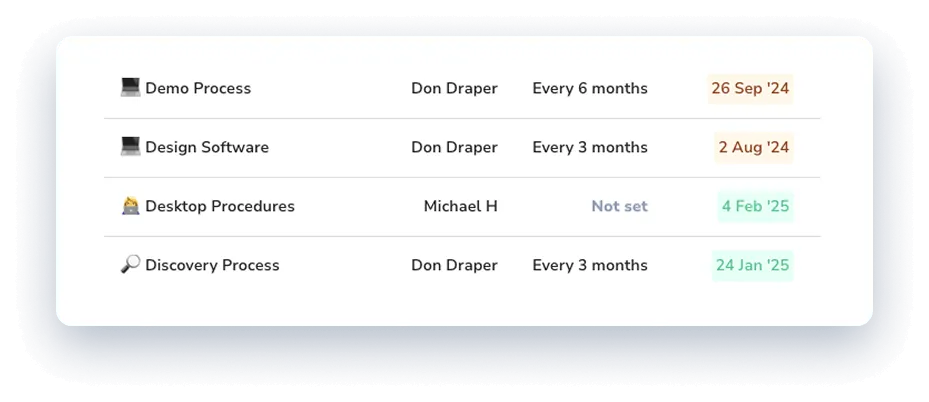
Name the expert. Set the review cycle. SOPs stay current on their own.
Assign a subject-matter expert as the owner of every card or playbook and set a review date. When the date arrives, Whale creates a review assignment for the right person so processes never quietly rot.
Learn about Expert Review IntervalsVersion History
Every edit saved. Every version one click away.
Every time a card is saved in Whale, a new version lands in the timeline with the author and timestamp. Compare any two versions side by side and restore a previous one in a single click.
Learn about Version History
Customer proof
“We reduced the time we spend creating new SOPs by more than 70%”
Get SOPs done with Whale
Approval Flows
Your team writes. You approve what goes live.
Every card update from a contributor goes through a reviewer before it is published, so every published change carries a named, dated sign-off.
Learn about Approval FlowsCustom Badges
Reward training with badges your team can see
Custom Badges award employees when they finish a training flow or pass a quiz. Each badge sits on the employee profile and in the org chart, so the whole team sees who is trained on what.
Learn about Custom BadgesMobile App
Put every SOP and training flow in your team's pocket
The Whale app runs natively on iOS and Android. Frontline and deskless teams open SOPs, complete assigned training, pass quizzes, and tick checklists from wherever the work happens.
Learn about Mobile AppComments
Flag the step. Ask the question. Fix the SOP
Threaded comments on any card or guide capture feedback where the process lives. Your team flags stale steps, asks questions, and suggests edits without leaving Whale.
Learn about CommentsOrg Chart
See who does what, where they sit, and who they report to
Whale’s org chart pulls from your user profiles. Departments, positions, and reporting lines in one view. Update a role, the chart updates with it. Every position links to the SOPs that role owns.
Learn about Org ChartChecklist
Run every process the same way, every time
Checklists turn any procedure into an executable task list your team runs in real time. Every step is ticked off, photos are captured as evidence, and every run is timestamped and logged.
Learn about ChecklistAuto-Translate
Write the SOP once. Read it in five languages.
Auto-Translate converts any Whale Card into English, French, German, Portuguese, or Spanish from whatever language you wrote it in. One source, five versions, every team member reading in the language they actually speak.
Learn about Auto-TranslateBranding
A workspace that looks like your company, not Whale
Custom logo, brand colors, your own domain at whale.yourcompany.com, and an email sender name your team recognizes. Whale reads as an internal tool, which is the version your team actually opens.
Learn about BrandingTag Management
Tag every SOP once. Find the right one every time.
Tag Management gives admins a controlled vocabulary to label Cards, Playbooks, and guides. Filter the knowledge base by role, department, or location, and power CoPilot, reporting, and training flows from the same set of tags.
Learn about Tag Management
Software Integrations
Connect Whale with your preferred tools
Whale easily connects with popular tools using built-in integrations and offers custom options for your specific needs. Whether it’s a two-way or one-way sync, Whale helps you simplify and organize your processes.
Learn about Integrations