
Train
Whale Read Assignments
Assign the exact card, playbook, or guide. See who has read it.
Send any card, playbook, or guide to a person, a role, or a user group with a due date. Whale delivers it to their inbox, nudges on the due date, and tracks completion per step in a live dashboard.
- 4.8/5 on G2
- SOC 2 certified









The problem
Sharing a link is not the same as knowing someone read it
You already send policy updates in Teams and email. Assignments put the right content in the right inbox with a due date, and Whale tracks each read so you know who is done, who is behind, and who never opened it.
How teams do it today: Policy updates pasted into Teams and hoped for the best
With Whale's Read Assignments: Assign the exact card to exact people, with a due date
How teams do it today: Chasing down who actually read the new procedure
With Whale's Read Assignments: A live dashboard showing who has read each assignment
How teams do it today: Compliance gaps nobody sees until an audit asks
With Whale's Read Assignments: Completion records kept per person for audit evidence
How teams do it today: Managers spending half their week repeating the same updates
With Whale's Read Assignments: Managers share once, Whale delivers and nudges the rest
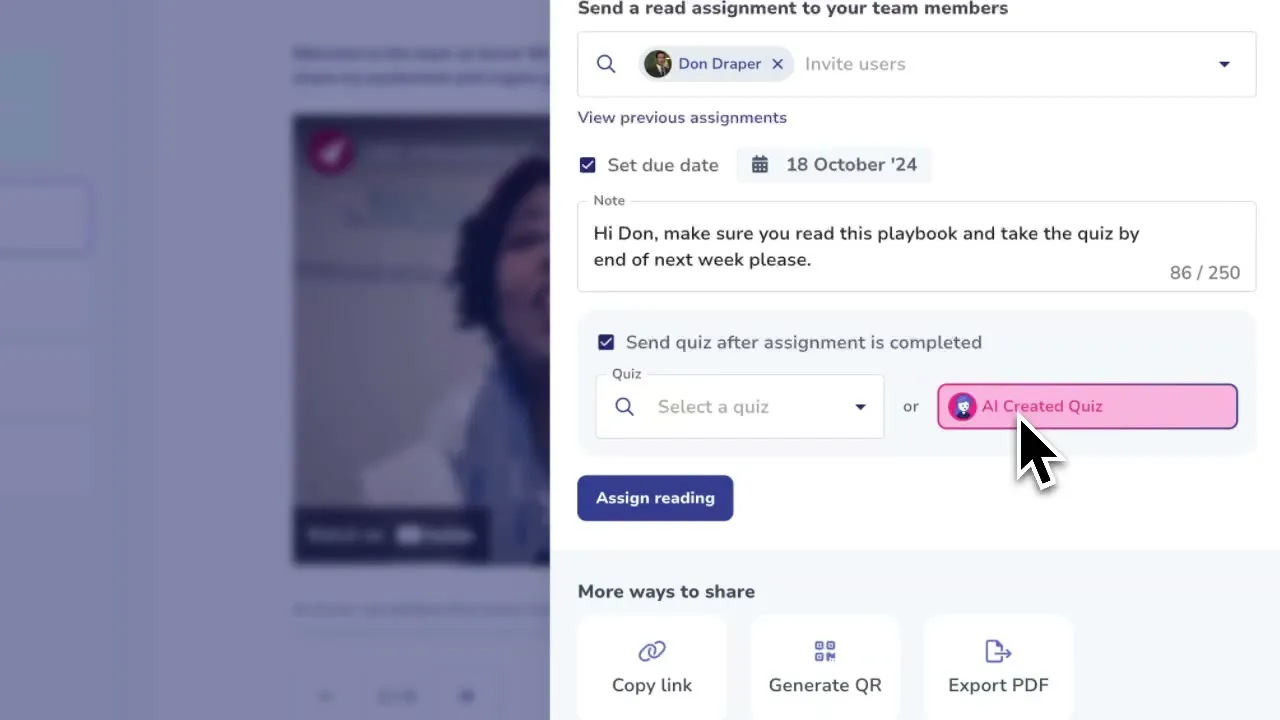
Assign any card, playbook, or guide in one click
Open any card or playbook, click Share, and assign it to a person, a role, or a user group. Set a due date, add a short note, and Whale drops the assignment into every recipient’s inbox and sends a reminder through email, Teams, or Slack when the date gets close.
Start for Free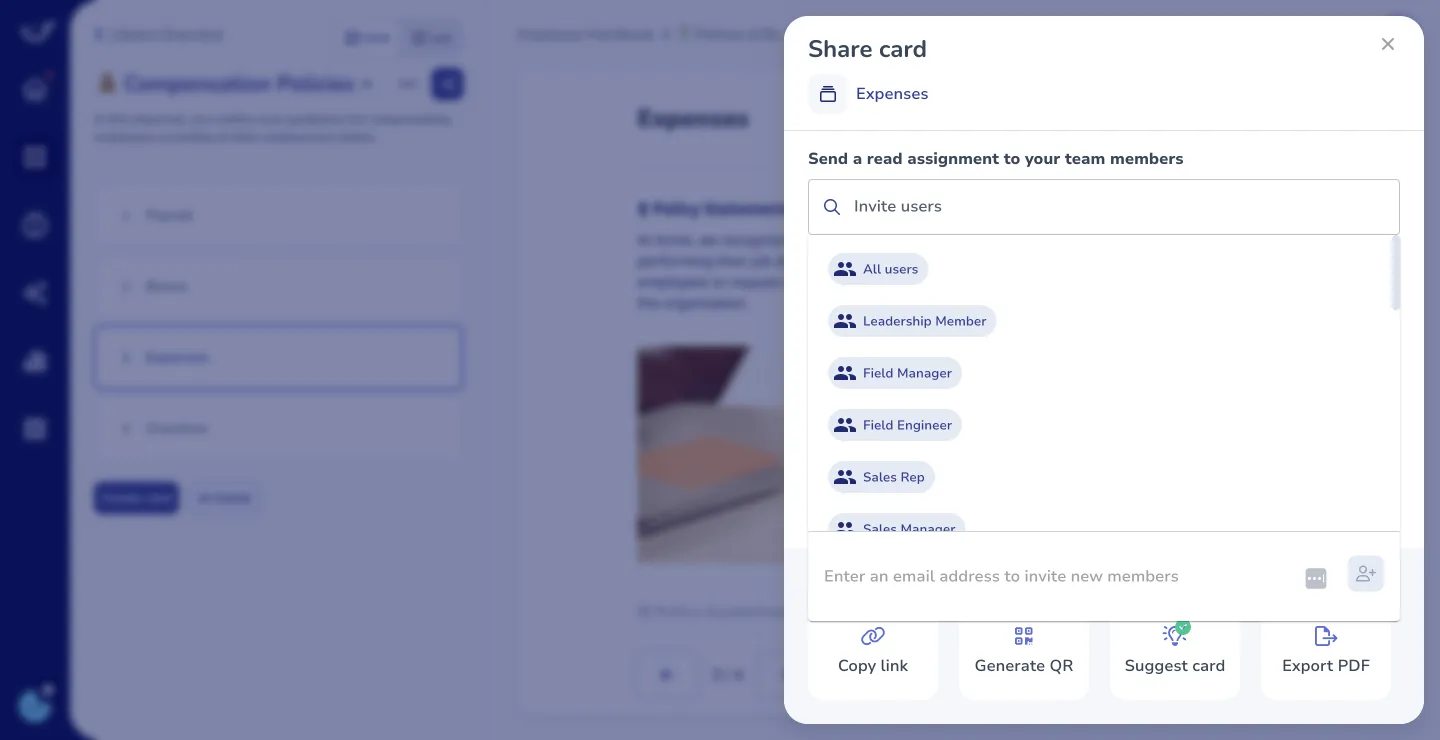
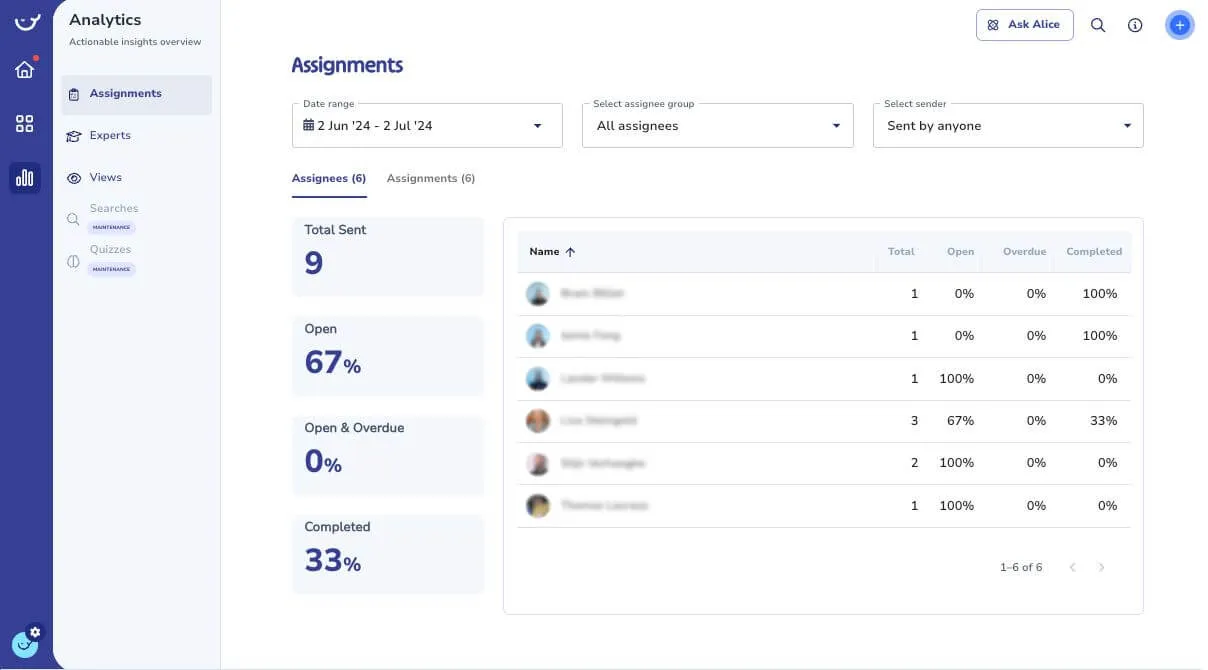
Track completion per person, per team, per card
A live dashboard shows who has read every assignment, who is overdue, and who has not opened it yet.
- Filter by person, team, or content to spot gaps before an audit does.
- Export the record for compliance acknowledgments or hand it to HR for onboarding sign-off.
Wired into the rest of Whale
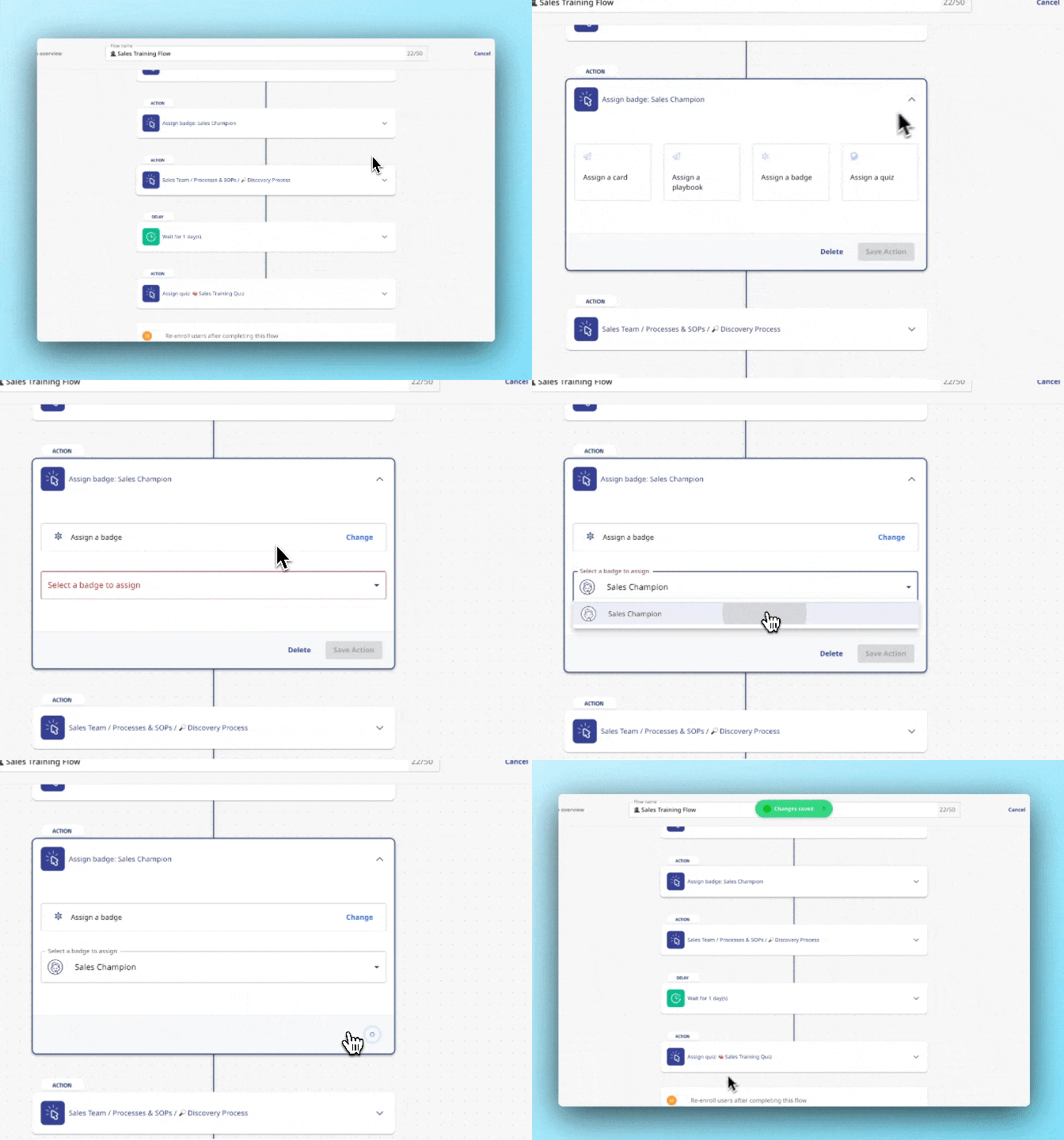
An assignment can be a single card or a full training flow with quizzes gating each step.
- Alice, Whale’s AI assistant, answers questions on the assigned content.
- CoPilot surfaces the same card inside the tool where the work happens, so the read turns into the doing.
How it works
- 01
Assign the content
Open any card, playbook, or guide. Click Share, pick the people, roles, or groups, set a due date, and send.
- 02
Whale delivers and nudges
Recipients get the assignment in their Whale inbox and an alert in email, Teams, or Slack. Reminders go out as the due date gets close.
- 03
Track who has read it
Watch completion land in the dashboard in real time. Filter by person, team, or content, and export the record when an auditor asks.
In their own words
Loved for its overall simplicity and support
“Exceptional Tool for Business Knowledge”
Whale is excellent to document and organize business knowledge. Their AI makes it even easier!
Lyndon S.Small-Business (0-50 emp.) “Whale Keeps Work Organized and Teams Confident”
Whale unifies documentation, training, and reviews in one ecosystem.
Verified User in AccountingMid-Market (51-1000 emp.) “Screen Recorder Transformed Our Productivity”
All features are excellent, but the Screen Recorder has boosted productivity for our company.
Andres A.Enterprise (> 1000 emp.) “User-Friendly Platform with Great Features”
Whale is very user-friendly. "Alice" has been a game changer, makes finding information effortless.
Martha Y.Mid-Market (51-1000 emp.) “Intuitive, fresh and easy!”
Whale's clean layout makes building and navigating SOPs a breeze.
Harley B.Small-Business (0-50 emp.) “Productivity Unleashed!”
Managing and write SOP versions, assign them, track progress through a dashboard, and automate revision tracking.
Verified User in FarmingMid-Market (51-1000 emp.) “My company utilizes Whale for our SOP’s and FAQ’s.”
Everything is very easy to locate and the search bar is my favorite feature. When I need a quick answer I turn to Whale to find what I am looking for.
Georgia R.Mid-Market (51-1000 emp.) “Whale Streamlined Our Processes and Boosted Team Onboarding”
Whale transformed how we manage internal processes. Documenting SOPs is fast and we can build and share training materials in minutes, making onboarding significantly more efficient.
Fábio B.Enterprise (> 1000 emp.) “Whale Keeps Department Training Organized with Boards, Libraries, and Playbooks”
Boards, Libraries, and Playbooks keep training organized by department, so you can generate videos, SOPs, quizzes, and more for each topic.
Ketan T.Mid-Market (51-1000 emp.) “Streamlines Documentation with Ease”
I use Whale for company handbooks, regulations, how-to's, and manuals, all on one platform. The step-by-step screen recorder auto-captures screenshots and saves me about an hour per guide.
Anouk V.Mid-Market (51-1000 emp.) “Effortlessly Streamlines Team Training with Solid Support”
Whale supports training my merchandising teams with AI and video features that break down training step by step. Creating training flows is easy, and quizzes ensure the material lands.
Shelley F.Mid-Market (51-1000 emp.) “Effortless SOP Management with Stellar AI Search”
Whale centralizes all our SOPs with standard formatting and makes them easy to find, especially with the fast AI search across thousands of documents.
Jitender T.Small-Business (50 or fewer emp.)
Frequently Asked Questions
Start for Free01What can I assign?
Any card, playbook, or guide in your Whale workspace. You can assign individual cards for a one-off policy update, a full playbook for a process change, or an entire training flow for onboarding. Assignments work on video cards, step recordings, checklists, and quizzes. Recipients see the assignment in their Whale inbox and get a reminder by email, Teams, or Slack.
02Can I assign to groups or only individuals?
Both. Assign to a single person, a list of people, a role like Sales or Support, or a custom user group. Group assignments expand automatically, so every current and future member of the group gets the assignment. This is how most teams handle role-based onboarding and company-wide policy updates without rebuilding the assignment each time someone new joins.
03How do I know if someone actually read it?
Every assignment tracks a completion event per recipient. The dashboard shows who has opened the assignment, who has finished it, and who has not started. For policy and compliance reads, you can require an acknowledgment click before the assignment is marked complete. For training flows, completion is gated by quiz passes. The record is kept per person and can be exported for audit evidence.
04Can I set due dates and automatic reminders?
Yes. Every assignment takes a due date. Whale sends a reminder a few days before the due date and again on the day, through the channel the recipient prefers, email, Teams, Slack, or push. Overdue assignments show up in the manager’s dashboard and in a weekly digest. If a recipient leaves the company, the assignment closes automatically when the user is deactivated.
05Does this work for compliance and audit acknowledgments?
Yes. Many Whale customers run assignments as their compliance read-and-acknowledge workflow for safety procedures, HIPAA training, SOC 2 policies, and handbook updates. Require an acknowledgment click, and the system records the timestamp, the user, and the version of the content read. Export the report when an auditor asks. For regulated industries, pair assignments with quizzes to confirm retention alongside the read.
06How is this different from Trainual?
Trainual treats assignment as a training-only workflow. Whale uses the same assignment mechanism for policy reads, SOP updates, onboarding paths, and compliance acknowledgments, from a single knowledge base. A card you assign is the same card Alice, Whale’s AI assistant, answers questions from, the same card CoPilot surfaces inside other tools, and the same card your team searches later. Teams switching from Trainual usually cite lower cost per user, stronger AI, and a content model that works for day-to-day reference, not just onboarding.
Other Features
Train
Training Flows
Automate onboarding with structured learning paths that run on autopilot.
Learn moreTrain
AI-Generated Quizzes
Test what your team actually knows with quizzes generated from your content.
Learn moreKnow
Analytics & Reporting
See who is trained, who is not, and where the gaps are.
Learn more