Use cases
Roll out
new software
Roll out new software without the chaos
- 4.8/5 on G2
- SOC 2 certified








Support employees in the flow of work
Help employees learn while they work with instant guidance directly inside the tools they use every day.

Train employees on new tools faster
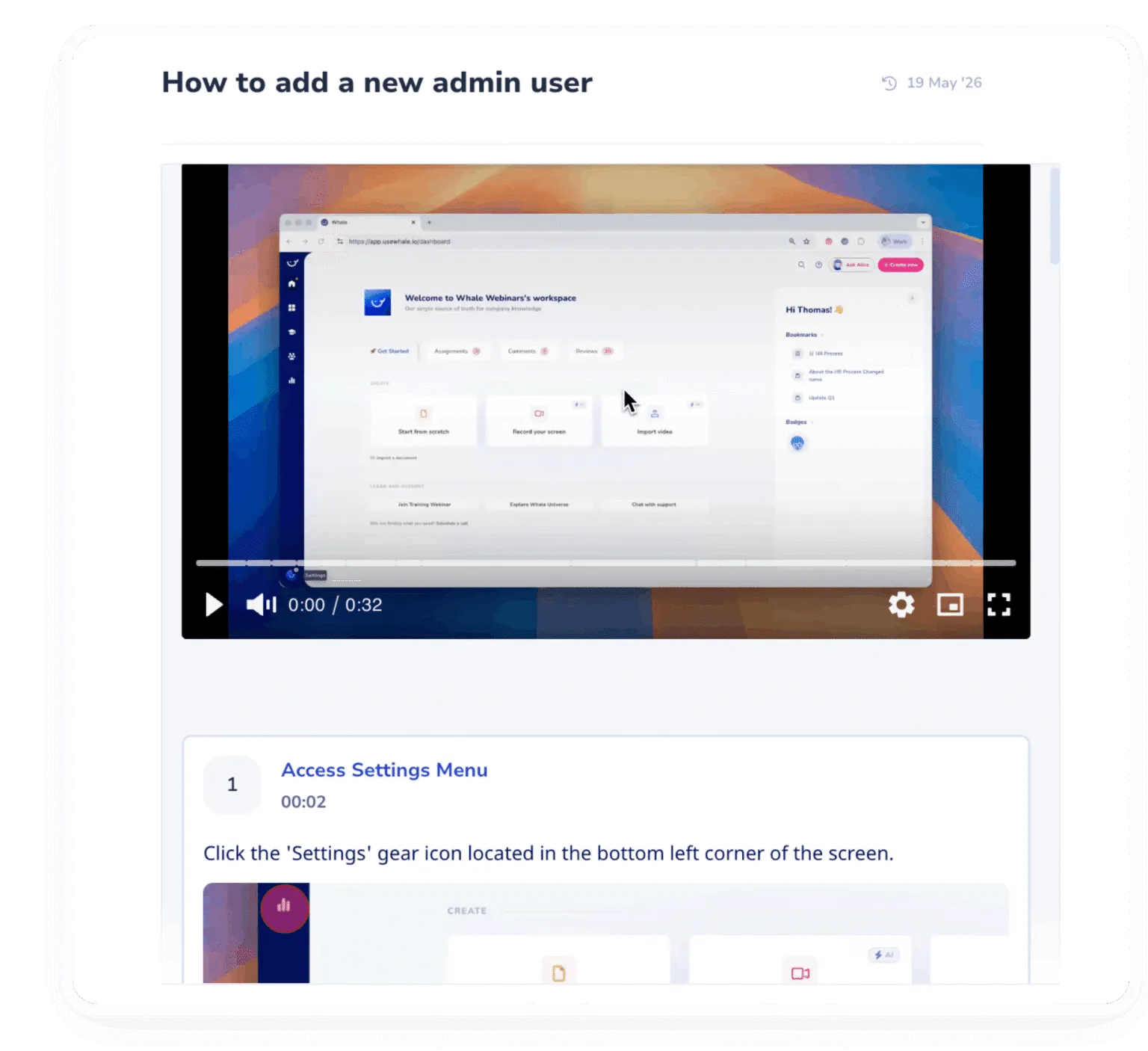
Create software onboarding people actually learn from with video walkthroughs, screenshots, annotations, checklists, and guided learning flows built from real workflows.
Standardize how teams use software
Ensure every employee follows the same workflows, best practices, and operational standards when adopting new systems.
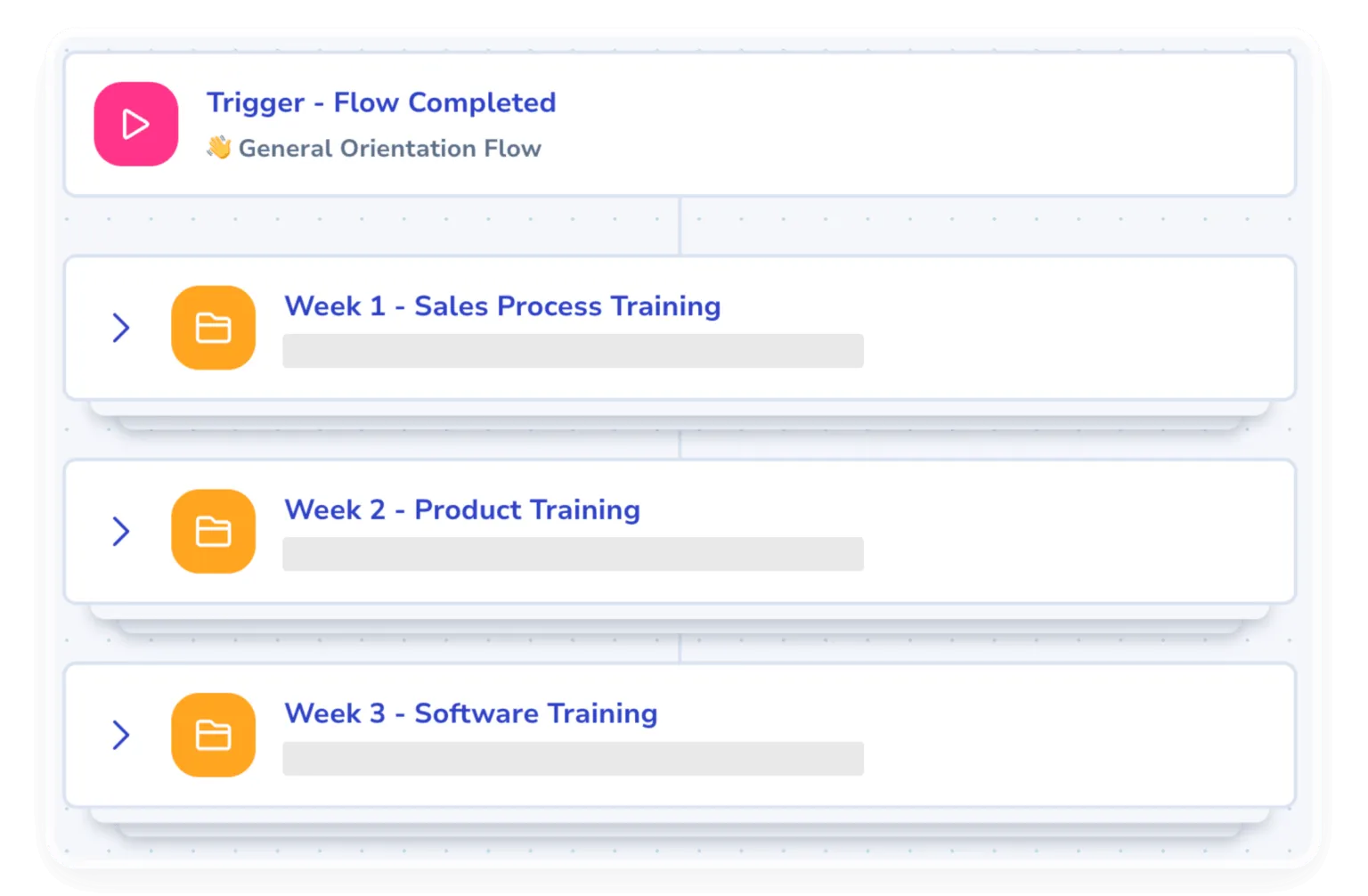
The leading standard operating procedure software
If you’re looking for a tool where you could step record, screen record, automate onboarding with processes, train your teams with quizzes, and more, then you need Whale.
Help employees confidently adopt new software
Capture workflows once and turn them into step-by-step guides, role-based training, and AI-powered support that help employees confidently adopt new systems.
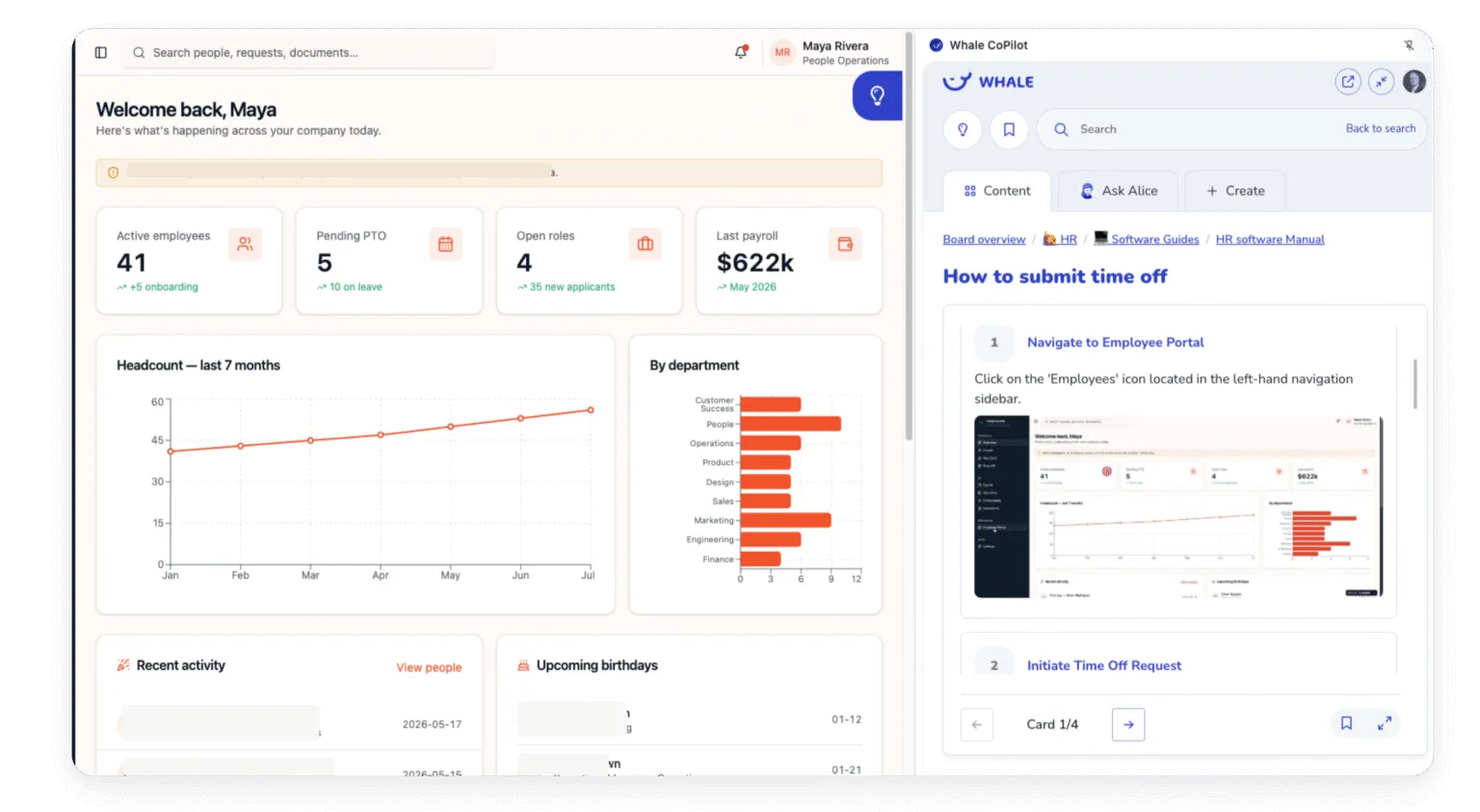
- Deliver contextual process guidance and SOPs directly inside your software stack so employees can learn without switching tabs or searching through folders.
- Automatically capture workflows and turn software actions into polished step-by-step video guides in minutes.
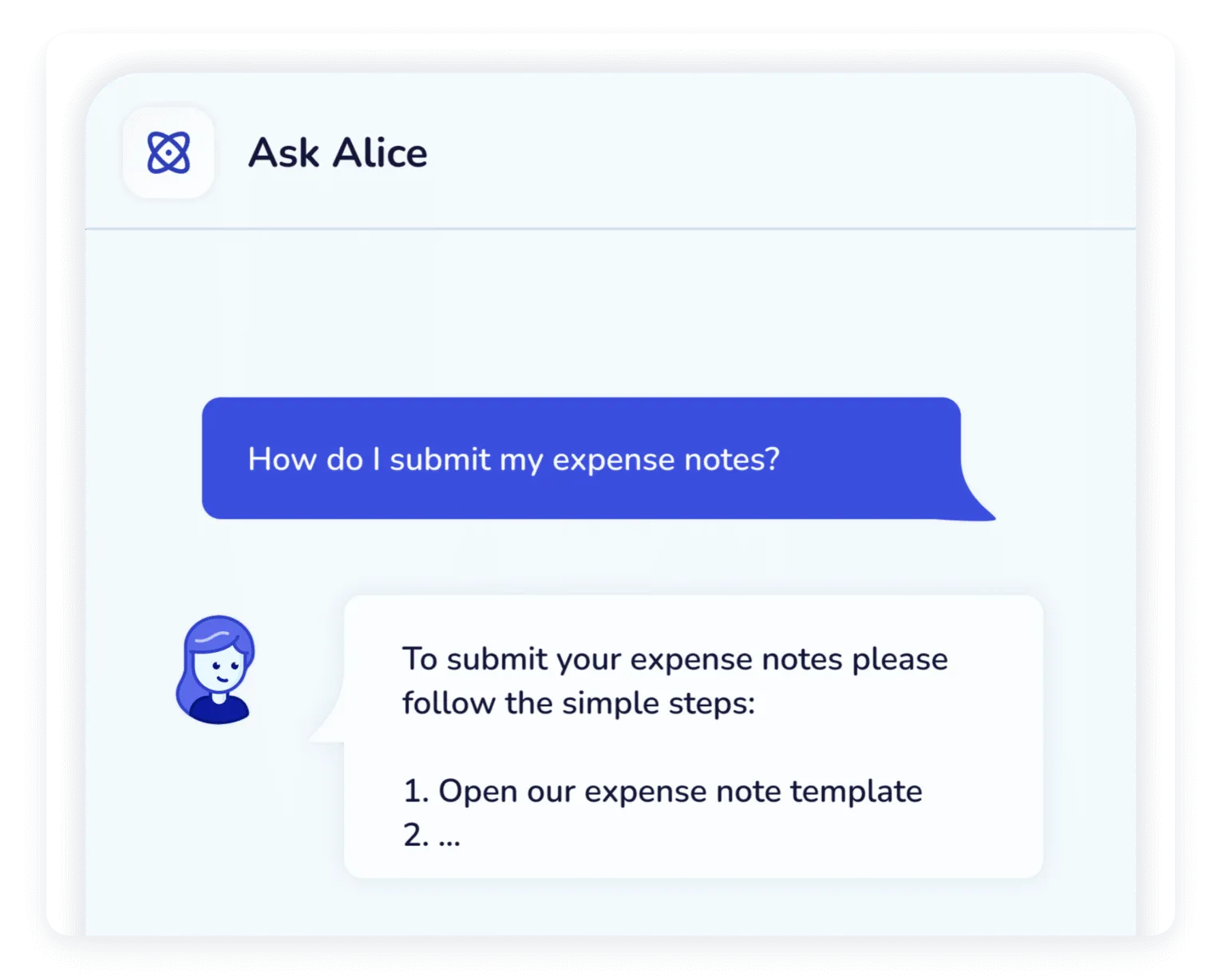
- Give employees instant answers to software and workflow questions so they can keep working without interruptions or confusion.
- Deliver only the training employees need based on their role, team, or responsibilities so people learn faster without being overwhelmed.
- Approval flows and expert reviews keep every workflow accurate, approved, and up to date so your team always works from trusted information.
In their own words
Loved for its overall simplicity and support
“Exceptional Tool for Business Knowledge”
Whale is excellent to document and organize business knowledge. Their AI makes it even easier!
Lyndon S.Small-Business (0-50 emp.) “Whale Keeps Work Organized and Teams Confident”
Whale unifies documentation, training, and reviews in one ecosystem.
Verified User in AccountingMid-Market (51-1000 emp.) “Screen Recorder Transformed Our Productivity”
All features are excellent, but the Screen Recorder has boosted productivity for our company.
Andres A.Enterprise (> 1000 emp.) “User-Friendly Platform with Great Features”
Whale is very user-friendly. "Alice" has been a game changer, makes finding information effortless.
Martha Y.Mid-Market (51-1000 emp.) “Intuitive, fresh and easy!”
Whale's clean layout makes building and navigating SOPs a breeze.
Harley B.Small-Business (0-50 emp.) “Productivity Unleashed!”
Managing and write SOP versions, assign them, track progress through a dashboard, and automate revision tracking.
Verified User in FarmingMid-Market (51-1000 emp.) “My company utilizes Whale for our SOP’s and FAQ’s.”
Everything is very easy to locate and the search bar is my favorite feature. When I need a quick answer I turn to Whale to find what I am looking for.
Georgia R.Mid-Market (51-1000 emp.) “Whale Streamlined Our Processes and Boosted Team Onboarding”
Whale transformed how we manage internal processes. Documenting SOPs is fast and we can build and share training materials in minutes, making onboarding significantly more efficient.
Fábio B.Enterprise (> 1000 emp.) “Whale Keeps Department Training Organized with Boards, Libraries, and Playbooks”
Boards, Libraries, and Playbooks keep training organized by department, so you can generate videos, SOPs, quizzes, and more for each topic.
Ketan T.Mid-Market (51-1000 emp.) “Streamlines Documentation with Ease”
I use Whale for company handbooks, regulations, how-to's, and manuals, all on one platform. The step-by-step screen recorder auto-captures screenshots and saves me about an hour per guide.
Anouk V.Mid-Market (51-1000 emp.) “Effortlessly Streamlines Team Training with Solid Support”
Whale supports training my merchandising teams with AI and video features that break down training step by step. Creating training flows is easy, and quizzes ensure the material lands.
Shelley F.Mid-Market (51-1000 emp.) “Effortless SOP Management with Stellar AI Search”
Whale centralizes all our SOPs with standard formatting and makes them easy to find, especially with the fast AI search across thousands of documents.
Jitender T.Small-Business (50 or fewer emp.)
Integrations
Whale works where you do.
Don’t change your workflow. Whale integrates with the tools your team already uses, providing answers exactly when they’re needed.
See our Integrations








Frequently asked questions
01How to use Whale for rolling out new software?
Use Whale to document the new workflow as SOPs before go-live, capturing the steps with the Step Recorder and the Screen Recorder. Build a training flow per role and assign it so each team learns only the parts that apply to them. Add quizzes to confirm understanding, and use analytics and reporting to see who is ready before you switch over.
02How do we document workflows in the new software fast enough to roll it out?
Step Recorder captures a real session in the new tool and turns it into a structured SOP in minutes. The person running pilot training records once, then Alice, Whale’s AI assistant, cleans up the draft so the whole team gets the same guide on day one of rollout.
03Will people actually find the SOP when they're stuck inside the new tool?
CoPilot surfaces the right SOP directly inside the new software or any web tool. Someone hits a screen they don’t recognize, opens CoPilot, and the relevant guide is there without switching tabs. This is the part that usually breaks rollouts.
04How do we know who's actually using the new software the way we trained them?
Analytics show who opened which SOP, completed which Training flow, where the team got stuck, and how scores trended over the rollout. Managers can spot lagging people or locations in one dashboard and target follow-up coaching there instead of running another all-hands training.
05Our IT team gets buried in tickets every time we roll out a tool. How does Whale help?
Self-serve answers absorb the first wave of questions. Alice responds in Slack or Teams with a sourced answer drawn from your guides, and CoPilot opens contextual help right inside the tool. IT spends time on edge cases instead of answering the same five questions ten times a day.
06Different roles need different parts of the new tool. Can the training reflect that?
Yes. Training flows can be assigned by role, department, location, or specific user, so a service tech and an account manager only see what they need. New hires get the right path automatically when they’re added to a group.
07We already use Loom for tutorials and Scribe for clicks. Where does Whale fit?
Loom and Scribe each cover a piece of the rollout (video or click-by-click), and many teams use them well. Where Whale fits: it handles both capture types and also covers the structured library for later retrieval, Training flows that prove people learned the new tool, CoPilot that delivers the right guide inside the tool when someone hits a wall, and analytics that show who got stuck where. Teams using all three often consolidate onto Whale to cut tool sprawl.