
Train
Whale Custom Badges
Reward training with badges your team can see
Custom Badges award employees when they finish a training flow or pass a quiz. Each badge sits on the employee profile and in the org chart, so the whole team sees who is trained on what.
- 4.8/5 on G2
- SOC 2 certified









The problem
Training gets finished and nobody notices
Your team already finishes training flows, quizzes, and checklists. Custom Badges mark each milestone on the employee profile and in the org chart, so the work shows up where the team already looks.
How teams do it today: Training completions disappear into a log nobody reads
With Whale's Custom Badges: Each completion produces a badge on the employee profile
How teams do it today: No visible signal of who learned what
With Whale's Custom Badges: Expertise shows up next to the name, not buried in a report
How teams do it today: Questions pile on the same two senior people
With Whale's Custom Badges: Teammates see who owns a process and route questions there
How teams do it today: Optional training never gets touched
With Whale's Custom Badges: Recognition gives the team a reason to finish what is optional
Recognition your team actually notices
Custom Badges use your own names, descriptions, and icons, so a badge reads as real recognition from the company instead of a generic sticker.
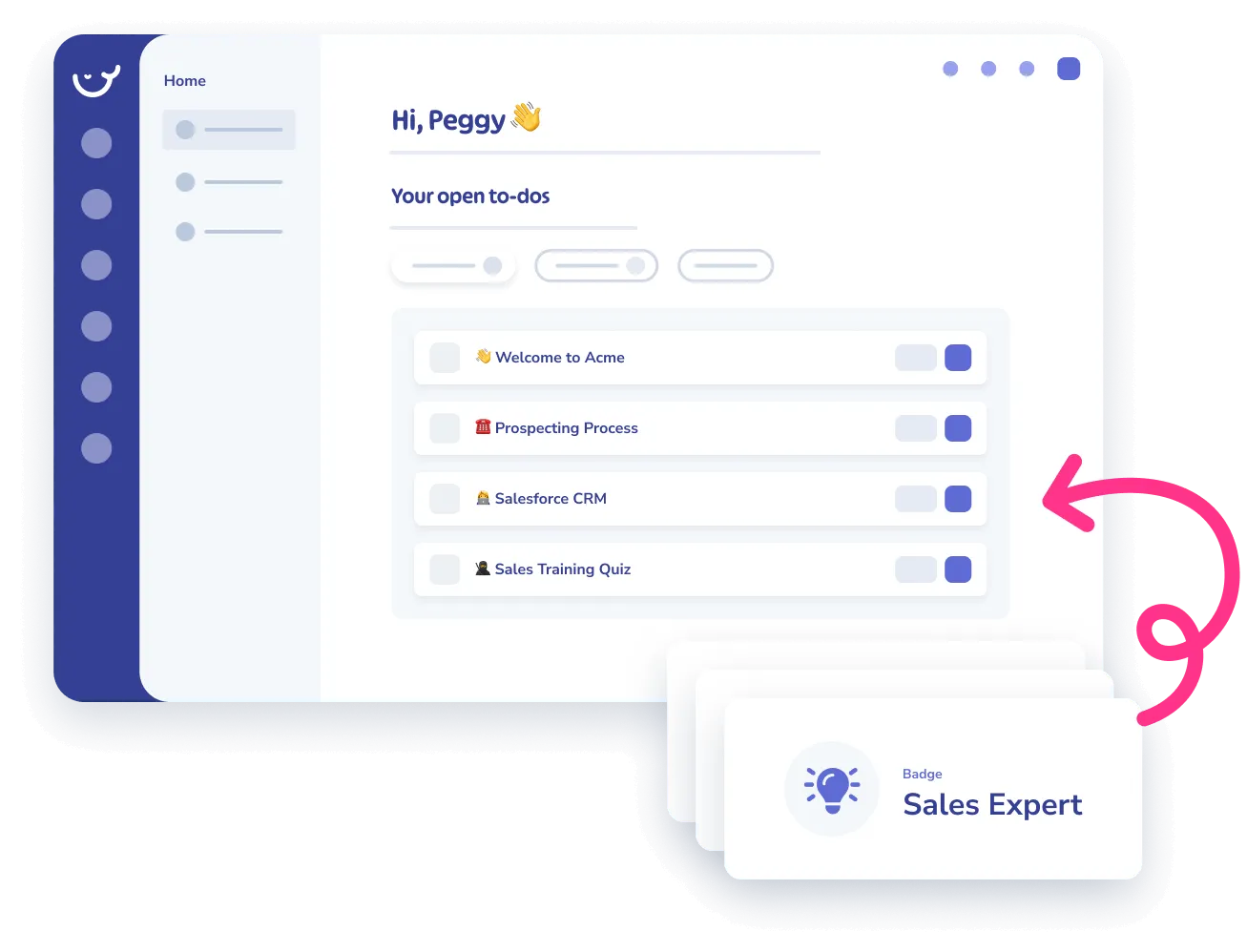
- Award one for completing the new-hire path, passing a compliance quiz, or finishing a role-specific training flow.
- Employees see badges on their profile from day one.
Expertise that shows up in the org chart
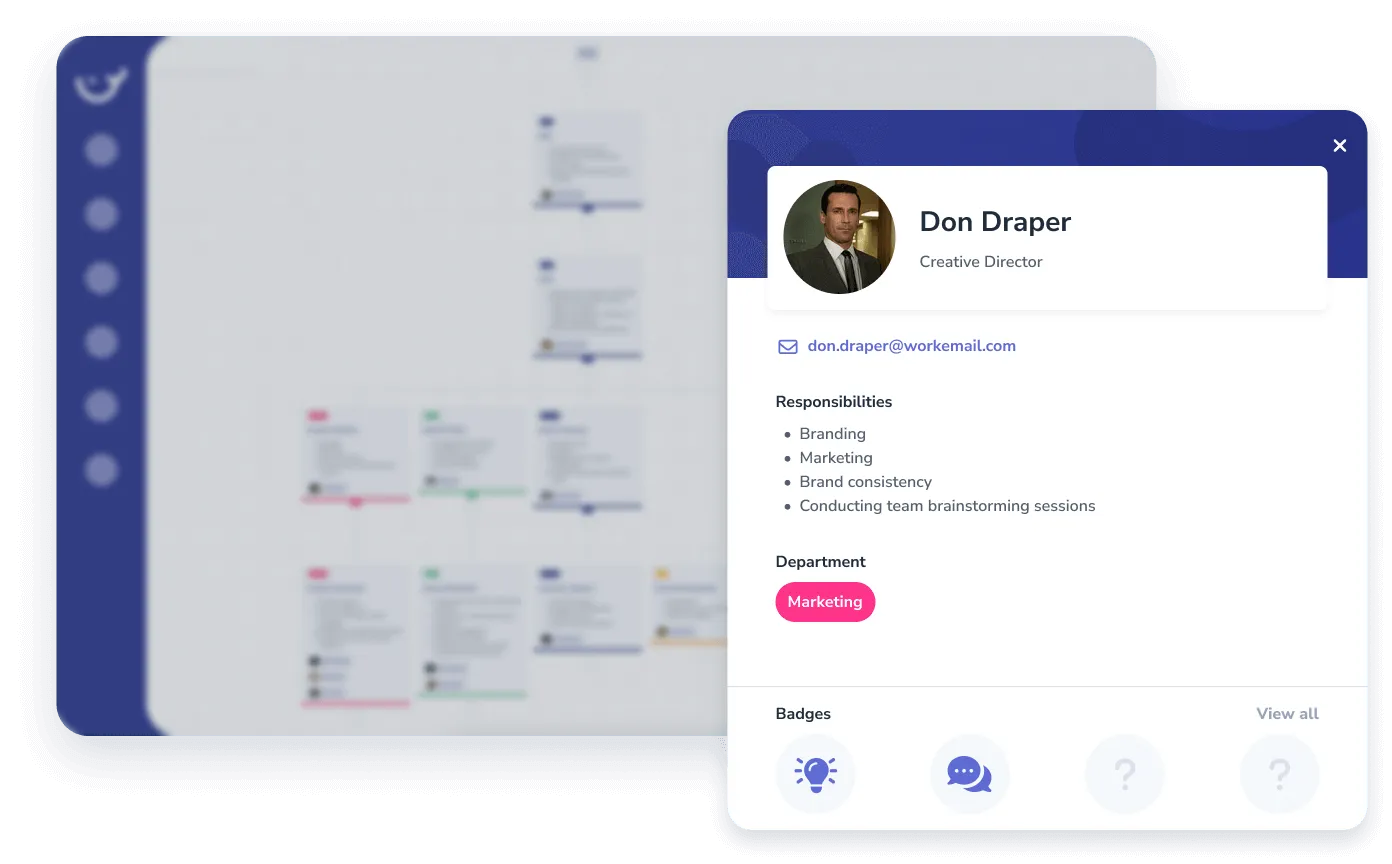
Every earned badge lands on the employee profile and in the company org chart.
- Anyone looking at the team can see who is certified on what without chasing a spreadsheet.
- New hires find the right person to ask.
- Managers see skill coverage across a department in one view.
Built into the rest of your Whale workspace
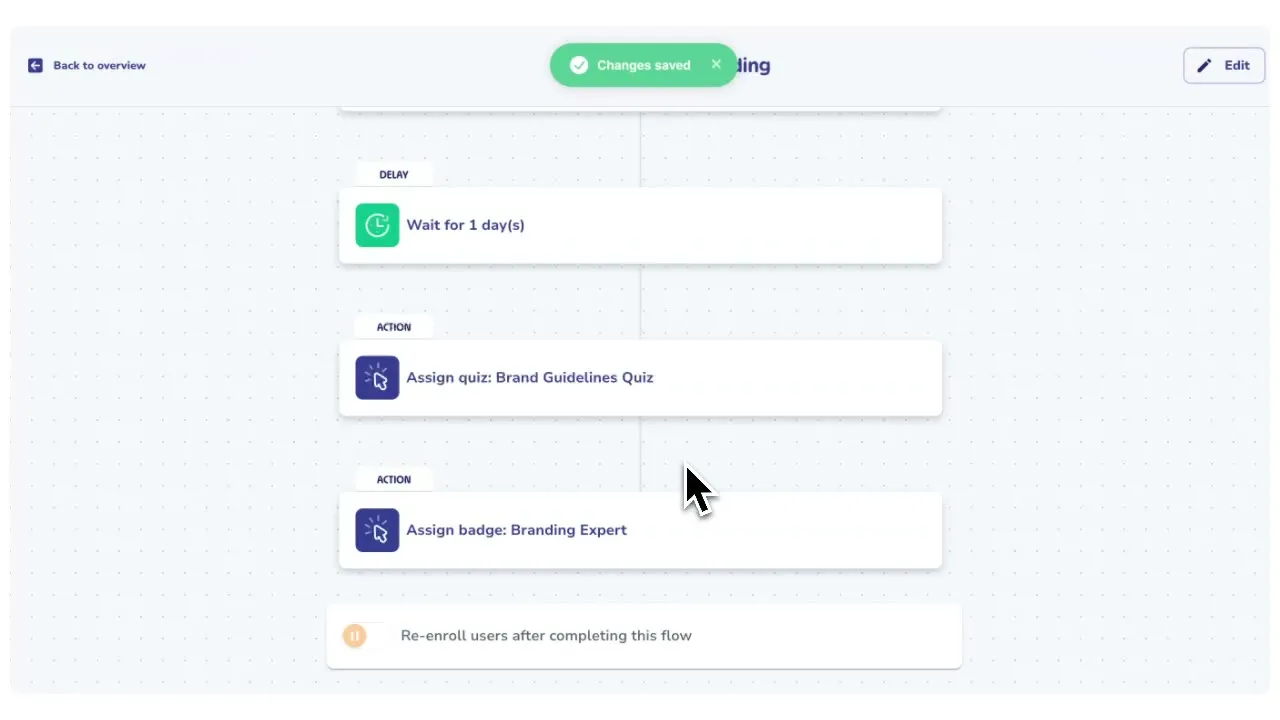
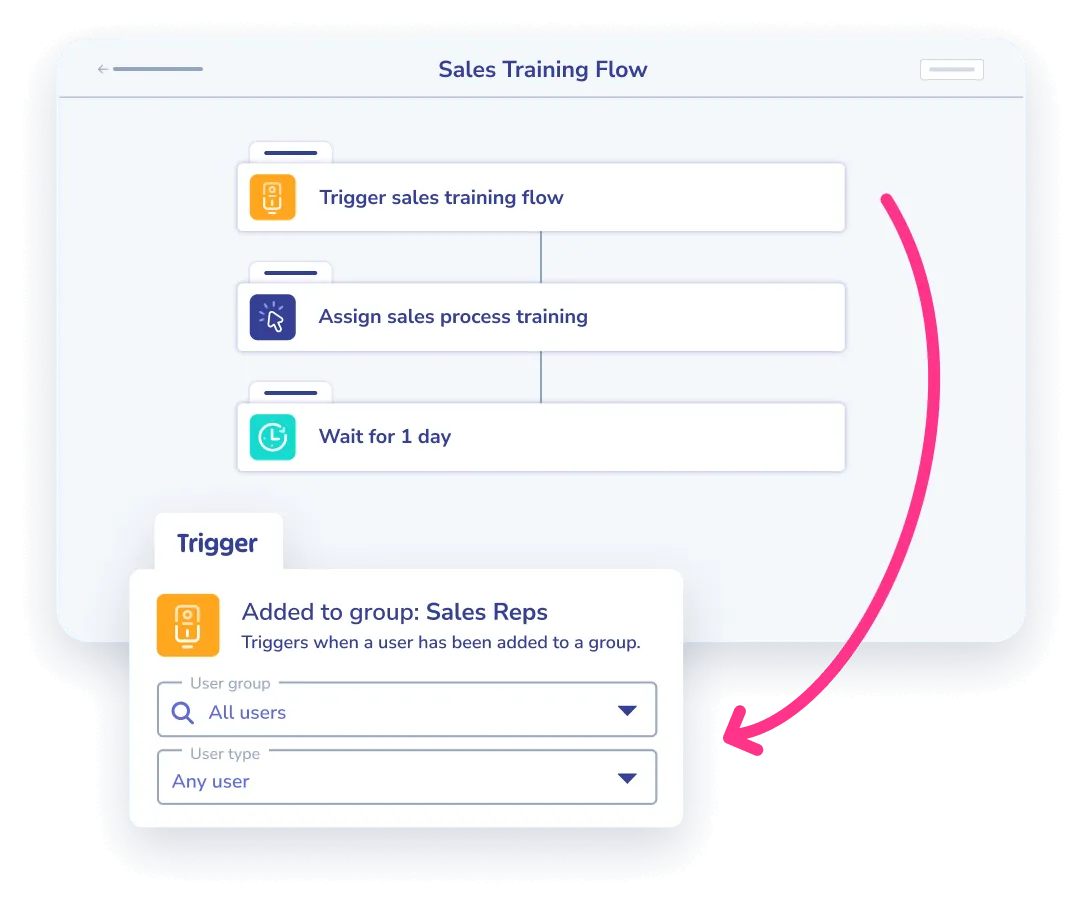
Add a badge as a step inside any training flow and Whale awards it the moment the flow is complete.
- Coral, Whale’s AI assistant, surfaces the badge holder when a teammate asks who knows a given process.
- CoPilot points new hires to the same expert inside the tool where the work happens.
How it works
- 01
Design a badge for the milestone
Name the badge, write a short description, pick an icon, and decide what earns it: a finished training flow, a passed quiz, or a completed checklist.
- 02
Award it automatically or by hand
Add the badge as a step inside a training flow and Whale awards it on completion. Admins can also grant a badge manually for recognition that sits outside a flow.
- 03
The badge lands on the profile and org chart
Every earned badge shows up on the employee’s profile page and in the Whale org chart, so the whole team can see who is trained on what.
In their own words
Loved for its overall simplicity and support
“Exceptional Tool for Business Knowledge”
Whale is excellent to document and organize business knowledge. Their AI makes it even easier!
Lyndon S.Small-Business (0-50 emp.) “Whale Keeps Work Organized and Teams Confident”
Whale unifies documentation, training, and reviews in one ecosystem.
Verified User in AccountingMid-Market (51-1000 emp.) “Screen Recorder Transformed Our Productivity”
All features are excellent, but the Screen Recorder has boosted productivity for our company.
Andres A.Enterprise (> 1000 emp.) “User-Friendly Platform with Great Features”
Whale is very user-friendly. "Coral" has been a game changer, makes finding information effortless.
Martha Y.Mid-Market (51-1000 emp.) “Intuitive, fresh and easy!”
Whale's clean layout makes building and navigating SOPs a breeze.
Harley B.Small-Business (0-50 emp.) “Productivity Unleashed!”
Managing and write SOP versions, assign them, track progress through a dashboard, and automate revision tracking.
Verified User in FarmingMid-Market (51-1000 emp.) “My company utilizes Whale for our SOP’s and FAQ’s.”
Everything is very easy to locate and the search bar is my favorite feature. When I need a quick answer I turn to Whale to find what I am looking for.
Georgia R.Mid-Market (51-1000 emp.) “Whale Streamlined Our Processes and Boosted Team Onboarding”
Whale transformed how we manage internal processes. Documenting SOPs is fast and we can build and share training materials in minutes, making onboarding significantly more efficient.
Fábio B.Enterprise (> 1000 emp.) “Whale Keeps Department Training Organized with Boards, Libraries, and Playbooks”
Boards, Libraries, and Playbooks keep training organized by department, so you can generate videos, SOPs, quizzes, and more for each topic.
Ketan T.Mid-Market (51-1000 emp.) “Streamlines Documentation with Ease”
I use Whale for company handbooks, regulations, how-to's, and manuals, all on one platform. The step-by-step screen recorder auto-captures screenshots and saves me about an hour per guide.
Anouk V.Mid-Market (51-1000 emp.) “Effortlessly Streamlines Team Training with Solid Support”
Whale supports training my merchandising teams with AI and video features that break down training step by step. Creating training flows is easy, and quizzes ensure the material lands.
Shelley F.Mid-Market (51-1000 emp.) “Effortless SOP Management with Stellar AI Search”
Whale centralizes all our SOPs with standard formatting and makes them easy to find, especially with the fast AI search across thousands of documents.
Jitender T.Small-Business (50 or fewer emp.)
Frequently Asked Questions
01Can I design my own badges?
Yes. Each badge has a custom name, description, and icon. Most teams create a set that mirrors their training programs: one badge for new-hire onboarding, one for each role-specific path, one for compliance refreshers. Admins can create and edit badges from the workspace settings at any time, and existing badges can be renamed or retired without affecting the employees who have already earned them.
02How are badges awarded?
Two ways. Automated: add a badge as a step inside a training flow, and Whale awards it the moment the employee finishes the flow. Manual: any admin can grant a badge from an employee profile for special recognition. Both methods write the badge to the employee record with a timestamp, so the award history is always auditable.
03Where do employees and managers see badges?
On the employee profile page and inside the Whale org chart. A manager scanning the team can see skill coverage at a glance. A new hire looking for the right person to ask about a process can spot the badge holders immediately. Coral, Whale’s AI assistant, also references badge holders when a teammate asks who knows a given process.
04Which plan includes Custom Badges?
Custom Badges are available on all paid plans. Automated badge awards through training flows require the Scale plan, since training flows themselves are a Scale feature. Manual awards work on every paid tier.
05Can I report on which badges have been earned and by whom?
Yes. The analytics dashboard shows badges earned per employee, per team, and per training flow, with filters by date range and role. Export the data to CSV for compliance reporting or an annual review cycle. Managers can see who is missing a required badge and route a training assignment from the same view.
06How is this different from Trainual's completion tracking?
Trainual tracks course completions in a list. Whale turns each completion into a visible badge that sits on the employee profile and in the org chart, so recognition is part of the daily workspace instead of a report nobody opens. Badges also feed the rest of Whale: Coral points teammates to badge holders when a question comes up, and CoPilot surfaces the same expertise inside the tools where work happens. Training completion becomes routable knowledge, not a line in a log.
Other Features
Train
Training Flows
Automate onboarding with structured learning paths that run on autopilot.
Learn moreTrain
AI-Generated Quizzes
Test what your team actually knows with quizzes generated from your content.
Learn moreKnow
Analytics & Reporting
See who is trained, who is not, and where the gaps are.
Learn more