
Great training materials don’t just happen. They’re built on a solid strategy, not just a burst of creative energy. Before you even think about drafting a single slide, the real work begins: you need to analyze your business needs, define exactly what you want people to learn, and truly understand your audience. This groundwork is what separates training that drives real results from training that’s just… busywork.
Start With Strategy, Not Just Content
It's a classic mistake: diving headfirst into creating content without a plan. We've all seen it happen. The result is usually a pile of generic, ineffective training materials that miss the mark entirely. This initial strategic phase is what separates impactful training that solves genuine business problems from a simple box-checking exercise.
The whole process kicks off with an honest look at what your organization actually needs. This isn’t about what you think employees should know. It's about finding the specific performance gaps holding your business back.
Are customer satisfaction scores tanking? Seeing a spike in safety incidents on the warehouse floor? Is the sales team fumbling the pitch for a new product? These are the kinds of problems that well-designed training can fix.
Pinpoint Gaps With a Training Needs Analysis
A Training Needs Analysis (TNA) is your secret weapon here. It’s how you diagnose the gap between where your team is now and where they need to be. Think of it like a doctor running tests before writing a prescription; you wouldn't want them guessing, right? A solid TNA looks at three key areas to get the full picture.
Before you start writing, a deep dive into these areas will ensure your training is targeted, relevant, and actually solves a problem.
| Core Components of a Training Needs Analysis | ||
|---|---|---|
| Analysis Area | Key Questions to Ask | Example Application |
| Organizational Analysis | Where is the company headed? What are our strategic goals for the next year? What skills will our teams need to get us there? | The company plans to launch a new software product in Q3. The training must equip the sales and support teams with deep product knowledge and new sales plays. |
| Task Analysis | What specific tasks are required to do a job correctly? What are the exact steps in our standard operating procedures (SOPs)? Where are people making mistakes? | New cashiers are consistently making errors during the end-of-day reconciliation process. The training needs to break down the SOP for cashing out, step-by-step. |
| Individual Analysis | Who exactly needs this training? Are they new hires or veteran employees? What’s their current skill level and comfort with technology? | A seasoned manager needs a quick upskilling module on a new HR platform, whereas a new hire needs a comprehensive introduction to the company's entire tech stack. |
This systematic approach makes sure you're not just creating content for the sake of it, but building a solution that directly addresses a validated need.
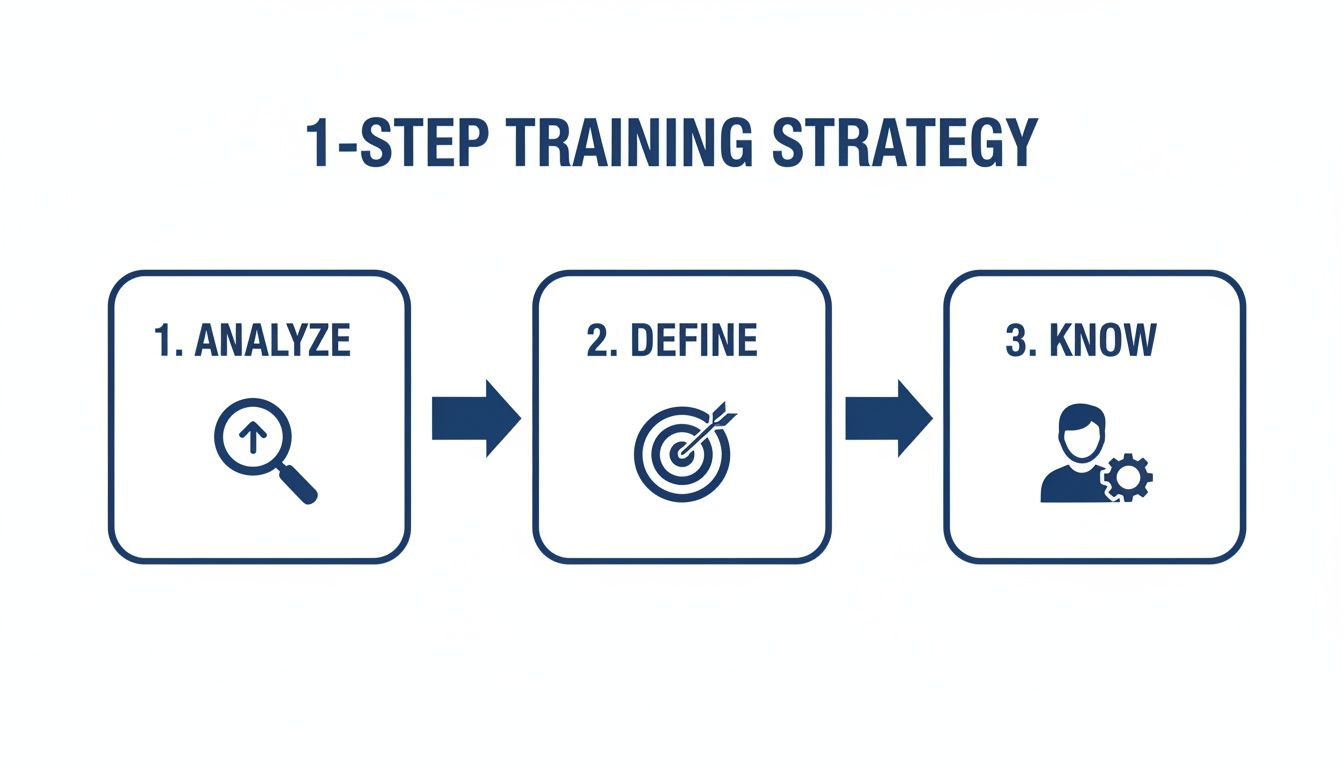
This three-part cycle—analyze, define, know—is the bedrock of any training material that actually gets results.
Define Clear Learning Objectives
Once you’ve identified the problem, you need to define what success looks like on the other side. This is where learning objectives come in. They are crystal-clear, measurable statements describing what an employee will be able to do after the training. Vague goals like "understand the new system" are practically useless. You have to get specific.
A strong learning objective acts as both a roadmap for the content creator and a benchmark for success. If you can't measure it, you can't manage it, and you certainly can't prove the training's ROI.
For instance, a weak objective is: "Learn about forklift safety." A much stronger, measurable one would be: "After completing this module, the operator will be able to identify all 15 critical pre-operation safety checkpoints and complete the inspection log with 100% accuracy." See the difference? Now you have a clear target to build your content around and a concrete metric for evaluation.
If you want to go deeper into this crucial planning phase, our guide on crafting an effective employee training strategy is a great next step.
Know Your Audience Deeply
Finally, who are you building this for? You have to tailor the material to the people who will actually be using it. The tone, language, format, and delivery method for training a team of senior software developers will be worlds apart from what you’d create for frontline retail staff.
You need to consider their existing knowledge, comfort with technology, and what their day-to-day work environment looks like. Are they at a desk or on their feet all day? Do they have time for a 60-minute course or do they need 5-minute micro-learning modules they can access on a phone? These details matter. They matter a lot. After all, if you're wondering how to create a course that sells internally, making it relevant is the first rule.
Design Content for Engagement and Retention
Okay, you've got your objectives nailed down and you know who you're training. Now for the fun part: structuring content that actually sticks. This is where you translate all that strategy into training materials people don't dread using. The secret isn't just what you teach, but how you teach it.
Good design makes information easy to digest, remember, and, most importantly, apply on the job. It's time to move past those dense, dusty manuals and slide decks that put people to sleep. We're creating learning experiences.

Choose the Right Format for the Job
Let's be real: not all content formats are created equal. Trying to force a one-size-fits-all approach is a recipe for failure. A blended learning strategy that mixes and matches formats based on the need is almost always the winning ticket.
Think about the task you're trying to teach. Is it a strict, step-by-step standard operating procedure (SOP)? That's a perfect fit for a detailed guide with clear text and images. But if you're trying to teach someone a complex software workflow, a screen-recorded video where they can see every click is going to be way more effective.
Here are a few common formats and my take on when to use them:
- Interactive E-Learning Modules: These are your heavy hitters for complex topics. Think compliance training or deep product knowledge where you can build in quizzes, simulations, and branching scenarios to check for understanding.
- Video Tutorials: Perfect for showing, not just telling. Use these for demonstrating physical tasks (like assembling a product) or navigating software. Keep them short, sweet, and to the point.
- Step-by-Step Guides (SOPs): This is your bread and butter for documenting precise, repeatable processes. If you're wondering how to create training materials for procedural tasks, a well-structured SOP is your absolute best friend.
- Job Aids and Checklists: These aren't for deep learning; they're quick-reference tools for the heat of the moment. They reinforce memory and ensure critical steps aren't missed when an employee is on the floor.
Break It Down with Microlearning
Let's face it, your team is busy. They're juggling tasks and constantly being interrupted. Expecting them to sit through an hour-long training session without zoning out is a tall order. The answer? Microlearning.
This is all about chopping up big topics into small, manageable bites. Each piece should focus on just one learning objective and take no more than 5-10 minutes to complete. It shows you respect their time and makes it infinitely easier for them to squeeze learning into a hectic day.
For instance, instead of a monster 60-minute course on "Customer Service Excellence," create a series of quick hits: "Handling an Upset Customer," "Processing a Return Flawlessly," "Upselling Techniques," etc.
Microlearning taps into what's known as the spaced repetition effect. People retain information better when they're exposed to it in short bursts over time. This shifts training from a one-and-done event to a continuous process.
This approach is a game-changer for mobile learning. Imagine a field tech pulling up a two-minute video on their phone to troubleshoot an issue on-site. That's delivering the right information, right when it's needed.
Weave in Real-World Relevance
Adults need to see the "why." If your training feels like a bunch of abstract theories and generic examples, you'll lose them in a heartbeat. The single most powerful way to make content stick is to ground it in the reality of their daily jobs.
Don't just tell them what to do. Show them why it matters with scenarios they'll instantly recognize.
- For Sales Training: Forget just listing product features. Build a role-playing exercise where a rep has to handle a common customer objection using the new product's selling points.
- For Safety Training: A list of rules is boring and forgettable. Instead, use a real (but anonymized) case study of a past incident to show the real-world consequences of skipping a safety protocol. That emotional hook makes the lesson unforgettable.
- For Software Training: Ditch the generic tour of the user interface. Structure the training around a core task they do every single day, like generating a specific weekly report or processing a complex customer order from start to finish.
When you use practical examples, simulations, and storytelling, you turn dry information into something compelling. This doesn't just make the training more engaging—it dramatically improves retention and ensures those new skills actually make it back to the workplace.
Use AI to Accelerate and Enhance Creation
Let's be honest: manually building every single piece of training content from scratch just isn't sustainable anymore. Artificial intelligence has thankfully moved beyond a simple buzzword and is now a practical co-pilot for busy operations and HR teams.
Think of it less as a replacement for your expertise and more as a powerful assistant that handles the heavy lifting. This lets you focus on strategy and fine-tuning the final product, dramatically speeding up your entire workflow.
The biggest win here is turning existing knowledge into teachable content almost instantly. Every company has dense process manuals, long-winded policy docs, or technical guides gathering digital dust in a shared drive. With the right AI tools, you can feed these documents in and get back a clear, step-by-step training guide, complete with summaries and key takeaways. This alone can slash development time from days to just a few minutes.
From Raw Documents to Polished Training
Staring at a blank page is often the hardest part of creating anything. AI is brilliant at solving this "blank page" problem. Just feed it your raw materials—like a dense SOP or a transcript from a recorded webinar—and you can generate a solid first draft of a training module in seconds.
The trick is learning how to write effective prompts. A vague request like "make a training guide" will get you a vague result. You have to get specific with your instructions:
- For an SOP: "Turn the attached 10-page equipment maintenance SOP into a 5-step checklist for new technicians. Use simple language, bold key safety warnings, and add a short summary explaining why each step is critical."
- For a Sales Call Recording: "Analyze the transcript of this sales call. Create a list of 5 effective questioning techniques the rep used and 3 areas for improvement. Present this as a one-page coaching sheet for the sales team."
- For a Policy Update: "Summarize the key changes in the attached employee handbook update. Then, generate three scenario-based questions to check for understanding about the new remote work policy."
This targeted approach ensures the AI gives you a strong foundation that's already tailored to your needs, which you can then quickly edit and refine.
Auto-Generating Assessments and Scenarios
One of the biggest time sinks in course creation is developing good assessments. AI can instantly whip up a variety of question types—multiple-choice, true/false, fill-in-the-blank—based on your source material to test comprehension. This keeps your knowledge checks directly tied to the learning objectives.
But it goes beyond simple quizzes. AI is a fantastic brainstorming partner for creating realistic practice scenarios. For example, you could prompt it to: "Generate a customer service role-playing scenario where a customer is upset about a delayed shipment. Include key details about the order and the customer's history. Write a script for both the agent and the customer."
This gives your team practical, immersive situations to apply their new skills. To really take things to the next level, it's worth exploring the best tools for content creators, which can help with everything from AI transcription to video editing.
AI-driven tools aren't just about speed; they're about consistency. They can help maintain a uniform tone, style, and terminology across all your training materials—which is essential for building a cohesive and professional learning library.
Scaling Training for Global Teams
For companies with a global footprint, translating training materials is often a slow and expensive headache. AI-powered translation can adapt your content into multiple languages with surprising accuracy, making it possible to roll out critical training to international teams all at once.
While you'll still want a human review for cultural nuance, AI handles the bulk of the work. For a deeper look, check out our guide on the role of AI in employee training.
The investment in skills development is massive. Creating training materials has become a cornerstone of corporate success, with the soft skills training segment alone forecasted to balloon by $207.785 billion from 2024-2029 at a staggering 34.5% CAGR. This reflects the urgent demand for materials that build interpersonal and leadership abilities in dynamic workforces and address the 80% of employees who crave personalized learning paths. Using AI allows you to meet this demand at scale without a proportional increase in your budget or headcount.
Build a Living Training Library, Not a Document Graveyard
Let's be honest. Even the most brilliant training materials are totally worthless if your team can't find them when it matters. Worse, they become a massive liability if people are pulling up old, outdated versions. This is exactly where so many training programs fall apart—not in the creation, but in the final, critical steps of distribution and upkeep.
The goal isn't just to churn out documents. It's to build a living, breathing library that your team actually trusts and uses. This means ditching the scattered files in shared drives and creating a centralized single source of truth. When everyone knows exactly where to go for the right answer, you kill the confusion and risk that comes from conflicting, outdated advice.
This shift from a "document graveyard" to a dynamic knowledge base is make-or-break for any business trying to scale. It’s a huge focus in the corporate training world, which is projected to balloon to $550.8 billion by 2031. For companies on the upswing, this means prioritizing tools with solid version control and integrations—especially when you consider that a shocking 60% of teams are impacted by document loss. You can explore the full research on corporate training trends to see just how big this is.
The Power of Smart Distribution
How you get your training materials to your team is just as important as what's in them. The best way? Weave that knowledge directly into their daily workflow, so it’s right there at the moment of need. This "just-in-time" learning approach cuts out the friction and sends productivity through the roof.
Think about these different ways to deliver knowledge:
- Workflow Integration: Embed your training right into the tools your team already lives in. Imagine a link to a process guide popping up directly in your CRM or project management software the second someone starts a specific task.
- Automated Onboarding Paths: New hires are automatically enrolled in a sequence of training modules. This creates a super consistent onboarding experience and gets them contributing faster, without a manager or HR having to hold their hand the whole way.
- Context-Aware Suggestions: Modern knowledge platforms are smart. They can suggest the exact guide or SOP someone needs based on the screen they're looking at or the task they're trying to complete.
The ultimate goal of distribution is to make finding the right answer easier than tapping a colleague on the shoulder. This builds self-sufficiency and ensures everyone is operating from the official playbook, not just tribal knowledge.
Version Control and Lifecycle Management
In industries like manufacturing, finance, or healthcare, using an outdated procedure isn't just a simple mistake—it can be a costly legal or safety disaster. This is why version control is completely non-negotiable.
Your training library has to make it crystal clear which version of a document is the current one. It also needs to keep a detailed audit trail of past changes—who updated what, and when. This is absolutely essential for accountability and surviving any kind of regulatory audit.
But it goes beyond just tracking versions. You need a game plan for the entire lifecycle of your content. That includes:
- A Regular Review Cadence: Set up scheduled reviews for all your critical materials (say, quarterly or annually) to make sure they’re still accurate and relevant.
- Automated Update Notifications: When a process changes, the system should automatically ping all the relevant people, letting them know new training is available while archiving the old stuff.
- Feedback Loops: Make it ridiculously easy for employees to flag materials that are confusing, wrong, or out of date. This turns your entire team into a quality control squad.
By treating your training materials like living assets that need ongoing care, you create a system that drives continuous improvement. This isn't just about staying compliant; it's about building a culture of excellence. If you want to dig deeper into this, you’ll probably find our guide on powerful strategies for scaling through knowledge sharing pretty useful.
Measure Real Impact Beyond Completion Rates
Creating great training materials is only half the battle. If you can't prove they're actually working, they might as well not exist.
The real test of your training isn't how many employees clicked "complete"—it's whether their behavior on the job has actually changed for the better.
Moving beyond simple completion rates is essential for demonstrating the true value of your efforts. When leadership asks about the ROI of your training program, a 95% completion rate means very little. But showing a 15% reduction in production errors or a 20% faster time-to-competency for new hires? That’s a language everyone in the C-suite understands.
Go Beyond Knowledge Checks to Assess Application
Standard quizzes are great for checking if someone remembers a fact, but they're terrible at telling you if they can actually perform a task. True comprehension is about application, not just memorization. This is where you need to get creative with your assessments.
The goal is to design tests that mirror the real-world challenges employees face every day.
- For a Sales Team: Instead of a multiple-choice quiz on product features, give them a practical simulation. Present a scenario with a difficult client objection and score them on how they navigate the conversation using the new sales methodology.
- For a Warehouse Crew: A written test on safety protocols is one thing. A far better assessment is an on-the-floor observation where a supervisor uses a checklist to verify the employee correctly follows the lock-out/tag-out procedure on a piece of machinery.
These application-based assessments give you a much more accurate picture of skill mastery. They directly measure the behavioral changes your training was designed to produce.
Track Business Metrics That Matter
The most powerful way to prove your training's impact is to connect it directly to key business metrics. Before you even launch any training, you need to identify the specific operational KPIs you expect to influence. This turns your evaluation from a subjective exercise into a data-driven conversation.
Here are a few powerful metrics to start tracking:
| Metric Type | Example Metric | Connection to Training |
|---|---|---|
| Efficiency Metrics | Time-to-Competency | How quickly new hires can perform their job independently after onboarding. |
| Quality Metrics | Error Reduction Rate | A decrease in mistakes or defects in a process after procedural training. |
| Customer Metrics | First-Contact Resolution | An increase in support tickets solved on the first try after product training. |
| Safety Metrics | Reported Safety Incidents | A reduction in on-the-job accidents following a new safety protocol rollout. |
By tracking these numbers before and after your training intervention, you can build a compelling case for its effectiveness and get the buy-in you need.
Gather Qualitative Feedback to Understand the Why
Numbers tell you what happened, but they don't always tell you why. This is where qualitative feedback becomes so valuable. It adds color and context to your data, helping you understand the learner experience on a much deeper level.
Don't just rely on "smile sheets" that ask if employees enjoyed the training. You have to dig deeper with more insightful methods.
Your employees are your best source of truth for what’s working and what isn’t. Anonymous surveys, one-on-one interviews, and small focus groups can reveal critical insights that quantitative data will never show you.
Ask open-ended questions that encourage honest, unfiltered feedback:
- What was the single most valuable thing you learned?
- Was there anything in the training that felt confusing or irrelevant to your daily job?
- What is one thing you will do differently as a result of this training?
This kind of feedback helps you pinpoint specific areas for improvement in your materials. Maybe a video was too fast-paced, or a critical step was missing from an SOP. These are the details that turn good training into great training.
This whole process—measuring application, tracking business outcomes, and gathering feedback—creates a powerful feedback loop. You use this data to continuously refine and improve your training materials, ensuring your library evolves right alongside your team's needs. This is how you stop creating disposable content and start building a strategic asset that delivers measurable results.
Got Questions About Creating Training Materials? We’ve Got Answers.
When you're in the thick of creating training materials, a few practical questions always pop up. Getting ahead of these common hurdles can save you a ton of time and headaches, making sure the final product is effective, engaging, and easy to keep current.
Let's dive into some of the most frequent questions we hear from operations and training teams on the ground.
What's the Single Biggest Mistake to Avoid?
The most expensive mistake you can make is jumping straight into creating content without a crystal-clear objective. I know, it's tempting to just open PowerPoint and start building slides, but that's a recipe for wasted effort and training that completely misses the mark.
This happens when you skip the most critical step: the training needs analysis.
Without that analysis, you're just guessing at the problem. You might build a beautiful, in-depth course on a topic that doesn’t actually fix the performance gap you’re seeing. The result? Training that feels pointless to employees and delivers zero measurable impact on the business.
The best training is always a solution to a well-defined problem. If you start creating content without first nailing down the specific skill gap, business need, and learning objective, you’re basically building a bridge without knowing where the other side of the river is.
Before you type a single word, you have to be able to answer this question with absolute clarity: "What, exactly, will an employee be able to do after this training that they couldn't do before?" If you can't, it's a huge red flag. Pump the brakes and go back to the strategy phase.
How Can I Make Mandatory Compliance Training… Not Awful?
Let’s be honest, nobody gets excited about "mandatory compliance training." But it doesn't have to be the soul-crushing, click-through chore everyone dreads. The secret is to stop talking about abstract rules and start focusing on real-world situations and active participation.
Endless lists of regulations are instantly forgettable. Instead, try building your training around scenarios that actually feel real to your team.
- Bring in Real-World Case Studies: Take a real (but anonymized) incident of non-compliance from your industry—or even your company's past. Walk learners through what went wrong, the tangible impact it had, and how following the proper procedure would have led to a totally different outcome. That emotional hook makes the lesson stick.
- Add a Dash of Gamification: You don't need a crazy-complex system. Simple things like leaderboards, points for right answers, or "unlocking" the next section can tap into our natural sense of competition and progress. It’s a small change that turns passive viewing into an active challenge.
- Build Interactive Scenarios: Create branching scenarios where learners have to make decisions and see the immediate fallout from their choices. Imagine a data privacy training where a pop-up says, "You get an urgent email from a VP asking for a full client list. What do you do?" Their answer dictates what happens next, delivering instant, contextual feedback that actually sinks in.
Using these techniques transforms dry material into a memorable experience that genuinely reinforces the right behaviors.
How Often Should I Update My Training Materials?
There's no magic number here, but the worst possible answer is "never." How often you need to refresh your content depends entirely on how quickly the process or information changes. A truly effective system for creating training materials has to include a plan for their entire lifecycle.
For example, training tied to fast-moving software updates or seasonal sales promotions might need a check-up every quarter. On the other hand, foundational safety procedures might only need a formal review once a year.
Here’s a simple framework that works for most teams:
- Update Immediately for Critical Changes: Anything related to legal compliance, safety regulations, or crucial security protocols demands an immediate update. There’s no grace period for this stuff.
- Schedule Formal Review Cycles: For all other core SOPs and essential processes, lock in a formal review schedule—usually annually. This creates a safety net to ensure nothing falls through the cracks, even if no major changes have popped up.
- Use a Centralized System: This is where having a single source of truth is a non-negotiable. When you use a platform with built-in version control, you can make an update once, and the old version is instantly archived. Everyone, everywhere, gets the correct, most current information without you having to chase them down.
This proactive mindset turns your training library from a dusty, static archive into a living, reliable resource that actually keeps pace with your business.