
Before you even think about writing, you have to lay the groundwork. A great SOP doesn’t just fall out of the sky; it’s built on a solid foundation. It's meant to solve a specific problem for a specific group of people.
Skipping this planning phase is like trying to build a house without a blueprint. Sure, you might get some walls up, but it's not going to be stable or reliable. The goal here is to nail down the 'why' before you get bogged down in the 'how'. This ensures your SOP becomes a go-to resource, not just another file collecting dust in a shared drive.
Getting this foundation right helps you avoid the classic SOP pitfalls: creating documents that are too vague, overly complicated, or completely disconnected from what your team actually does day-to-day. Before you start, it's also worth understanding the fundamental difference between procedures and processes to make sure you're building the right kind of documentation.
Define a Clear Purpose and Business Goal
Every single SOP needs a clear, singular purpose that ties directly back to a business goal. Ask yourself: why does this procedure need to be documented? Vague goals just lead to vague, unhelpful instructions.
For instance, "document the client onboarding process" is okay, but it's not great. A much stronger purpose would be, "To reduce client onboarding errors by 30% and ensure all new clients receive consistent brand messaging."
This kind of clarity gives your SOP a real sense of direction and makes its value crystal clear to everyone on the team. It answers the crucial "What's in it for me?" question for every employee who has to use it.
Let's look at a couple of examples:
- Weak Purpose: Document how to process invoices.
- Strong Purpose: To standardize the invoice approval workflow, ensuring all payments are processed within a 15-day net term to avoid late fees and maintain positive vendor relationships.
- Weak Purpose: Explain the hiring process.
- Strong Purpose: To create a fair and consistent hiring procedure that reduces time-to-hire by 20% while improving the quality of new candidates.
Identify Your Target Audience
Who is this SOP actually for? The answer to that question will dramatically change the language, level of detail, and format you use. An SOP written for a senior developer will look completely different from one created for a brand-new customer service rep.
Think about their existing knowledge. A new hire is going to need every acronym spelled out and every step explained in painstaking detail. A seasoned pro, on the other hand, might just need a high-level checklist for a complex task they only do once in a while.
"If you write for everyone, you write for no one. An SOP for a new hire should be a detailed roadmap. For an expert, it should be a simple, elegant checklist. Tailoring the content to the audience is the difference between a document that's used and one that's ignored."
For a deeper dive, our guide on documenting a process from scratch offers more detailed strategies for analyzing your audience.
Establish a Focused Scope
Finally, you have to draw a clear line in the sand and define your SOP's boundaries. Scope creep is the silent killer of good documentation. A procedure for "Managing Social Media" is way too broad—that could mean anything from content creation and scheduling to community management and ad campaigns.
Instead, break that massive topic into smaller, more manageable pieces. Create a separate, focused SOP for each distinct part of the process:
- SOP 1: How to Schedule Weekly Content on LinkedIn
- SOP 2: How to Respond to Customer Comments on Instagram
- SOP 3: How to Compile the Monthly Social Media Performance Report
Keeping the scope narrow makes the document concise, easy to follow, and a heck of a lot simpler to update. It clearly defines where one task ends and another begins, preventing confusion and making sure every step is relevant to a single, achievable outcome.
Structuring SOPs for Maximum Clarity
So, you've nailed down the why and the who for your SOP. Now comes the crucial part: giving it a logical structure. A solid structure is what turns a dense wall of text into a scannable, easy-to-follow guide that anyone can use, even on a hectic day.
Think of it like this: the structure is the skeleton of your SOP. Without it, all the critical information just becomes a jumbled mess, and all your hard work goes to waste. The goal isn't just to list steps; it's to present them in a way that makes immediate sense.
Starting with a proven template is a massive shortcut. It stops you from reinventing the wheel and makes sure you don’t miss any essential pieces, which helps keep all your company documents consistent.
Essential Components of an SOP
Every good SOP, no matter how simple or complex, needs a few core elements. These are the non-negotiables that provide context, clarify who's responsible for what, and, of course, lay out the procedure itself.
- A Descriptive Title: Be specific. "HR SOP" is useless. "SOP for Onboarding New Sales Hires" tells you exactly what you're getting.
- Purpose Statement: Just one or two sentences explaining why the SOP exists. For example, "This procedure outlines the steps for processing customer returns to ensure a consistent experience and accurate inventory management."
- Scope: Clearly define what the SOP covers—and just as importantly, what it doesn't. This stops people from using the right process for the wrong situation.
- Roles and Responsibilities: List the job titles responsible for each part of the task. No more confusion about who owns what.
- Step-by-Step Instructions: This is the heart of your SOP. Detail the actual procedure with clear, actionable steps.
- Version Control: A small section or table showing the version number, who wrote it, and the last time it was reviewed.
This setup gives your team all the key info at a glance. It lets them quickly confirm they have the right document for the task. You can also dig deeper into the difference between high-level SOPs and more detailed guides in our article on work instructions vs SOPs.
Choosing the Right Format
The format you choose should depend entirely on how complex the task is. There's no one-size-fits-all answer here; the best format is whatever makes the process clearest for your team.
For simple, linear tasks, a basic checklist format is often perfect. Think of a pilot's pre-flight check or a coffee shop's daily opening routine. It’s ideal for experienced employees who just need a quick reminder so they don’t skip a step.
But for more complex procedures with decision points, you'll need something more robust. A hierarchical format, which uses numbered steps and sub-steps, is great for this. It breaks down a bigger process into smaller, more manageable chunks.
For instance, an SOP for deploying new software code might have a main step like "3. Run Pre-Deployment Tests," with sub-steps breaking that down into "3.1 Execute unit tests," "3.2 Run integration tests," and "3.3 Perform security scan."
This layered approach gives you all the detail you need without overwhelming the reader.
Interestingly, the power of a clear structure isn't just a business thing. In the hyper-competitive world of PhD admissions, the Statement of Purpose (SOP) is everything. An analysis found that the most successful applicants structure their essays around their research experience (which is weighted at 40%) and a clear research vision (20%), not just top grades. It just goes to show that a well-organized document that presents clear evidence is universally more persuasive. You can learn more about the key factors in successful academic SOPs.
Writing Actionable Steps That Get Results
Alright, you've got a solid structure. Now for the most important part: writing the actual instructions. This is where the magic happens, turning high-level goals into simple, repeatable actions that leave zero room for guesswork.
The benchmark for a great SOP? A brand-new team member should be able to pick it up and get the same high-quality result as a ten-year veteran. It’s the difference between a document that gets bookmarked and forgotten, and one that actually gets used every single day.
Use Active Voice and Keep It Simple
The best SOPs are written in an active voice. This just means the subject of the sentence is doing the action. It's direct, it's clear, and it tells people exactly what to do.
Let's look at a quick comparison:
- Passive (vague): "The report should be submitted by the end of the day."
- Active (clear): "Submit the report by 5 PM."
See the difference? The active voice cuts through the noise. There's no question about who needs to do what.
Pair this with simple, direct language. Ditch the jargon, acronyms, and fluffy corporate-speak unless it’s absolutely necessary (and if it is, define it!). A good rule of thumb: if you wouldn't say it out loud while training someone, it doesn’t belong in your SOP.
The goal is clarity, not complexity. Your SOP is a tool for action, not a showcase for an impressive vocabulary. If someone needs a dictionary to get through a step, you've already failed.
Kill Ambiguity with Extreme Specificity
Vague instructions are the #1 reason SOPs fail. Words like "regularly," "promptly," or "properly" are the enemy because they mean different things to different people. Your job is to hunt them down and replace them with specific, measurable directions.
Think like you're writing instructions for a robot. Every detail matters because it guarantees the outcome is the same every time.
- Instead of "Check inventory levels regularly," write "Review inventory levels for Part #ABC-123 every Friday at 4 PM."
- Instead of "Heat the mixture until it's warm," write "Heat the mixture to 350°F for exactly 12 minutes."
- Instead of "Respond to customer tickets quickly," write "Acknowledge all high-priority customer tickets within 15 minutes of receipt."
Specificity eliminates the need for interpretation, which is the key to consistency. This isn't just a business-world concept, either. Think about academic applications, where a Statement of Purpose needs to be just as rigorous. As noted by academic writing experts, candidates who connect their experience to specific outcomes—like using data analysis to secure more school funding—are far more compelling. The principle is universal: hard numbers and clear actions always beat vague claims. You can discover more insights about crafting impactful academic SOPs to see how this plays out.
The table below breaks down how to transform those fuzzy instructions into crystal-clear actions your team can actually follow.
Transforming Vague Instructions into Actionable Steps
| Vague Instruction (To Avoid) | Actionable Instruction (To Use) | Why It Works |
|---|---|---|
| "Update the project status regularly." | "Update the Asana project board with 'On Track,' 'At Risk,' or 'Off Track' every Monday by 10 AM." | Removes all guesswork about what, where, and when. It's a clear, scheduled task. |
| "Handle customer complaints properly." | "Follow the 'Tier 1 Complaint Resolution' script. If unresolved, escalate to a manager within 30 minutes." | Defines the exact procedure and sets a clear time-based trigger for escalation. |
| "Keep your workspace tidy." | "At 5 PM daily, clear your desk of all documents, wipe down the surface, and store equipment in the designated cabinet." | Turns a subjective idea ("tidy") into a simple, repeatable checklist. |
| "Review your emails promptly." | "Acknowledge all client emails within 60 minutes during business hours (9 AM – 5 PM)." | Sets a measurable service level agreement (SLA) that everyone can adhere to. |
By making every step specific, measurable, and time-bound, you create a process that drives consistent results, no matter who is performing the task.
Show, Don't Just Tell, with Visuals
Let's be honest, sometimes words just don't cut it, especially for complex or technical tasks. This is where visual aids come in. They can bridge the understanding gap in an instant.
Instead of just describing a step, show it.
- Screenshots: Absolute gold for any software-based task. Use arrows, circles, and highlights to point out exactly where users need to click.
- Diagrams and Flowcharts: Perfect for mapping out workflows with decision points or different paths. Think "If X happens, do Y. If not, do Z."
- Short Videos or GIFs: For physical tasks or tricky software maneuvers, a quick video is often much clearer than a wall of text.
Visuals do more than just clarify—they break up the text, make the document easier to scan, and cater to people who learn visually. An SOP for assembling a product becomes ten times more effective with a simple diagram for each step. Don't underestimate the power of a well-placed image.
Using Technology to Simplify SOP Management
Let’s be honest: creating SOPs manually in Word or Google Docs is a recipe for disaster. Before you know it, you're drowning in version control chaos, battling inconsistent formatting across departments, and constantly worrying that your team is using an outdated guide.
This is where dedicated SOP software completely changes the game. It transforms your procedures from dusty, neglected files into a dynamic, single source of truth for your entire company.
Modern platforms are built to handle the entire lifecycle of your documentation—from creation and training to ongoing updates. By putting everything in one central hub, you kill the frustrating hunt for the "latest version" buried in someone's email or a messy shared drive. It’s all about making your processes accessible, reliable, and ridiculously easy to manage.
This diagram breaks down the three core principles of a solid SOP writing process: keeping it active, simple, and visual.
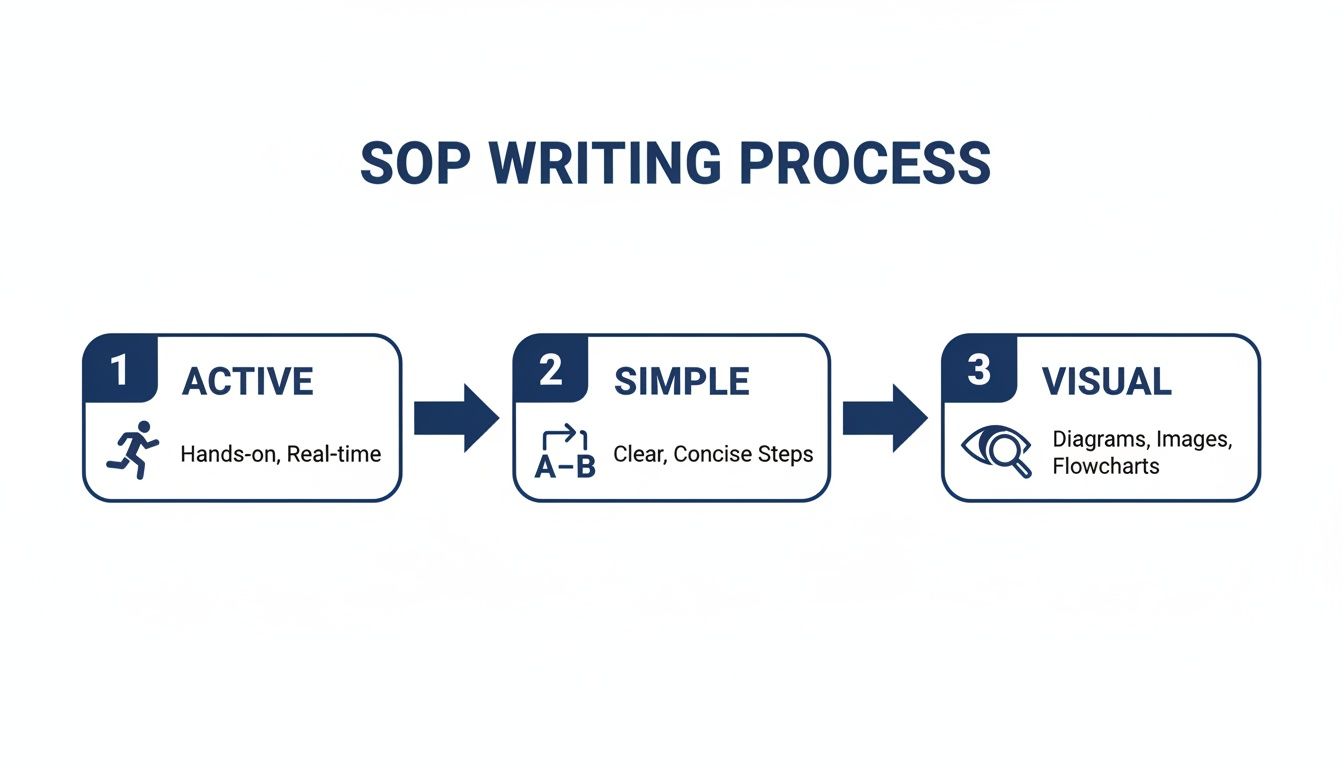
The best SOPs are built on actionable language and clear visuals—and that’s exactly what the right software helps you achieve.
Accelerate Creation with AI and Templates
One of the biggest roadblocks to getting processes documented is the time it takes just to start. Staring at a blank page is slow, painful, and almost always leads to inconsistent results.
This is where AI-powered tools come in.
Imagine turning a rough outline or even a quick screen recording of a process into a perfectly structured SOP in just a few minutes. AI assistants can take your simple prompts and spit out clear, step-by-step instructions, saving your subject matter experts a ton of time.
Beyond AI, using a library of pre-built templates is another huge win. These give you a standardized framework for different types of processes, making sure every SOP in your organization has a consistent, professional look.
- Sales: Templates for lead qualification or client onboarding.
- HR: Standardized guides for employee reviews or expense reporting.
- IT: Checklists for setting up new user accounts or troubleshooting common issues.
This approach doesn't just speed things up; it enforces best practices for clarity and structure across the board. If you're exploring your options, there's some fantastic process documentation software out there to fit just about any business need.
Maintain Control with Versioning and Quizzes
Getting an SOP written is only half the battle. The real work is keeping it current and making sure your team actually understands it. Manual version tracking—we've all seen files named "SOP_v2_FINAL_final"—is a guaranteed path to confusion.
Modern SOP platforms automate this completely. Every time you update a procedure, a new version is logged, and your team only ever sees the most current one. No more guesswork, no more outdated information.
The most beautifully written SOP is useless if it’s out of date. Automated version control isn’t a luxury; it’s a fundamental requirement for building a reliable operational playbook that your team can trust.
To close the loop, you need to confirm that your team has read and understood the new procedures. This is where built-in quizzes are a game-changer. After you publish a new or updated SOP, you can attach a short quiz to test comprehension. This gives you clear, trackable data on who's been trained and who might need a quick refresher, making your compliance and training efforts far more effective.
Driving Team Adoption of Your New SOPs
You’ve planned, structured, and written a crystal-clear SOP. You’ve done the hard work. But here’s the tough truth: a perfect SOP that nobody uses is completely worthless.
The final, and arguably most critical, step is making sure your new procedures become a living, breathing part of your team's daily routine. This isn’t about just emailing a link and hoping for the best. Driving real adoption requires a thoughtful rollout strategy built on communication, accessibility, and proving the value of the SOP to every single person on your team.
The goal is to embed these procedures into your company culture until they become the default way of working.
The impact here is huge. In regulated fields like finance and manufacturing, businesses report 28% error reductions just by implementing standardized procedures. For other operations, structured SOPs can slash onboarding time from weeks to days and boost compliance by as much as 45% in warehouse settings. A solid playbook scales, no matter the industry. If you want to dig deeper, you can learn more about how structured documentation drives business results.
Communicate the "Why" Before the "How"
Before you even think about rolling out a new SOP, you need to get your team’s buy-in. People are naturally resistant to change, especially when it feels like just another top-down mandate. Your first job is to sell the benefits and answer their most important question: "What's in it for me?"
Instead of just presenting the new process, frame it around the problems it solves for them.
- For a sales team: "This new lead qualification SOP will help you stop wasting time on dead-end prospects and focus on closing bigger deals."
- For a support team: "This procedure for escalating tickets will get you faster answers from engineering, so you can resolve customer issues in record time."
- For an IT team: "By following this new user setup checklist, we'll eliminate the back-and-forth emails and get new hires productive on day one."
When you connect the SOP to a real benefit—less frustration, faster work, better results—it stops feeling like a chore and starts becoming a tool for their success.
A successful rollout is 10% about the document and 90% about the communication. If your team doesn't understand why the SOP matters, they will always find a workaround.
Make SOPs Impossible to Ignore
If your SOPs are buried in a maze of shared folders, they won’t get used. It’s that simple. Accessibility is everything. Your procedures need to be available right where the work is happening, integrated seamlessly into the tools your team already uses every day.
This means moving beyond static documents. You have to embed your SOPs directly into your workflow. Imagine a customer support agent seeing the relevant troubleshooting guide pop up directly within their ticketing system. That’s how you drive adoption.
Here are a few practical ways to make your SOPs a natural part of the workday:
- Integrate with Your Tools: Use a platform that connects with apps like Slack, Jira, or your CRM to surface relevant guides based on the task at hand.
- Create a Central Knowledge Hub: Establish one single, searchable place for all company knowledge. It needs to be the undeniable source of truth.
- Use Browser Extensions: Give your team tools that let them look up procedures without ever leaving their current tab.
Establish a Simple Feedback Loop
Your SOPs shouldn't be set in stone. The people on the front lines, the ones using these procedures every day, are your best source of information for improving them. An outdated or clunky process is one of the main reasons teams abandon SOPs.
Create a simple, low-friction way for employees to give feedback. This could be a dedicated Slack channel, a suggestion feature in your SOP software, or a quick form linked in every document. When someone points out a broken step or a better way to do something, acknowledge their contribution. And if it makes sense, update the SOP quickly.
This does two powerful things: it keeps your documentation accurate and relevant, and it gives your team a sense of ownership. When people feel heard, they become advocates for the system instead of critics. This transforms SOP management from a top-down directive into a collaborative cycle of continuous improvement.
Common Questions About Writing SOPs
Even with a solid plan, you're going to have questions when you start writing SOPs. That's completely normal. The details are what turn a decent document into an indispensable tool for your team.
Let's dive into some of the most common questions we see. Getting these answers straight will help you sidestep common roadblocks and make your whole documentation process run smoother.
What Is the Best Format for an SOP?
There's no single "best" format—the right choice always comes down to the complexity of the task. Your goal is to match the format to the process, making it as intuitive as possible for the person doing the work.
For simple, linear tasks, you can't beat a step-by-step checklist. Think about a retail store's daily opening routine. It's clean, scannable, and makes it almost impossible to miss a critical step.
But what about more complex jobs? For any process with decision points—like a troubleshooting guide or a tricky customer service workflow—a flowchart is your best friend. It gives a clear visual map of all the possible paths an employee could take. A hierarchical format, using nested lists for sub-steps, is also great for breaking down big, multi-stage procedures into smaller, more manageable chunks.
The real goal here is clarity. The best format is whichever one makes the process easiest for the end-user to follow without a second thought. This is where a tool like Whale shines, offering a library of templates so you can pick the perfect structure for any task without having to build it from scratch.
How Often Should We Review SOPs?
Think of your SOPs as living documents. They're not meant to be written once, filed away, and forgotten. For them to stay useful, they have to evolve right alongside your business.
As a rule of thumb, schedule a formal annual review for all your procedures. This simple cadence ensures nothing gets totally neglected and that every process you have documented is still relevant.
That said, some events should trigger an immediate update. You need to jump on a review right away whenever:
- A core process or workflow changes.
- You roll out new technology or software.
- There are updates to regulatory or compliance requirements.
This is why using a system with built-in version control is a non-negotiable. It creates a clear audit trail of every change, logs who made it, and ensures your team is always working from the most current version. You completely eliminate the risk of someone following outdated instructions, which is where costly mistakes happen.
How Can I Encourage My Team to Use SOPs?
You can write the most beautiful, comprehensive SOPs in the world, but they're useless if nobody actually reads them. Getting your team to adopt them is all about making the documents accessible and demonstrating their value.
First, involve your team in creating and reviewing them. When people have a hand in building the procedures, they feel a sense of ownership. That buy-in is huge—they're far more likely to turn to a document they helped create.
Next, make your SOPs ridiculously easy to find. Don't bury them three folders deep in a shared drive nobody ever opens. They should be available right inside the tools your team already uses every single day. The less friction there is, the more likely they are to become a natural part of the workflow.
Finally, you have to sell the "why." Show your team how following these procedures actually makes their jobs easier, saves time, and cuts down on frustrating errors. You can even reinforce their importance with short training quizzes to boost engagement and make sure everyone is on the same page.