
It’s a familiar scene: you need to document a critical process, so you stare at a blank page, feeling a bit overwhelmed. Many teams solve this by grabbing the first generic SOP document template they find, quickly filling in the blanks, and calling it a day.
But this approach almost always backfires. Soon enough, that shiny new SOP is gathering digital dust, completely ignored. This happens because it treats process documentation as a one-off task, not the living, breathing system it needs to be.
Why Most SOP Document Templates Fail
The appeal of a quick-fix template is totally understandable, but it often creates more problems than it solves. When a static document becomes your single source of truth, it almost immediately falls out of sync with reality. Processes change, software gets updated, and team members come and go, yet the document remains frozen in time.
This isn't just a minor inconvenience; it has real, tangible consequences. For a fast-growing startup, a vague onboarding SOP can lead to a chaotic and confusing first few weeks for new hires, tanking both their productivity and morale. In a manufacturing setting, an outdated procedure could lead to costly operational mistakes or, even worse, serious safety incidents.
The Problem with Static Documents
At its core, the issue is that traditional SOP document templates are completely passive. They just sit there in a shared drive, often buried so deep they're hard to find and even harder to update. This creates a huge knowledge gap where team members go back to "tribal knowledge"—tapping a coworker on the shoulder or just guessing—which is the exact problem SOPs were created to solve in the first place.
Think about these all-too-common points of failure:
- Lack of Accessibility: If your team can't find an SOP in the moment they need it, it might as well not exist.
- No Version Control: Multiple versions of the same document start floating around, creating mass confusion about which one is the right one.
- Zero Engagement: Let's be honest, a wall of text is rarely read, let alone understood and actually remembered by the team.
- Difficult to Update: The person who originally wrote the SOP might have left the company, leaving no clear owner to make crucial updates.
The most dangerous SOP is the one that's outdated but still trusted. It creates a false sense of security while actively guiding employees toward incorrect actions, undermining the very consistency it was designed to create.
Moving Beyond the Template Mindset
To build a truly resilient operational backbone for your business, you have to shift from thinking about static files to creating a dynamic system. It’s about building a living library of processes that is easy for everyone to access, simple to update, and actually integrated into your team's daily workflow. This is where modern SOP management platforms completely change the game, turning documentation from a painful chore into a real competitive advantage.
It's no surprise the global SOP management solution market is projected to skyrocket to US$9.3 billion by 2033. This surge is a direct response to the failures of old methods. For instance, in manufacturing, paper-based systems are responsible for up to 30% of operational errors.
An effective system ensures consistency across the board, slashes training time, and protects your business from compliance risks. By using a proper SOP checklist, you lay the foundation for procedures that your team will actually want to use.
Anatomy Of An Effective SOP Document
A powerful SOP is a lot like a blueprint for a house. Just listing steps won't cut it. The best SOP document template gives you context, spells out who owns what, and cuts through any potential confusion. It’s all about creating a complete guide that anyone on your team can pick up and follow with confidence.
Moving beyond a simple title and a numbered list is what separates a document that actually gets used from one that collects dust in a shared drive. To give a procedure real meaning and direction, we need to include critical fields like Purpose, Scope, and Responsibilities.
The Foundational Elements
Every solid SOP starts with the basics. These are the components that set the stage, telling the user what the document is, why it exists, and who it’s for. Think of it as the "cover page" for your procedure.
- Title: Make it descriptive and crystal clear. "New Hire Device Setup" is infinitely better than something generic like "IT SOP #12."
- Unique SOP ID: Give it a unique identifier (e.g., FIN-004). This makes it a breeze to track down and reference later.
- Version Control: This one is non-negotiable. You absolutely need fields for the version number, approval date, and last review date to stop people from using outdated information.
- Department/Owner: Clearly state which department owns the SOP and who the go-to person is for questions or updates.
Getting this information upfront means team members instantly know if they have the right, most current document for the job.
An SOP without a clear purpose and scope is just a list of instructions without a destination. It tells people what to do but fails to explain why it matters, which is a key ingredient for team buy-in and consistent execution.
Defining The Why And The What
Once the administrative details are locked in, you get to the core of the SOP. This is where you lay out the procedure's reason for being and its specific boundaries. Skimping on this part is a recipe for confusion and operational gaps down the line.
The Purpose statement should be a quick, concise summary of the SOP's goal. For a "Monthly Expense Reporting" SOP, the purpose might be: "To ensure all employee expenses are submitted, approved, and reimbursed accurately and on time, in compliance with company policy." That one sentence gets everyone aligned on the outcome.
Next up is the Scope. This section defines exactly what the procedure covers—and just as importantly, what it doesn't. For instance, an IT team’s 'New Hire Device Setup' SOP scope might state: "This procedure covers the configuration of company-issued laptops and mobile phones for new employees. It does not cover software access requests, which are handled under SOP IT-007."
Defining the scope prevents "procedure creep," where people try to apply an SOP to situations it was never built for. If you want to dive deeper into structuring these documents, understanding the differences between processes and procedures can be a huge help.
Before we get to the step-by-step, let's break down all the essential pieces that turn a basic list into a high-impact SOP that people will actually use.
Key Components Of A High-Impact SOP Template
| SOP Component | Purpose And What To Include | Real-World Example Snippet |
|---|---|---|
| Title & ID | A clear, searchable title and a unique identifier for easy tracking. | Title: New Client Onboarding ID: CS-001 |
| Version Control | Tracks the document's history with version numbers, dates, and author names. | Version: 1.2 Last Reviewed: 2024-10-15 Author: Jane Doe |
| Department & Owner | Specifies who owns the procedure and is responsible for keeping it current. | Department: Customer Success Owner: Head of CS |
| Purpose | A one or two-sentence summary explaining why this procedure exists. | "To ensure a smooth and consistent onboarding experience for all new clients, setting them up for long-term success." |
| Scope | Defines the boundaries—what the SOP covers and what it specifically excludes. | "This SOP covers all steps from contract signing to the final kickoff call. It does not cover post-onboarding support." |
| Responsibilities | Lists all roles involved and clarifies what each person is accountable for. | Account Manager: Schedules kickoff call. Onboarding Specialist: Configures account settings. |
| Required Materials | Lists all necessary tools, software, or documents needed to complete the task. | – Access to Salesforce (CRM) – Client Onboarding Checklist (Google Doc) – Project Management Tool (Asana) |
| Step-by-Step Instructions | The detailed, actionable guide. Use clear language, short sentences, and visuals. | "1. Log into Salesforce and locate the new client's account. 2. Change the 'Account Status' from 'Prospect' to 'Active Client'." |
| Review & Approval | A section for sign-offs to make it official and a log of past revisions for audit trails. | Approved by: [Manager Signature] Date: [Approval Date] |
By building out your SOPs with these components, you're not just writing instructions; you're creating a robust framework that drives clarity and consistency across your whole organization.
The Actionable Core Of The SOP
With all the context in place, it’s time for the play-by-play. This section needs to be completely unambiguous, listing every resource needed and clearly assigning who does what.
- Responsibilities: List out the roles involved and their specific duties. For that expense reporting example, this is where you'd define what's expected of the Employee, the Manager, and the Finance Department. This is how you eliminate the classic "I thought someone else was doing that" problem for good.
- Required Materials/Tools: Don't ever assume people know what they need. List everything, from specific software (e.g., "Access to Expensify") to physical equipment ("Barcode scanner model XYZ").
- Step-by-Step Instructions: This is the heart of your SOP. Write in plain, simple language. Use short sentences and an active voice. And whenever you can, use screenshots, diagrams, or even short video clips to make complex steps easier to follow.
- Approval & Review: Finish up with a section for signatures or digital approvals, plus a log of past revisions. This creates an official record and reinforces accountability.
When you structure your SOP document template with all these pieces, you build a powerful framework that supports clarity, consistency, and compliance across your entire organization.
How To Write An SOP Your Team Will Understand
Knowing what goes into a solid SOP document template is half the battle. Bringing it to life with clear, actionable content your team will actually use? That’s where the real magic happens. A good template is just the skeleton; the words, visuals, and flow you add are what give it a pulse.
Let's walk through building an SOP for a scenario we can all relate to: “Customer Complaint Resolution.” This process is a classic friction point, which makes it the perfect candidate for crystal-clear documentation.
Gather Your Information First
Before you type a single word, you have to become a temporary expert on the process. The biggest mistake I see is someone trying to document a process from an ivory tower, without talking to the people actually doing the work every day.
Start by interviewing your subject matter experts (SMEs). In this case, that means your most seasoned customer support agents and their manager.
Your goal here is to map the entire process, warts and all.
- Ask Open-Ended Questions: Don't just ask, "What's step one?" Instead, try something like, "Walk me through what happens the second an unhappy customer gets on the line."
- Pinpoint the Tough Spots: Dig into the tricky parts. Ask, "What do you do if a customer's issue doesn't neatly fit into our standard categories?"
- Map Out the Tools: Make a note of every single piece of software they touch, from the CRM to internal wikis and Slack channels.
This groundwork ensures your SOP reflects what really happens, not just an idealized version of how things should work.
Writing With Clarity And Simplicity
With your notes ready, it’s time to start filling in that template. Your guiding light here should be absolute, undeniable clarity. Ditch the jargon, corporate buzzwords, and acronyms whenever you can. If you have to use an acronym, spell it out the first time.
Write in an active voice using direct commands. Instead of the passive, "The ticket should be categorized by the support agent," be direct: "Categorize the ticket in the CRM." It's a small tweak that makes the instruction immediate and actionable.
For a deeper dive into the nuts and bolts of this process, check out this excellent guide on how to create standard operating procedures for more tips.
Pro Tip: Read your instructions out loud. If a sentence sounds clunky or confusing when you say it, it’s going to be ten times harder for someone to parse in the middle of a stressful customer call.
This visual breaks down the essential anatomy of any great SOP.
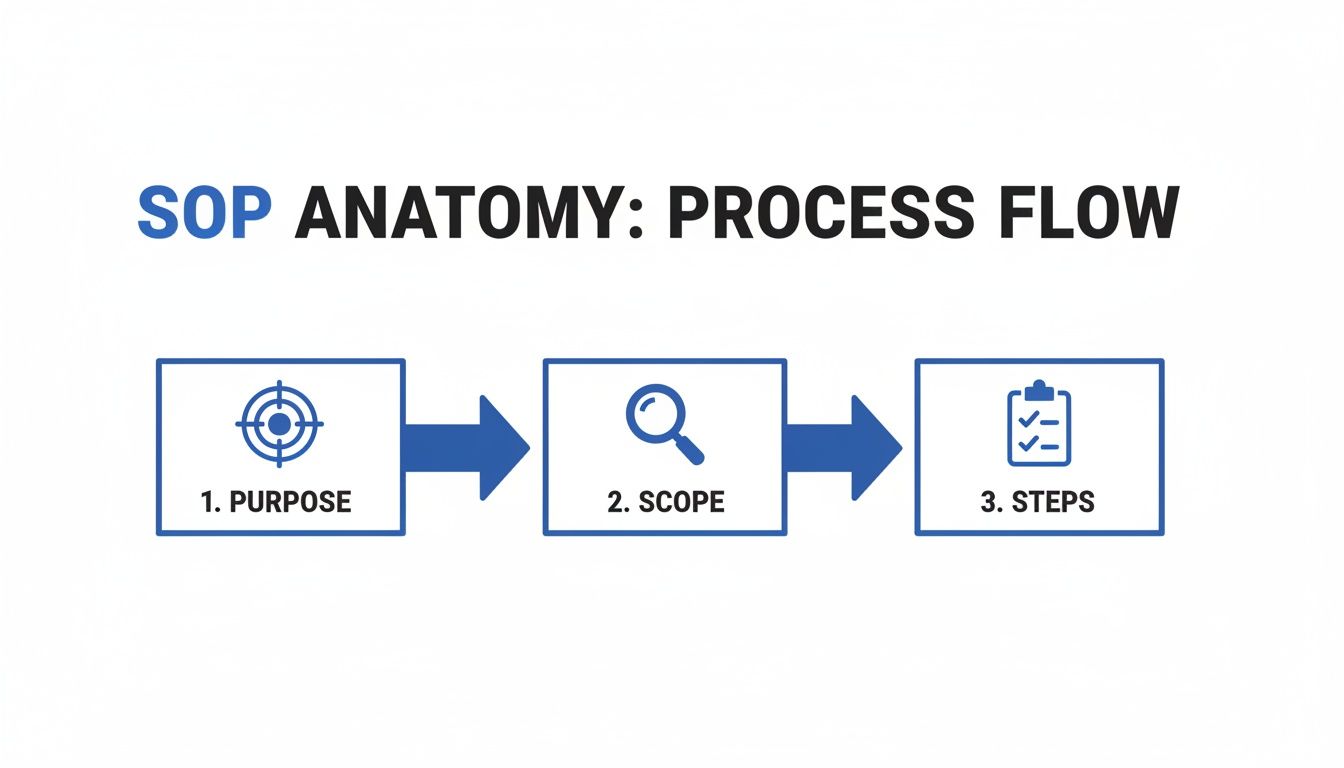
This flow really drives home how a clear purpose and scope set the stage perfectly before you even get to the step-by-step details.
Incorporate Visuals For Better Comprehension
Let’s be honest: humans are visual creatures. We process images way faster than text. For a process like handling complaints, visuals are your secret weapon. Don't just tell them where to click; show them.
- Use Annotated Screenshots: When you’re explaining how to log a complaint in the CRM, pop in a screenshot with arrows or red boxes highlighting the exact fields to fill out.
- Create Simple Flowcharts: Got a decision point? (e.g., "Is the customer asking for a refund?"). A simple flowchart can make the different paths an agent needs to take instantly understandable.
- Embed Short Video Clips: A quick 30-second screen recording of a complex step can be infinitely more helpful than pages of text trying to describe it.
Visuals do more than just break up a wall of text. They make the document more engaging and slash the odds of misinterpretation.
Formatting For Scannability
Nobody sits down to read an SOP like it’s a good novel. Your team is scanning it, looking for the one piece of information they need in that exact moment. Format your document to help them do just that.
Keep your paragraphs short and punchy—three sentences, max. Use bullet points and numbered lists to break down steps, requirements, or key takeaways. This simple formatting makes the entire document feel less daunting and helps your reader find their answer fast.
The move to replace chaotic manual processes is serious business. The global SOP management market hit USD 1,625.5 million in 2024 for a reason. In regulated fields, poor SOP management is tied to a staggering 70% of quality issues. On the flip side, simply using standardized templates can cut warehouse picking errors by 25-35%. The numbers don't lie—there's immense value in moving from static documents to dynamic, well-built SOPs.
When you bring together thorough research, clear writing, helpful visuals, and scannable formatting, you transform a blank SOP document template into a powerful tool that helps your team get the job done right.
Driving Team Adoption Of New Procedures

Let’s be honest. A beautifully crafted SOP document is completely useless if it just gathers digital dust in a shared drive. The real make-or-break moment is the implementation phase—that’s where your procedures meet your people, and where most documentation efforts either sink or swim.
If your launch plan is just emailing a link with a “please read,” you’re setting yourself up for failure. That approach is a fast track to low adoption and a quick slide back into the old, inefficient habits you were trying to fix.
To get your team on board, you need a smart change management strategy. You’ve got to sell them on the “what’s in it for me.” This isn’t about adding more rules; it’s about giving them a tool to make their jobs easier, kill the frustrating guesswork, and stop answering the same questions over and over.
Communicating The Change Effectively
The rollout for a new or updated SOP should start long before it actually goes live. A solid communication plan is your best tool for setting expectations and getting buy-in from the very beginning. Forget the top-down mandates; aim for a collaborative launch that makes your team feel like they’re part of the solution. The role of an Operations Manager is often central to this process, and their insights can be invaluable.
Think about tackling communication this way:
- Lead with the ‘Why’: Before you even show them the document, explain the problem it solves. Something like, "Hey team, we saw a 20% spike in shipping errors last quarter, which was creating a lot of headaches for customers. This new process is designed to help us catch those mistakes before they ever leave the building."
- Host a Kickoff Session: Get everyone together for a quick meeting, whether it's virtual or in person. A live walkthrough is the perfect time to answer questions on the spot and clear up any confusion before it starts.
- Find Your Champions: Every team has influencers. Identify a few key people who can advocate for the new process. Their peers are far more likely to get on board when they hear it from a trusted colleague instead of just another company-wide email.
This kind of proactive approach turns a mandate into a shared goal.
Making Training Engaging And Accessible
The old way of training—making someone passively read a document and just hoping they absorb it—is notoriously bad. For an SOP to truly stick, the training needs to be active, easy to access, and woven directly into your team’s daily workflow. The objective is genuine comprehension, not just checking a box.
The ultimate test of an SOP isn't how well it's written. It's whether a new hire can use it to complete a task successfully without asking for help. If they can't, the document has failed.
Modern tools like Whale let you embed SOPs right inside the platforms your team uses every single day. Picture a sales rep in their CRM, and the guide for logging a new lead pops up right beside them, at the exact moment they need it. That kind of contextual learning beats making someone hunt for a document every single time.
You can also go a step further and confirm they actually get it. Platforms that use AI to auto-generate quizzes from your SOP content can turn a dull reading assignment into an interactive check-in. This gives you instant feedback and confirms your team didn't just skim the procedure—they understood it. This gives you hard data, allowing you to spot knowledge gaps and offer extra support exactly where it's needed most.
Keeping Your SOPs Accurate And Scalable
Creating a solid SOP is a major win, but let's be honest, it’s only half the battle. The real challenge—and where most companies drop the ball—is keeping that documentation from going stale.
An outdated SOP isn't just unhelpful; it's actively dangerous. It quietly guides your team toward the wrong actions, creating a false sense of security while chipping away at the very consistency you worked so hard to build.
Processes aren't static. You adopt new software, teams get restructured, and someone inevitably finds a better way to do things. Your SOP library has to be a living, breathing system that reflects reality on the ground. This means shifting your mindset from documentation as a one-off project to an ongoing, dynamic practice.
Establishing A Regular Review Cadence
The single best way to stop your SOPs from becoming obsolete is to put a formal review cycle in place. Don't leave it to chance or wait for something to break before you take a look. A structured review process ensures that every single procedure is regularly validated by the people who actually use it.
How often should you review? It really depends on the process itself.
- High-Risk or High-Change Processes: Think IT security protocols, financial compliance, or your core marketing workflows. These are constantly evolving and need a check-up at least quarterly or semi-annually.
- Stable, Routine Processes: For the tasks that rarely change—like how to open the office or submit an expense report—an annual review is usually enough to catch any small updates.
The key is to assign a clear owner to each SOP. This is the person responsible for kicking off the review. In a platform like Whale, you can automate reminders so nothing ever slips through the cracks. It's this kind of systematic approach that turns a folder of documents into a reliable single source of truth.
An SOP is only as good as its last review. Without a scheduled check-in, even the best-written document will eventually become a liability, not an asset.
Managing Versions And Archiving The Old
Okay, so you've updated a procedure. What do you do with the old one? This is where version control becomes absolutely critical. Without it, you’re practically inviting chaos. You risk having multiple, conflicting versions of an SOP floating around, causing massive confusion when someone digs up an old file from their downloads folder.
An effective system should make two things incredibly simple:
- Clear Version History: Every SOP needs a transparent history that shows exactly what was changed, when, and by whom. This is non-negotiable for accountability and for understanding how a process has evolved.
- Archiving, Not Deleting: Never, ever just delete old versions. Archiving them creates a historical record that can be a lifesaver for audits, troubleshooting, or just figuring out why a change was made in the first place.
This structured approach makes sure everyone on your team is always working from the most current, approved version. If you want to dig deeper into this, check out our guide on how to review your SOPs.
Scaling Your SOP Library As You Grow
As your company gets bigger, your collection of procedures will explode. A system that worked perfectly fine for ten SOPs will quickly fall apart when you hit one hundred. To scale without creating a mess, your strategy has to evolve.
The numbers don't lie. The SOP Management Solution market is on track to grow from USD 4.716 billion in 2024 to a massive USD 10.82 billion by 2035. Why? Because businesses are finally moving away from clunky, paper-based systems that contribute to 20-30% of errors and inflate costs by 10-15% every year. Small and medium-sized businesses, which make up 40% of adopters, are jumping on solutions that can cut implementation time by 50%. You can read the full research about the future of SOP management to see where things are headed.
To prepare for this growth, get serious about structure now. Organize your SOPs logically by department or function, use a consistent naming convention, and make your library dead simple to search. A well-organized system ensures that as you scale, your single source of truth remains accessible, reliable, and a genuine asset to your team.
A Few Lingering SOP Questions? You're Not Alone.
Even with the slickest SOP document template ready to go, there are always a few questions that pop up. That’s totally normal. Getting your processes documented isn't just about filling in boxes; it's about making them a living, breathing part of how your team actually works.
Let's tackle some of the most common questions we hear from teams neck-deep in building out their own playbooks. From review cycles to making sure people actually use them, here are the quick and dirty answers you need.
How Often Should We Really Be Reviewing Our SOPs?
There's no magic number here. The right review cadence really depends on how volatile—and how critical—the process is. You have to tailor it.
Think about high-stakes, fast-moving stuff like IT security protocols or financial compliance tasks. Things change constantly. For these, you absolutely need to be checking in more often. A quarterly or semi-annual review is a good starting point to make sure you’re aligned with the latest tech and regulations.
But for the boring (but necessary) things that rarely change—like how to open the office or basic admin workflows—an annual check-up is probably fine.
The most important thing is to get a formal schedule on the books with clear owners. A modern SOP platform can automate these reminders, so nothing ever gets dangerously out of date just because someone forgot.
And of course, always trigger an immediate review after a big event. This could be a major operational screw-up, a new software rollout, or a shift in compliance rules that throws a wrench in the old way of doing things.
What's The Real Difference Between An SOP And A Work Instruction?
Ah, the classic question. People get tangled up in this one all the time, but it’s pretty simple when you think about scope. An SOP is the 30,000-foot view.
A Standard Operating Procedure (SOP) answers the big "what" and "why." It lays out the major stages of a process, who's involved, and the overall goals. A great example would be an SOP for "Processing Customer Returns." It covers the whole journey, from the moment a customer reaches out to the final inventory update.
A work instruction, on the other hand, is the nitty-gritty. It zooms in on a single task within that SOP and gives you the "how" in painstaking detail.
- SOP Example: "Process Customer Returns"
- Work Instruction Example: "How to Log a Return in the CRM System"
That work instruction would be packed with screenshots, field-level directions, and click-by-click guidance. SOPs give you the map; work instructions are the turn-by-turn directions.
How Do We Get Our Team To Actually Use The SOPs We Write?
This is the million-dollar question. The most beautiful SOPs in the world are just shelf-ware if nobody uses them. Getting your team on board is all about making your processes easy to find, easy to use, and genuinely valuable. You can't just toss a Word doc in a shared drive and hope for the best.
First off, get your team involved in creating them. When people have a hand in building the process, they feel a sense of ownership. It becomes their tool, not just another rule from on high.
Second, make them dead simple to find. Your SOPs need to live in one central, searchable spot. If someone can't find what they need in less than 30 seconds, they’re just going to tap a coworker on the shoulder and ask.
And finally, you have to bring the SOPs to them. Using tools that can pop up relevant guides right inside the apps your team already uses—like your CRM or helpdesk software—is a total game-changer. The documentation stops being a destination they have to go to and becomes an assistant that shows up right when they need it.
What Are The Biggest Mistakes People Make When Writing SOPs?
It's painfully easy to create an SOP that no one can actually use. The number one mistake? Being too vague or assuming the reader already knows what you're talking about. You have to write for the new hire on their first day. Use plain English and kill the jargon.
Another killer is the "wall of text." Nobody wants to read long, dense paragraphs. It's intimidating and makes it impossible to quickly scan for the one piece of information they need.
Here are the top mistakes we see all the time:
- Writing in a Vacuum: If you don't get input from the people doing the job every day, your SOP will be wildly out of touch with reality. It's a guaranteed recipe for failure.
- Awful Formatting: A document without short paragraphs, bullet points, and visuals is a nightmare to read. Formatting isn't just about looks; it's about usability.
- The 'Set It and Forget It' Trap: Documentation is never "done." If you don't have a scheduled review process, your SOPs will become outdated, untrustworthy, and eventually, a liability.