
If you want to boost your team's productivity, stop asking them to work harder and start engineering a smarter way to work. It all comes down to creating clear, accessible processes and getting rid of the daily friction—like hunting for information or guessing at tasks—that kills momentum. The first step is figuring out what’s really slowing everyone down.
Why Your Team's Productivity Is Really Stalling

When output feels stuck, it’s almost never about a lack of effort. More often, stagnant productivity points to deeper, systemic issues that quietly sabotage even your most dedicated people. The modern workplace, especially in hybrid setups, is full of these invisible hurdles that add up over time.
This isn’t just a hunch; it’s a measurable global trend. In 2024, global employee productivity growth limped along at just 0.4%, a massive drop from the pre-pandemic average of 1.8%. This slowdown is directly linked to low engagement—only 21% of workers feel truly engaged—costing economies an estimated $438 billion in lost output.
Identifying the Common Culprits
So, where are these hidden productivity drains? They usually show up as small, everyday frustrations that snowball into major losses of time and focus. The usual suspects include:
- Scattered Information: Productivity grinds to a halt when your team spends more time digging through old emails, chat threads, and random folders for answers than they do actually working.
- Ambiguous Processes: With no clear, documented way of doing things, everyone is forced to reinvent the wheel. This leads to inconsistent work and mistakes that could have been avoided.
- Constant Interruptions: A lack of standardized procedures means people are constantly tapping each other on the shoulder (physically or digitally) for help, shattering concentration and derailing deep work.
These issues create a vicious cycle. Small errors cause rework, unclear expectations create delays, and the endless hunt for information kills engagement. Sometimes, the problem is even simpler—an inefficient physical office can stall productivity. It's worth exploring the idea of rethinking shared spaces to see how workspace dynamics, like adding freestanding booths, can make a difference.
The core problem isn't your team's work ethic; it's the absence of a supportive operational framework. Productivity isn't accidental—it's engineered through clear, accessible Standard Operating Procedures (SOPs).
To move forward, you need a shift in mindset. Stop asking, "How can my team work harder?" and start asking, "How can I make it easier for my team to do their best work?" This means overcoming the https://usewhale.io/blog/3-mindsets-that-prevent-process/ that hold so many businesses back. This guide will walk you through diagnosing these hidden problems and implementing solutions that actually stick.
How to Establish a Meaningful Productivity Baseline
If you want to boost your team's productivity, you first need to get a crystal-clear picture of where things stand right now. It’s an old saying for a reason: you can't fix what you haven’t measured. Without a solid starting point, any effort you make is just a shot in the dark.
Establishing a meaningful baseline is all about creating a data-driven snapshot of your team's current output. This becomes the benchmark you’ll measure all future progress against.
This isn’t about becoming Big Brother or tracking every single keystroke. It’s about zeroing in on metrics that actually reflect value and spotting the real friction that’s slowing everyone down. The goal here is to gather data ethically and transparently, so you can turn those vague feelings about inefficiency into concrete, actionable insights.
Go Beyond Generic KPIs
Let's be honest, standard metrics like "tasks completed" are often too generic to be of any real use. To build a proper baseline, you need to get granular and focus on outcome-oriented metrics that are specific to what each team actually does. It's a shift from measuring activity to measuring impact.
Take a customer support team, for example. Their success isn't just about the number of tickets they close. A far more insightful metric is their First Contact Resolution (FCR) rate. A high FCR means they're solving problems on the first go, which points to deep knowledge and smooth processes—things that directly boost customer satisfaction.
Here are a few other examples of specific, value-driven metrics I've seen work well:
- IT Help Desk: Instead of just tracking ticket volume, look at the average ticket resolution time. If it's taking ages to resolve issues, it might signal a need for better documentation or training on common problems.
- Sales Team: Ditch the focus on call volume. Measure the lead-to-opportunity conversion rate. This tells you how effectively the team is qualifying prospects, not just how busy they are making dials.
- HR Department: Start tracking the time-to-hire for new roles. A long, drawn-out process could mean bottlenecks in scheduling interviews or getting approvals, which holds back the entire company’s ability to grow.
A great productivity metric tells a story. It doesn't just count what was done; it reveals how well it was done and what the impact was on the business.
Gathering Data Without Fostering Fear
How you collect this data is just as important as the metrics themselves. You're trying to build a culture of improvement, not a culture of surveillance. Always, always communicate the "why" behind any new measurement you introduce. Make it clear that the goal is to find and remove systemic roadblocks, not to put individual performance under a microscope.
The good news? You can probably use the tools you already have. Your CRM, project management software, and help desk platforms are absolute goldmines of performance data. By tapping into this existing information, you avoid adding new, annoying tracking tasks to your team's plate.
For instance, most project management tools can spit out reports on project cycle times, showing you exactly how long it takes to get from an idea to a finished product. This reveals process delays, not personal failings. To keep all this organized, check out our guide on creating a powerful process scorecard.
Analyzing the Baseline to Pinpoint Bottlenecks
Once you’ve got a few weeks of data under your belt, it's time to roll up your sleeves and look for patterns. This is where your baseline transforms from a simple report into a diagnostic tool.
A consistently low FCR rate in customer support might not mean the team is underperforming at all. It could be a flashing red light that your knowledge base is hopelessly outdated, forcing them to waste time hunting for answers.
Look for the inconsistencies and outliers. If one specific stage of your client onboarding process always takes twice as long as the others, you've just found a major bottleneck. Is it a clunky software tool? A missing piece of documentation? An approval that always seems to get stuck in someone's inbox?
Your baseline gives you the hard evidence you need to have focused, productive conversations. Instead of saying, "We need to onboard clients faster," you can walk into a meeting and say, "Our data shows the contract review stage is taking an average of four days, which is double any other step. Let's figure out why." This data-driven approach turns vague problems into solvable challenges and gives us a clear roadmap for the improvements we’ll tackle next.
Building Your Single source of Truth with SOPs
Once you have a data-driven baseline, the real work begins. It’s time to pull all that "tribal knowledge"—the stuff locked away in your team's heads—and build a centralized, accessible knowledge hub. This isn't just about writing down a few instructions; it's about creating a single source of truth that empowers your entire team to work with genuine clarity and confidence.
The foundation for all of this is a solid set of Standard Operating Procedures (SOPs). When done right, SOPs kill the guesswork, slash errors, and give a serious boost to productivity. Why? Because they give people the answers they need, right when they need them, freeing them from the soul-crushing cycle of asking questions and hunting for information.
The process is pretty straightforward. You're essentially moving from gathering raw data to defining clear, actionable standards for your team.
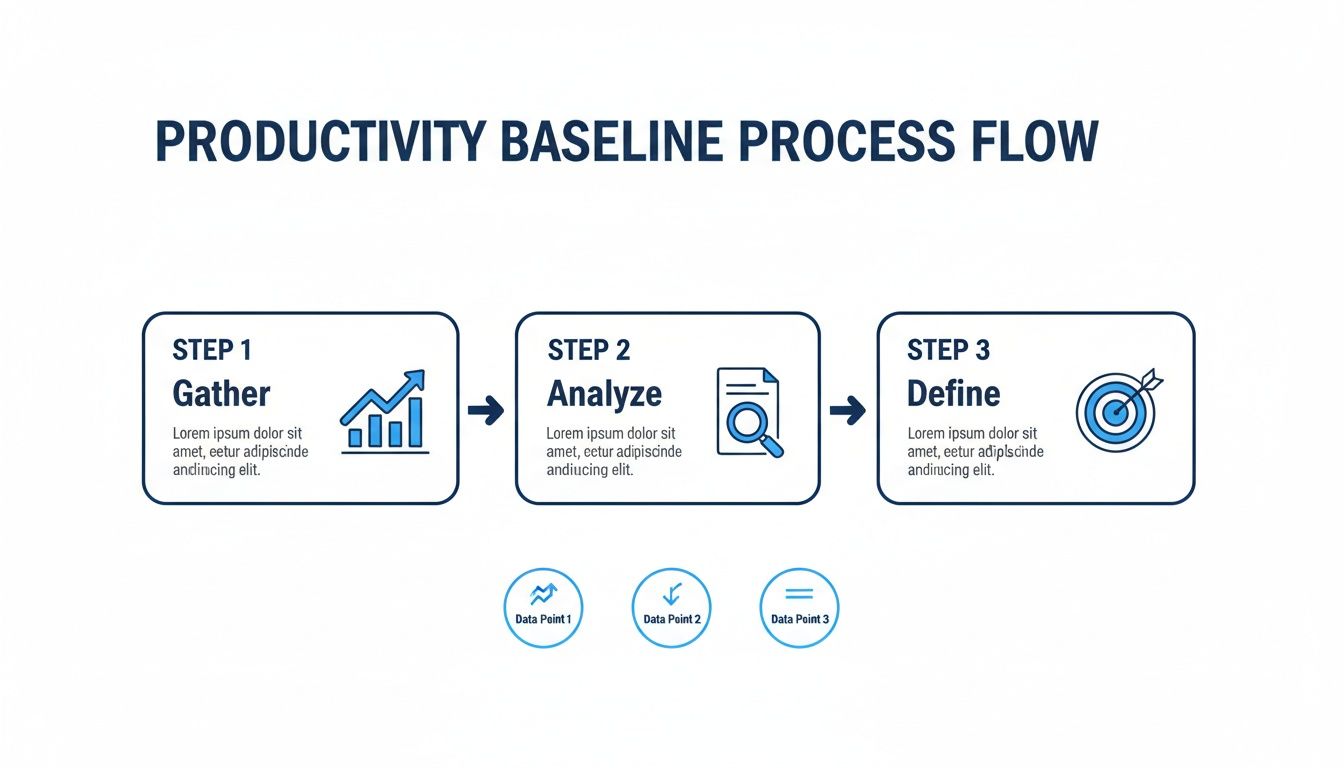
This flow shows how you refine that raw data into the specific, targeted procedures that will become your operational backbone. The end result is a system built on evidence, not assumptions.
Turning Chaos Into Clarity
Just think about the most common, repetitive questions your team asks. "How do I process this type of invoice?" or "What's the protocol for a new client kickoff?" Every single one of those questions points to a gap in your processes—and a drain on your team's productivity. Your mission is to plug those gaps with clear, easy-to-find documentation.
A great way to start is by identifying the tasks that cause the most friction or have the highest risk of error. Look for processes that are complex, have a ton of steps, or require strict compliance.
Some prime candidates for your first round of SOPs could be:
- Onboarding a New Client: Document every step, from the moment the contract is signed to the first project meeting.
- Submitting Expense Reports: Create a simple guide that lays out the rules, required receipts, and submission deadlines. No more ambiguity.
- Managing IT Support Tickets: Outline the exact process for categorizing, escalating, and resolving common technical issues.
By knocking out these high-impact areas first, you’ll deliver immediate value and build momentum to tackle other workflows.
A well-crafted SOP does more than just explain a task. It gives employees the autonomy to solve problems on their own, fostering a sense of capability and reducing dependency on others.
Leveraging Modern Tools to Accelerate Documentation
The thought of documenting every single process can feel completely overwhelming, but modern tools have made it faster and easier than ever. You don't have to start from a blank page. An AI-powered platform like Whale, for instance, lets you import existing documents—like those scattered Word files and Google Docs—and instantly convert them into structured, searchable SOPs.
This cuts the manual lift way down. Instead of writing from scratch, your team can focus on refining and improving the information you already have. You can even automatically generate training materials or quizzes directly from your SOPs, making sure your team not only reads the procedures but actually understands them.
This centralized approach is also a huge factor in employee engagement. We know engagement is the linchpin of productivity. While it's projected to climb to 30% by 2025, that still means over 40% of workers feel disconnected. This disengagement is costly, contributing to an estimated $438 billion in global losses in 2024. Centralized SOPs directly combat this by providing the clarity people crave and reducing the constant interruptions—which hit employees every three minutes and can take over 23 minutes to recover from.
Managing Compliance in Regulated Industries
For anyone managing operations in fields like manufacturing, finance, or healthcare, SOPs aren't just a "nice-to-have"—they're a must-have for compliance. In these industries, an outdated procedure can lead to serious regulatory penalties or even safety incidents.
This is where version control becomes absolutely critical. Your knowledge hub must provide a clear, indisputable history of changes for every single document. This accomplishes two vital things:
- Audit Readiness: When auditors come knocking, you can instantly show them the exact procedure that was in place at a specific point in time, complete with a log of who approved the changes and when.
- Operational Consistency: Your team is always working from the most current, approved version of a process. This eliminates the huge risk of someone using outdated information they saved on a local drive.
An effective system should let you assign owners to specific SOPs, set review schedules, and automatically ping stakeholders when a procedure needs an update. This kind of proactive management keeps your documentation alive and accurate, forming the reliable backbone your organization needs to scale safely and efficiently. By digging into the full benefits of standard operating procedures, it becomes clear how this foundation supports every part of business growth.
Using AI to Automate and Accelerate Workflows
So, you’ve put in the work to get your processes documented. That solid foundation isn't just for show—it’s the perfect launchpad for automation. It's time to bring in artificial intelligence to take over the repetitive, soul-crushing tasks that bog down your team.
This isn't about replacing people. Far from it. The goal is to give your team superpowers, freeing them up to focus on the strategic, creative, and high-impact work that actually moves the needle.
Companies that get this right are already seeing huge wins. Research shows 75% of knowledge workers feel AI saves them time and helps them focus. And while 54% of employees have tried AI in the last year, a massive 75% of them reported direct productivity boosts.
But there's a catch. Another study found that 77% of workers felt their workload increased when AI was rolled out without clear guardrails. This is a critical warning sign. It shows why you absolutely must tie AI tools to structured, well-defined processes. You can dig into more of these insights in these workplace statistics from Cake.com.
Start with High-Impact Automation Targets
The secret to a successful AI rollout? Start small. Go after the low-hanging fruit.
Look for the tasks that are highly repetitive, follow a clear set of rules, and suck up a ridiculous amount of your team’s time. These are your prime candidates for automation because they deliver quick wins and show immediate, undeniable value.
Think about the daily grind in your operations. Where are the bottlenecks?
Here are a few practical places you can start:
- Automating Data Entry from Invoices: Instead of having someone manually type in data from hundreds of invoices, an AI tool can read them, pull out the vendor name, date, and amount, and pop it right into your accounting software. That's hours back in your finance team's week, every week.
- Drafting Standard Reports: That weekly sales report that takes hours to pull together from five different spreadsheets? An AI can be set up to do that automatically. It can grab the numbers, format the report, and even write a first-draft summary, leaving your team to do the important part: analyzing the data.
- Answering Common Client Questions: Feed your SOPs to an AI-powered chatbot. Suddenly, you have a 24/7 support agent that can answer routine customer questions instantly. This frees up your human support team to handle the tricky, high-touch issues that really require their expertise.
The SOP and AI Synergy
Here’s the most important thing to understand if you want AI to actually improve productivity: your automation is only as good as the processes you feed it.
If your SOPs are a mess—unclear, outdated, or scattered all over the place—your shiny new AI tools will just make that chaos happen faster. They’ll pull the wrong data, follow the wrong steps, and create more headaches than they solve.
A centralized SOP platform is the "brain" for your AI. It acts as the single source of truth, making sure every automated task is based on accurate, up-to-date company procedures.
This connection is what stops the dreaded workload increase so many companies experience. When an AI can confidently pull from a well-maintained knowledge base, it gets things right the first time. This builds trust, encourages your team to actually use the tools, and makes AI a reliable part of your workflow instead of just a fancy new toy.
To see just how big of a difference this makes, let's compare some common manual tasks to their AI-supported counterparts.
Manual Processes vs AI-Augmented SOPs
Here’s a side-by-side look at how integrating AI with solid SOPs can completely change the game for your team's productivity.
| Task | Traditional Manual Approach (Time/Effort) | AI-Augmented SOP Approach (Time/Effort) | Productivity Gain |
|---|---|---|---|
| New Hire Onboarding | HR manually sends documents; answers repetitive questions via email. | AI chatbot answers FAQs using onboarding SOPs; auto-assigns training. | 60% Faster Onboarding |
| Invoice Processing | AP clerk manually keys in data from 100 invoices. Takes ~4 hours. | AI extracts data in minutes. Clerk verifies exceptions. Takes ~45 mins. | Over 75% Time Saved |
| Sales Proposal Creation | Rep spends hours gathering data and writing a standard proposal. | AI drafts a proposal using a template and CRM data in seconds. | 90% Reduction in Draft Time |
When you ground your automation strategy in a strong SOP framework, you're not just making things faster. You're building a smarter, more resilient system that reduces errors and empowers your team to do their best work.
Fostering a Culture of Continuous Improvement
Getting your team productive isn't a project with a finish line. It’s a constant commitment. Once you've documented your SOPs and started automating workflows, the real work begins: building a living system of improvement that keeps your processes sharp and effective.
This is all about creating a culture where finding a better way to work is everyone's job. It’s a fundamental shift away from a top-down model where managers dictate processes. Instead, you build a collaborative environment where the people actually doing the work have a real say in how it gets done.
Let's be honest, the best ideas for improvement almost always come from the front lines. Your employees are the ones interacting with these workflows day in and day out. They’re the first to see the awkward handoffs, the clunky steps, or the parts that just don't make sense anymore. A culture of continuous improvement gives them the power to turn those observations into action.
Create an Active Feedback Loop
Your documented procedures should never be static files collecting digital dust. They have to be living, breathing documents. To make that happen, you need a direct, frictionless feedback loop that lets employees suggest improvements right from within their daily work.
Picture a support agent following an SOP for a tricky customer issue. They get to step four and realize a recent software update made it totally redundant. Instead of just sighing and moving on, they should have a simple way to flag that procedure, add a comment suggesting the change, and instantly notify the process owner.
This simple change transforms your SOPs from rigid instruction manuals into collaborative playbooks. It ensures your documentation evolves in real-time right alongside your business, keeping it accurate and trustworthy. This isn't just a small tweak; it's a powerful way to boost productivity by getting rid of the tiny, daily frustrations that kill momentum.
Use Analytics to Guide Your Efforts
A good knowledge management platform does more than just store information—it tells you exactly how that information is being used. Analytics are your secret weapon for spotting which processes are humming along smoothly and which ones are creating friction for your team.
Dive into the data to see:
- Most Viewed SOPs: Is a particular guide getting a ton of traffic? That might mean it’s a critical or complex process that needs regular attention. It could also be a red flag that new hires aren't getting enough support in that area.
- Search Queries with No Results: When people search for something and come up empty, that’s not a failure—it’s a gift. You've just been handed a direct signal of a knowledge gap that needs filling. It's the perfect, data-driven prompt for creating your next essential SOP.
- Frequently Questioned Processes: If you’re seeing a flood of comments or questions on a specific procedure, that’s a clear sign it's confusing, outdated, or just plain broken.
This data-driven approach takes all the guesswork out of the equation. Instead of wondering what to improve next, you can let your team's real-world behavior point you directly to the areas where you'll make the biggest impact.
Make Process Improvement a Shared Goal
Building this kind of culture takes more than just the right tools; it demands a real shift in mindset. You have to actively encourage and, more importantly, reward the act of improving processes. This means celebrating team wins and giving a shout-out to individuals who contribute smart, practical suggestions.
When a team member’s feedback leads to a change that saves the team an hour a week, make that a big deal. Announce it in a team meeting or a company-wide Slack channel. This kind of positive reinforcement shows everyone you genuinely value their expertise on the ground and inspires others to get involved.
Ultimately, this creates a self-powering cycle of growth. Better processes lead to higher productivity, which frees up your team's time to think more strategically and spot even more opportunities for improvement. By fostering a culture where everyone is invested in finding a better way, you're not just making small tweaks—you're building a more agile, resilient, and productive organization from the ground up.
Burning Questions About Employee Productivity
As you start to build a more productive workplace, you're bound to run into some tricky questions. Let's tackle a few of the most common ones I hear from ops managers and business leaders.
How Do I Measure Productivity for Creative or Strategic Roles?
This is a big one. For roles where the output isn't just about cranking out widgets, you have to shift your thinking from activity metrics (like hours logged) to outcome metrics. Forget about counting tasks—focus on the real-world impact their work has on the business.
What does that actually look like? It means sitting down and defining what "success" is for that specific position. For a marketing strategist, maybe it's the lead quality score generated from a new campaign. For a designer, you could look at client satisfaction scores or how closely a new design nailed the project brief.
Here are a few metrics that work well for these kinds of roles:
- Project Milestone Achievement: Are they consistently hitting key deadlines on complex, long-term projects? This shows they can manage their time and deliver.
- Quality Scores: Don't just guess. Measure their work against a pre-defined quality rubric to keep things objective and fair.
- Client Satisfaction (NPS): Nothing speaks louder than direct feedback. Client happiness is a huge indicator of high-quality, impactful work.
- Impact on Company Goals: Use a framework like Objectives and Key Results (OKRs) to draw a straight line from their efforts to the company's biggest objectives.
And don't forget, even in creative fields, having clear SOPs for things like project kickoffs or creative briefs can standardize the inputs, making it much easier to measure the quality of the outputs.
How Can I Get My Team to Adopt New Processes and Tools?
Let's be honest: people don't resist change, they resist being changed. Most of the time, that pushback comes from a fear of the unknown. The trick is to get out ahead of it with clear communication and a smart rollout plan.
First, always start with the "why." You have to show your team how this new process or tool will make their lives easier. Frame it as the solution to the problems and daily frustrations they're already complaining about. When they see it's about reducing headaches, not adding more work, you'll start winning them over.
To really get them on board, involve them early. Share draft SOPs and ask for their feedback before you launch anything. Find those influential "champions"—the people who are genuinely excited about the change—and empower them to help rally their peers.
The single biggest factor for adoption is providing great training and ongoing, easy-to-find support. This is where an integrated knowledge platform like Whale makes a world of difference. When the answers live right inside their workflow, they don't have to go hunting for them in some separate system.
What Is the Most Impactful First Step I Can Take?
Don't try to boil the ocean. The single best thing you can do to get started is to identify and document your single most broken process. Seriously, just one.
Look for a workflow that causes a ton of frustration, touches multiple people, and is a consistent source of headaches. Maybe it's client onboarding, or how you handle urgent support tickets. Your goal is to find that one process that, if you fixed it, would make everyone's day noticeably better.
Once you’ve picked your target, get the team involved to map out all the current, messy steps. Then, work together to design a simple, clear SOP for the new-and-improved version.
This approach gives you a quick, visible win. It shows everyone the real-world value of having documented processes and builds the momentum you need to start tackling bigger challenges.
How Do Clear SOPs Improve Employee Engagement?
Disengagement is rarely the root problem; it's usually a symptom of chronic frustration and confusion. When people can't find the information they need to do their jobs, they waste time, make mistakes they could have avoided, and start to feel like they’re being set up to fail.
Good, accessible SOPs get rid of those daily roadblocks. They give employees the clarity and guidance they need to feel confident and autonomous in their roles. That’s a massive boost for morale.
Think about it. When a team member can find a definitive answer in a central knowledge base in just a few seconds instead of having to interrupt a colleague, they feel more capable and empowered. That feeling of mastery and the reduction in daily friction are powerful, often-overlooked drivers of job satisfaction.
And since we all know that higher job satisfaction is directly linked to higher productivity, it’s pretty clear that investing in your processes is one of the best investments you can make in your people.