
For a lot of companies, "employee training" is a nice way of saying a new hire shadows a veteran for a few days, gets handed a stack of outdated documents, and is then pretty much left to figure things out on their own. This sink-or-swim approach might feel resourceful, but it's a silent killer of productivity, morale, and your bottom line.
A structured training plan for employees template isn't just about ticking boxes. It's a strategic move to plug those hidden financial leaks and build a team that’s ready for anything.
Why Ad-Hoc Employee Training Is Silently Costing You
Let’s get one thing straight: not all training is good training. When you leave onboarding to chance, you’re creating hidden drags on your business, opening yourself up to compliance risks, and quietly encouraging your best people to look for the exit.
If your training is chaotic and undocumented, every new person gets a slightly different story on how things really get done. This leads to mass confusion, preventable mistakes, and a whole lot of wasted time.
Picture this common scenario: a fast-growing e-commerce brand hires two new customer service reps, one in June and one in July. The first rep learns a patchwork of shortcuts from a manager who’s stretched too thin. The second gets a completely different workflow from a well-meaning peer. The result? Frustrated customers, duplicated work, and a culture where no one is actually sure what the standard operating procedure is.
The True Cost of Inconsistent Onboarding
Without a single source of truth, all your critical knowledge lives inside the heads of a few key employees. When they inevitably leave, that institutional wisdom walks right out the door with them. You're then forced to reinvent the wheel every single time you hire someone new. It's a frustrating cycle of inefficiency that makes it impossible to scale. A standardized training template breaks that cycle for good.
The impact on retention is especially stark. Organizations that put formal employee training plans in place see a massive difference. Research from the Society for Human Resource Management (SHRM) found that companies with structured onboarding processes boost new hire retention by a whopping 82%.
With global employee engagement hovering at just 23% worldwide, providing solid training is one of the most direct ways to improve motivation and commitment. You can discover more insights about how training impacts employee engagement right here.
Today's workforce doesn't just want a paycheck; they expect a clear path for growth and development. A structured plan is your best defense against costly turnover. It shows employees you're invested in their success from day one.
A Strategic Asset, Not Just a Document
If you're still thinking of a training plan as just another document, you're missing the bigger picture. It's a core strategic asset that directly fuels the health of your company.
- Scalability: Standardized training means you can bring new people on board efficiently and consistently, no matter how fast you're growing.
- Compliance: It ensures every single employee gets the critical training they need on safety protocols, data privacy, and industry regulations, slashing your legal risks.
- Productivity: New hires get up to speed way faster. This shrinks the time-to-productivity and minimizes the performance dip that almost always comes with new staff.
For example, platforms like Whale offer pre-built templates you can grab, customize, and manage from one central hub.
This shows how a centralized system gives you ready-to-use templates for different roles, saving your managers from having to start from scratch every time. By using a system like this, you turn a messy, chaotic process into a streamlined, repeatable workflow that actually supports long-term growth.
Crafting Your Core Training Template From the Ground Up
Building your master training template is a lot like laying the foundation for a house. It needs to be strong, adaptable, and designed with a clear purpose. A generic checklist just won't do the job here; you need a solid framework that actually supports real-world learning and contributes directly to your company's bottom line.
The whole point is to create a core structure you can easily tweak for any role. This turns what feels like a monumental documentation project into a smooth, repeatable process.
Nail Down Your Learning Objectives First
The bedrock of any effective template is a set of clear, measurable learning objectives. This isn't about just listing tasks—it's about defining outcomes. What, specifically, should the employee be able to do on their own after the training is complete? These objectives have to tie directly back to your bigger business goals.
For example, a new warehouse operator’s objective might be: “Independently pick and pack 50 multi-item orders per hour with a 99.8% accuracy rate by Day 30.” This is specific, measurable, and clearly linked to operational efficiency.
On the other hand, a new hire in finance might have this objective: “Correctly process and document all vendor invoices under $5,000 without supervision, adhering to all SOX compliance checks, within the first 60 days.” Both are crystal clear, role-specific, and performance-driven.
Define Your Core Template Components
Once you’ve got your objectives locked in, it's time to build out the core modules of your template. These are the non-negotiable elements that provide structure and consistency, no matter the department.
Think of these as the universal building blocks for every employee's training journey:
- Company & Culture Onboarding: This goes way beyond the mission statement. It should cover the org chart, key people, and how your team actually communicates (e.g., when to use Slack vs. email). Most importantly, it should show your core values in action.
- Essential Tools & Systems Access: Make a list of every single piece of software they'll need, from the company-wide HR system to role-specific platforms. Be sure to include login instructions and links to any basic tutorials.
- Compliance & Safety Protocols: This part is non-negotiable. It has to cover all mandatory training—data privacy, workplace safety, anti-harassment policies—and you need a clear way to track that it's been completed.
- Role-Specific Skills & Knowledge: This is the section that will change the most. It outlines the core competencies, standard operating procedures (SOPs), and job-specific knowledge needed to excel in that particular role.
This diagram perfectly illustrates how moving from chaotic, undocumented training to a structured template helps you get costs under control and build a scalable solution.
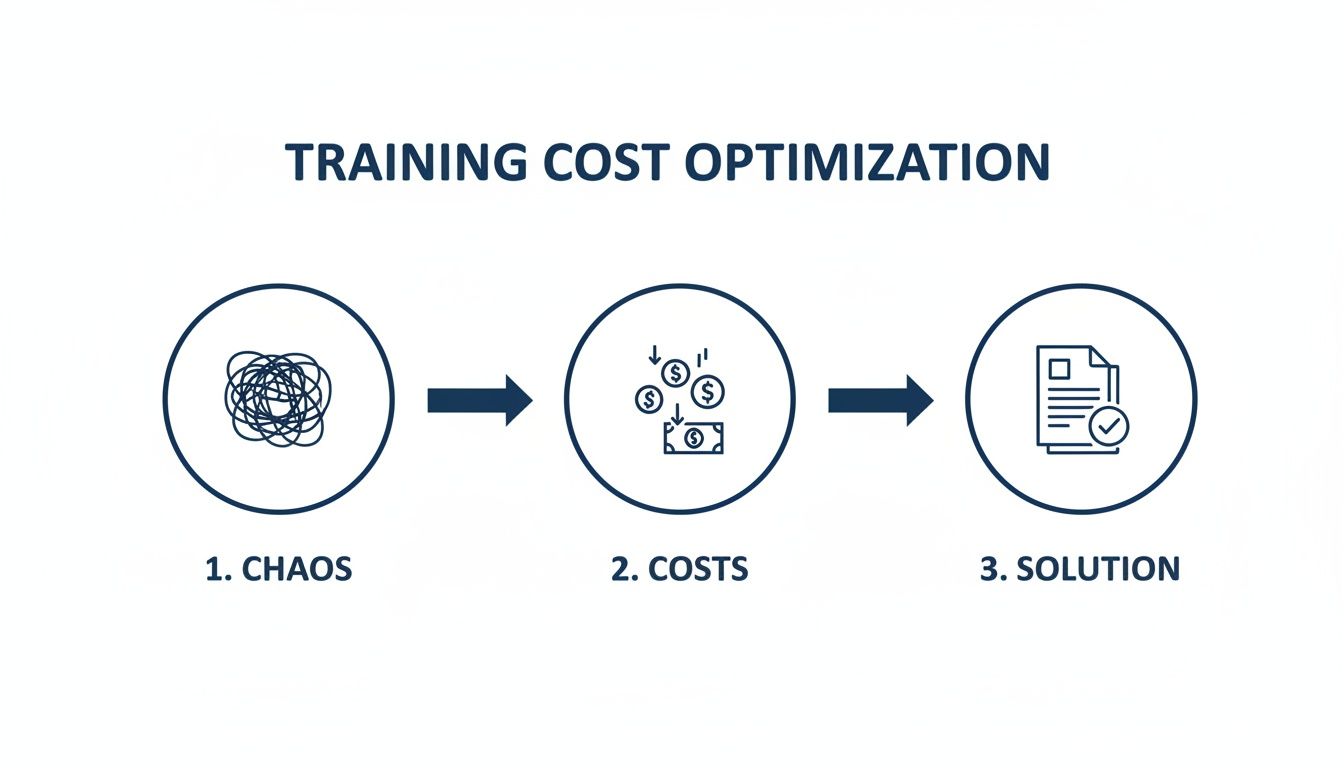
As you can see, a well-defined employee training plan template is the bridge between wasteful, ad-hoc onboarding and an efficient, systemized process that actually scales.
To help you get started, here's a breakdown of what every high-impact template needs. Think of these as the must-haves that ensure your training plan is practical, consistent, and easy for everyone to follow.
| Component | Description | Example |
|---|---|---|
| Learning Objectives | Clear, measurable outcomes that define what an employee must be able to do post-training. This sets expectations from day one. | "By the end of Week 2, the new sales rep will be able to conduct a full product demo independently, hitting all 5 key value props." |
| Modular Content | Content broken down into logical, self-contained sections (e.g., Company Culture, Core Tools, Role-Specific Skills). | A "Core Tools" module might contain sub-sections for Slack etiquette, how to use the project management tool, and where to find HR documents. |
| Timelines & Milestones | A schedule that outlines what should be completed by specific dates (e.g., Day 1, Week 1, Day 30). This keeps the employee and manager on track. | Day 1: System logins & IT setup. Week 1: Complete all compliance modules. Day 30: First solo project completed. |
| Assessment Methods | Methods for verifying comprehension and skill acquisition, such as quizzes, practical exercises, or manager check-ins. | A short quiz after the "Data Security" module. A mock customer call to assess product knowledge. A manager shadow session. |
| Resource Links | Direct links to all necessary documents, tools, and supplementary materials, all in one place. No more hunting through shared drives. | Links to the official employee handbook, key SOPs in your knowledge base, and tutorials for the company's CRM. |
| Feedback Mechanism | A structured way for the new hire to provide feedback on the training process itself, helping you improve it over time. | A short survey at the 30, 60, and 90-day marks asking about the clarity, pace, and usefulness of the training materials. |
Putting these pieces together creates a master template that’s not just a document, but a true roadmap for success. It ensures every new hire gets the same high-quality, consistent experience while still being flexible enough to meet the unique needs of their role.
Structure Your Template for How Adults Actually Learn
Adults learn best when they understand the "why" behind what they're doing and can apply new knowledge to their job right away. Your template needs to be built with this in mind.
Don't just create a long, linear checklist they have to slog through from top to bottom. Instead, organize your content into a modular format. This approach is incredibly powerful because it lets you easily swap modules in and out. A marketing coordinator and a software developer will both need the core culture and compliance modules, but their role-specific sections will be completely different.
Before you start building those role-specific plans, it's a smart move to conduct a thorough analysis of what each role truly needs. You can learn more about this crucial first step in our guide on creating a training needs analysis template.
It’s worth the effort. Globally, companies that offer structured training see 17% higher productivity and are 21% more profitable. At the same time, 74% of workers are hungry to learn new skills to stay relevant. Your template is the key to bridging that gap effectively.
By focusing on clear objectives, essential components, and a modular structure, you can build a master template that is both rock-solid and incredibly flexible. This foundation ensures every new hire gets a consistent, high-quality onboarding experience that truly sets them up for success.
Adapting Your Template for Different Roles and Departments
A master training plan for employees template is a fantastic starting point, but its real power is unlocked through smart, role-specific customization. Let's be honest, a one-size-fits-all approach to training just doesn't cut it. An engineer requires a completely different skill set than a sales executive, and your training plan needs to reflect that reality.
If you skip this step, you’re just delivering generic content that feels irrelevant, disengages new hires, and completely fails to close critical skill gaps. Real performance improvement happens when learning is targeted, practical, and directly tied to an employee's day-to-day work. This is where you transform a simple document into a dynamic development tool.

Partner with Department Heads to Uncover Needs
The single most effective way to adapt your template is to go straight to the source: the department heads and team leads. They’re on the front lines and have priceless insights into the specific challenges, tools, and workflows their teams grapple with every single day.
Set up some quick, focused meetings to conduct a practical needs assessment. Don't just ask them what training they think is needed. Dig deeper to get at the real pain points and priorities.
Try using these questions to guide the conversation:
- What are the most common mistakes you see new hires make in their first 90 days?
- Which piece of software or which process consistently trips people up?
- If you could give this team one new skill that would make an immediate impact, what would it be?
- Are there any big projects or new technologies on the horizon we need to prep for?
Their answers will basically hand you a customization roadmap, ensuring every training module you build is solving a real-world problem.
Build Role-Specific Learning Pathways
Once you’ve got a handle on a role’s unique needs, you can start building out a custom learning pathway. This is all about adding, removing, or tweaking modules from your master template to craft a tailored experience. For a really deep dive on how to structure these, check out our guide to creating a comprehensive training matrix.
Let's walk through two very different examples to see how this works in practice.
Scenario 1: The New Sales Development Representative (SDR)
For an SDR, the name of the game is speed-to-productivity. They need to be booking meetings—and fast.
- Core Modules: Company Culture, Compliance, HR Systems.
- Custom Modules Added:
- CRM Deep Dive: Not just the basics, but advanced training on lead management, activity logging, and pulling reports.
- Cold Calling & Scripting: Practical workshops with mock calls and direct, actionable feedback.
- Product Knowledge Mastery: Quizzes and presentations zeroing in on key value propositions and differentiators.
- Objection Handling: Role-playing common pushback and mastering effective responses.
By tailoring the plan, you’re doing more than just generic onboarding. You're arming the SDR with the exact tools and confidence they need to hit their targets faster. The goal isn't just to teach them about the company; it's to make them lethal at their job.
Scenario 2: The Veteran IT Specialist
For an experienced hire, the focus shifts completely. You're not teaching them the basics; you're getting them up to speed on your company's specific systems and advanced knowledge.
- Core Modules: Company Culture, HR Systems (the quick version).
- Custom Modules Added:
- Advanced Cybersecurity Protocols: In-depth training on your internal threat detection and incident response procedures.
- Proprietary Software Architecture: Sessions with senior engineers to walk through the company’s unique tech stack.
- Vendor Management & Ticketing System: A detailed walkthrough of the internal helpdesk workflow and who the key vendor contacts are.
By creating these distinct pathways, you make sure every employee gets training that’s not just relevant but also respects their existing expertise. This targeted approach is a game-changer for engagement and drastically shortens the time it takes for them to start making a real impact.
How to Measure Training Effectiveness and Track Progress
Building a solid training plan for employees template is a huge step, but it's really only half the job. If you’re not actually measuring the impact of that training, you're flying blind.
It’s time to move past simple completion rates. Ticking a box that says "training complete" means nothing if it doesn't translate to real-world results. The goal isn't just to get people through the training; it's to make them better at their jobs.
So, how do we do that? We shift our focus from "Did they finish the module?" to "Can they now do the job better, faster, and with fewer mistakes?"
Key Performance Indicators That Matter
To see the real return on your training investment, you need to track the right Key Performance Indicators (KPIs). These are the metrics that connect the dots between what someone learned and how they’re performing.
Here are a few high-impact KPIs I always recommend starting with:
- Time-to-Productivity: How long does it take for a new hire to get fully up to speed? A good training plan should consistently shorten this runway.
- Error Rate Reduction: This one is super clear. Track the number of mistakes made on specific tasks before and after the training. A customer service team, for instance, should see a noticeable drop in incorrect order entries.
- Skill Proficiency Scores: Use quizzes, practical assessments, or even simulations to score someone's ability in a specific skill. This gives you hard data on how much knowledge they’ve actually absorbed.
- Increased Task Throughput: Look at how many tasks an employee can get done in a set amount of time. A warehouse packer who goes through your new training should see their items-per-hour rate climb.
Having a dashboard, like this one from Whale, gives you a live look at training progress and how your team is engaging with the material.
This kind of visual data lets managers see at a glance who’s on track and which materials are actually being used. It makes it so much easier to step in and offer targeted support right when it's needed.
Gathering Qualitative Feedback
Numbers tell you what's happening, but they don't always tell you why. That’s where qualitative feedback comes in. This is the human insight you can’t get from a dashboard, and it's invaluable for tweaking your program.
One of the best ways to get this feedback is through structured check-ins. The 30-60-90 day framework is a classic for a reason—it just works.
Regular check-ins turn training from a one-time event into an ongoing conversation. They give new hires a safe space to ask questions, share concerns, and provide honest feedback on what’s actually helping them succeed.
During these meetings, ditch the yes/no questions and ask open-ended ones that get people talking:
- "Which part of the training has been most helpful in your day-to-day work?"
- "Where do you still feel unsure or need more support?"
- "Was there anything in our documentation that was confusing or felt outdated?"
This kind of feedback is gold. It helps you find and fix gaps in your training, clarify confusing steps, and make improvements on the fly. When you combine hard data with real human insights, you turn your training program from a simple expense into a powerful, data-backed investment in your team’s success. For a deeper dive, check out our guide on using employee training tracking software to manage this whole process.
Using Technology to Manage and Automate Your Training
Let's be honest. A perfect training plan is useless if it’s buried in a shared drive, ignored, and collecting digital dust. The real challenge isn't just creating the template; it's making it a living, breathing part of your operations. This is where the right tech stops your plan from being a static document and turns it into a system that actively helps your team grow.
One of the biggest headaches I see is version control. How do you make sure everyone—from the brand-new hire to the seasoned manager—is using the most current procedures? Without a central system, you inevitably end up with five different versions of the same document floating around, which is a recipe for confusion and costly mistakes.
Centralize Everything in a Single Source of Truth
The first, most impactful step is to get all your training materials out of scattered folders and into one accessible hub. A platform like Whale essentially becomes your company's "single source of truth." It gives everyone on the team instant access to the correct, up-to-date training plan for employees template and all its related guides.
This one move solves several problems at once:
- No More Guesswork: Employees always know exactly where to find the answers they need.
- Instant Updates: When a process changes, you update it once. That's it. Everyone immediately has the new version.
- Controlled Access: You can manage permissions so people only see the training that’s actually relevant to their roles.
By creating this central knowledge base, you cut out all the administrative drag that comes with manually managing documents. It becomes the go-to spot for any and all process questions.
Make Learning Part of the Daily Workflow
The most effective training doesn't pull people away from their jobs; it slides right into their existing workflow. The best tools today are designed to deliver knowledge at the exact moment it's needed, right inside the apps your team already uses every single day.
Picture this: an employee is working in Salesforce or Slack and has a question. Instead of stopping what they're doing to go hunt through a shared drive, a browser extension can pop up with the precise SOP or guide they need. This is just-in-time learning, and it’s a total game-changer for productivity.
Training shouldn't feel like a separate, burdensome chore. When you embed learning directly into the workflow, it becomes a natural, helpful part of the job, boosting both competence and confidence.
This approach respects your team’s time and makes continuous improvement feel like a background process, not a disruptive event. If you're looking to manage and automate your training this efficiently, it's worth exploring options like an LMS for online employee training to see how these systems can be put into practice.
Ultimately, using technology to manage your training plan isn't about adding another complicated tool to your tech stack. It’s about removing friction and making it incredibly easy for your team to do their best work. When you automate updates, centralize knowledge, and embed training into daily tasks, you create a system that truly scales with your business—transforming your template from a simple document into a powerful engine for growth.
Got Questions About Your Training Plan Template? We've Got Answers
Even with a killer template in hand, putting a structured training program into practice always brings up a few questions. It's totally normal. Let's tackle some of the most common ones we hear from managers and HR leaders who are rolling out their own training plan for employees template. One important aspect to consider is the creation of effective training templates for managers that cater specifically to their team’s needs. These templates should not only facilitate knowledge transfer but also encourage engagement and continuous improvement. By leveraging these resources, managers can ensure a more consistent and impactful training experience for everyone involved.
How Often Should I Update My Training Plan?
Think of your master template as needing a big-picture check-up at least once a year. You'll also want to give it a refresh after any major company shift—think a new business strategy, a core technology change, or new industry regulations. This keeps the foundational stuff everyone needs fresh and relevant.
But for role-specific plans? You need to be more agile. I recommend sitting down with department heads quarterly or, at the very least, bi-annually. This ensures the training is perfectly synced up with their team’s evolving job demands and performance goals.
A little pro-tip: Using a centralized knowledge hub like Whale makes these updates a breeze. When you edit a procedure, it instantly pushes the latest version out to everyone. No more digging through shared drives or worrying someone is using an old, outdated guide on the job.
What Is the Biggest Mistake to Avoid?
Easy. The absolute most common pitfall is creating a one-size-fits-all plan in a vacuum. A template that's built without any input from the people who will actually use it is doomed from the start.
If your plan doesn't solve real, on-the-job challenges or reflect what your employees actually need, it’ll just gather digital dust. Always, always, always start by talking to your managers and, just as importantly, your front-line employees. Their feedback is gold. It’s the only way to build something that’s flexible, relevant, and genuinely helpful in their day-to-day work.
How Can I Make Training Engaging for Overwhelmed Employees?
This is a big one. The secret is to stop thinking in terms of long, disruptive training sessions and start embracing microlearning and just-in-time support.
Instead of pulling people away from their work for an hour-long seminar, break down complex procedures into short, bite-sized guides that are easy to search for.
This way, team members can find the exact answer they need at the exact moment they need it. When you integrate training directly into their workflow—using tools that pop up with SOPs right inside the apps they already use—learning stops being another task on their to-do list. It just becomes a natural, helpful part of doing their job well.