
Let's be honest, workflow automation is one of those terms that gets thrown around a lot. At its simplest, it’s about using technology to run your repetitive, rule-based business tasks on autopilot.
Think of it as the digital version of a perfectly choreographed relay race. Instead of manually passing information from one person or system to the next, automation ensures the baton of work is handed off seamlessly, every single time. It strings together a series of individual steps into a smooth, self-running process.
What Is Workflow Automation and Why Does It Matter?
Imagine your team's daily operations are like a line of dominoes. The manual way involves someone carefully finding and tipping over each one, hoping they don’t miss a step or topple one out of order. It’s slow and ripe for error.
Workflow automation, on the other hand, sets up the entire line of dominoes perfectly. Then, it gives the first one a gentle, automatic nudge, guaranteeing the whole sequence unfolds exactly as planned.
It’s about building smart systems to handle the predictable, repeatable stuff. This frees up your team to focus on the work that actually requires a human touch—things like creativity, strategic thinking, and building customer relationships. This isn't just about speed; it's about making your operations more reliable and a whole lot smarter.
The Engine Behind Modern Business
Adopting automation isn't just a cool trend; it's a fundamental shift in how successful businesses get things done. The global workflow automation market is currently valued at USD 26.01 billion and is expected to skyrocket to USD 40.77 billion by 2031.
That kind of explosive growth tells you everything you need to know. It’s becoming critical for building efficient, scalable companies. You can dig deeper into the workflow automation market trends to see just how quickly it's expanding.
At its core, workflow automation moves your team from being doers of repetitive tasks to being designers of efficient systems. It’s a strategic shift that elevates the value of human talent within an organization.
By turning a manual process into an automated workflow, you're not just saving time. You're guaranteeing that every task is completed to the same high standard, every single time, building a more resilient and consistent business.
The Fundamental Building Blocks
To really get your head around what workflow automation is, you have to understand its core parts. Think of it like building with LEGOs—you have a few distinct types of bricks that click together to create something powerful and functional.
Every automated workflow, no matter how complex it seems, is built from these same simple components working in harmony.
The table below breaks down these fundamental elements for a quick, at-a-glance summary of how the magic happens behind the scenes.
Table: Core Components of Workflow Automation
| Component | Function | Simple Analogy |
|---|---|---|
| Triggers | The initial event that kicks off the workflow. | A customer pressing the doorbell. |
| Actions | The specific tasks performed automatically after a trigger. | The porch light turning on automatically. |
| Conditions | The "if-then" rules that guide the workflow's path. | If it's nighttime, then turn on the light. |
| Integrations | The connections that allow different software to communicate. | The doorbell system telling the light switch what to do. |
Once you understand these four pieces—triggers, actions, conditions, and integrations—you can start to see how you can connect them to automate just about any process in your business.
The Building Blocks of an Automated Workflow
To really get what workflow automation is all about, you have to look under the hood. It’s a bit like cooking; a chef combines a few simple ingredients to create a sophisticated dish. Automation works the same way, using a handful of core building blocks to construct powerful, self-running processes.
Every automated workflow, no matter how complex, boils down to three key elements working together.
Imagine a busy coffee shop. When a customer places an order, it sets off a chain of events. That initial moment is the first and most critical piece of the automation puzzle.
Triggers: The Starting Gun
A trigger is the specific event that kicks off an automated workflow. It’s the "if this happens…" part of the whole sequence. Without a trigger, the system just sits there, waiting for its cue to jump into action. It’s the first domino that, once tipped, gets the entire process rolling.
In our coffee shop, the trigger is the customer completing their purchase. That single event launches everything that needs to happen next. In a business setting, triggers can be almost anything:
- A new email arrives in a shared inbox like support@company.com.
- A form is submitted on your website, signaling a new sales lead.
- An invoice is marked as "paid" in your accounting software.
- A specific date and time is reached, like the first of the month, to run reports.
Each of these is a signal for a pre-defined process to begin, which brings us to the next building block.
Actions: The To-Do List
Once a trigger fires, the system executes a series of actions. These are the "then do that…" steps—the actual work being automated. Each action is a specific task performed by the system without anyone needing to lift a finger. They’re the jobs your team would otherwise have to do by hand.
Back at the coffee shop, the actions that follow an order would look something like this:
- Send the order details to the barista's screen.
- Grind the coffee beans.
- Brew the espresso shot.
- Steam the milk.
- Combine everything and call out the customer's name.
Each step is a direct result of the one before it, creating a logical, efficient flow. For more technical examples of how this works, you can check out different types of workflow management software to see how various platforms handle these actions.
Integrations: The Connective Tissue
Finally, integrations are the bridges that let all your different software tools talk to each other. They're the unsung heroes of workflow automation, allowing data to flow seamlessly from one app to another. Without them, your tools would be stuck in their own little silos, unable to work together.
In our coffee shop example, an integration is what connects the point-of-sale system (where the order is placed) to the barista's order screen. It ensures the information gets passed along accurately and instantly.
Key Takeaway: Integrations transform a collection of separate tools into a unified, automated ecosystem where information and tasks are passed between systems automatically.
This is where the real magic happens. A new lead in your CRM can automatically be added to your email marketing platform, and a notification can be sent to your team's Slack channel—all because integrations are connecting these separate systems.
The map below shows how these building blocks come together to deliver tangible business benefits like greater efficiency, better accuracy, and the ability to scale.
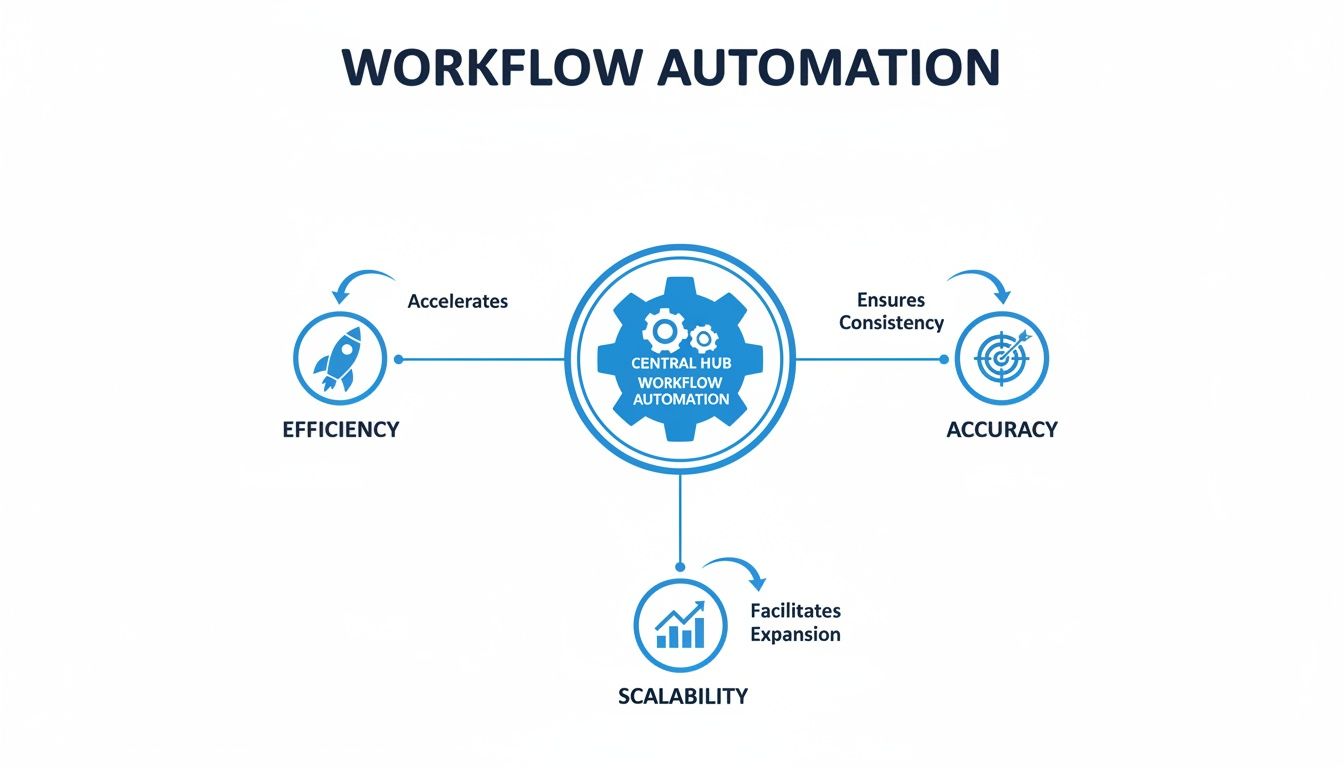
This visual makes it clear: a well-designed workflow directly fuels measurable improvements across the board. The business case for this technology is pretty hard to argue with. Globally, over 80% of organizations are planning to ramp up their automation investments.
Why? The results speak for themselves: ROI within 12 months, productivity jumps of 25-30%, and error reductions between 40-75%. By getting a handle on triggers, actions, and integrations, you can start designing workflows that deliver these kinds of powerful outcomes for your own business.
Unlocking the Real Benefits of Workflow Automation
Knowing the nuts and bolts of workflow automation is great, but the real magic happens when you see the results hit your bottom line. Let's move past buzzwords like "efficiency" and dig into how automated processes actually build a stronger, more resilient, and more profitable business. The impact isn't just about saving a few minutes here and there—it’s measured in dollars, data accuracy, and team morale.
One of the first and most powerful wins is a massive drop in human error. Let’s be honest, manual tasks are a breeding ground for mistakes, especially things like data entry, invoice processing, or compliance checks. A single misplaced decimal or an overlooked detail can snowball into financial losses, compliance fines, or a damaged customer relationship.
Think of workflow automation as your built-in quality control. You define the process with a clear set of rules, and the software executes it perfectly every time. The system doesn't get tired, distracted, or have an off day; it just delivers flawless consistency.
Slashing Costs and Boosting Productivity
That consistency and accuracy translate directly into serious cost savings. Just think about all the hours your team spends hunting down errors, fixing bad data, or flat-out redoing work. Every single one of those hours is a direct hit to your budget. Automation cuts that rework to a minimum, freeing up cash and resources you can pour back into growth.
But it’s not just about fixing mistakes. Automation unlocks a whole new level of productivity. When your sharpest minds are no longer stuck with repetitive, low-value chores, they can finally focus on the strategic work that actually moves the needle.
Automation gives your team back its most valuable asset—time. It lets them pivot from mind-numbing tasks to innovation, customer engagement, and complex problem-solving. This isn't about doing things faster; it's about doing more of the right things.
The opportunity here is huge. A staggering 94% of companies are battling the exact kind of repetitive, time-sucking tasks that automation is built to solve. When they get it right, businesses report average productivity gains of 25-30% and cut errors by 40-75% compared to doing things by hand. You can dig into more of these workflow automation market findings on Research Nester.
Enhancing Employee Satisfaction and Morale
This is the benefit everyone forgets, but it might be the most important. Mind-numbing, repetitive tasks are a one-way ticket to burnout and job dissatisfaction. Nobody gets excited about spending their day copying and pasting data between spreadsheets or manually sending hundreds of follow-up emails.
When you automate those tedious jobs, you fundamentally improve the quality of work for your team. People get to tackle more fulfilling, challenging projects that help them grow professionally while driving the company forward. This creates a huge shift in your workplace culture.
- Increased Engagement: Team members who feel their work is meaningful are far more likely to be engaged and proactive.
- Lower Turnover: Happy, less burned-out employees stick around. It’s that simple.
- Focus on Creativity: Automation handles the robotic work, freeing up your people to do what humans do best: create, strategize, and connect.
The data backs this up, showing that automation improves jobs for 90% of knowledge workers and boosts productivity for 66% of them. It's proof that automation isn’t about replacing people—it’s about empowering them to operate at a higher level.
Achieving Scalability and Consistent Quality
Finally, workflow automation lays the foundation you need to grow without things breaking. As your business scales, manual processes become bottlenecks. You can't just keep hiring more people to click buttons faster—it’s expensive, inefficient, and completely unsustainable.
Automation lets your operations handle a flood of new work without needing more hands on deck or sacrificing quality. A well-built workflow can process ten transactions or ten thousand with the exact same speed and accuracy. This ensures that as you grow, your service and operational consistency stay rock-solid, creating a reliable framework for the future.
Real-World Workflow Automation Examples Across Industries
Theory is one thing, but seeing workflow automation in action is what really makes the concept click. To get what workflow automation is, you need to see how it solves real problems for real teams. Let’s jump into some practical use cases across different parts of a business, showing the clear "before" and "after" of putting an automated process in place.

These examples aren't some futuristic fantasy; they are happening right now in companies that are thinking ahead. Each one takes a process that was once prone to delays and mistakes and turns it into a smooth, reliable, and hands-off operation.
Transforming Human Resources with Onboarding Automation
Employee onboarding is a classic example of a complex process. It touches multiple departments and is absolutely stuffed with repetitive tasks. A manual approach often creates a frustrating first impression for new hires and a logistical nightmare for HR.
Before Automation:
The HR manager has to manually email IT to set up a new user account. Then, they shoot off a separate request to facilities for a desk and equipment. On top of that, they have to remember to enroll the new employee in benefits and orientation sessions. This chain of emails and reminders is slow, inconsistent, and things constantly fall through the cracks. It's not uncommon for a new hire to start without a laptop or a critical software license.
After Automation:
The second a candidate signs their digital offer letter (that's the trigger), a workflow kicks into gear.
- Action 1: An IT helpdesk ticket is automatically created to provision a user account and order standard equipment.
- Action 2: The new hire is auto-enrolled in the next available onboarding and training sessions right in the HR system.
- Action 3: A welcome email is scheduled to send on their first day, complete with links to essential documents and a team directory.
This single trigger sets off a series of perfectly coordinated actions. The result? Every new employee gets a consistent and positive day-one experience without any manual chasing from HR.
Streamlining Operations with Inventory Management
For any business that deals with physical products, managing inventory is a constant balancing act. Running out of stock means lost sales, but holding too much ties up cash. Workflow automation can turn this reactive process into a proactive, intelligent system.
By automating inventory controls, businesses can maintain optimal stock levels, reduce carrying costs, and prevent the stockouts that frustrate customers and damage brand reputation. It shifts inventory management from guesswork to a data-driven science.
Before Automation:
A warehouse manager physically checks stock levels once a week. When they notice a product is running low, they manually fill out a purchase order request and email it to the procurement team for approval. This delay can easily lead to stockouts, especially during a busy period.
After Automation:
The inventory management software becomes the brain of this workflow.
- Trigger: The system detects that stock for a specific item has dropped below a pre-set threshold (e.g., 50 units).
- Action 1: A draft purchase order for a standard reorder quantity is instantly generated.
- Action 2: The PO is routed to the designated manager for a simple one-click approval.
- Action 3: Once approved, the official purchase order is sent directly to the supplier's inbox.
This automated cycle ensures that replenishment happens at the exact right moment, minimizing both shortages and excess inventory.
Optimizing IT with Intelligent Helpdesk Routing
An IT helpdesk is the nerve center of a company's technical support, but it can get overwhelmed fast without smart systems. Manually reading, categorizing, and assigning every single support ticket is a massive time-suck for skilled IT pros who should be solving problems.
Before Automation:
A support agent opens a generic "New Ticket" email. They have to read the entire message to figure out the issue, decide if it’s a hardware or software problem, guess its priority, and then manually assign it to the correct specialist. This process can take several minutes per ticket, leading to frustratingly slow response times.
After Automation:
Now, when a user submits a ticket through a support portal, the automation platform analyzes its content on the fly.
- Trigger: A new support ticket is created.
- Action 1: The system scans the ticket's title and description for keywords like "password," "printer," or "VPN."
- Action 2: Based on these keywords, it automatically categorizes the ticket (e.g., "Account Access," "Hardware Issue") and sets a priority level.
- Action 3: The ticket is instantly assigned to the correct IT specialist or group responsible for that category.
This workflow gets issues to the right expert in seconds, dramatically cutting down resolution times and freeing up the IT team to focus on fixing things instead of doing administrative triage.
How Documented Processes Fuel Successful Automation
Let's start with a hard truth about workflow automation: you can't automate what you haven't clearly defined.
Trying to automate a process without a solid map is like building a house without a blueprint. Sure, you might get a few walls up, but the whole thing is unstable and bound to come crashing down.
Every single successful automation project is built on the foundation of well-documented Standard Operating Procedures (SOPs). These aren't just bureaucratic fluff; they are the literal instruction manuals that tell your automation software exactly what to do, when to do it, and how to handle things when they go sideways.
Without this "single source of truth," your automation efforts are basically guesswork. Teams often run on tribal knowledge—those unwritten rules and shortcuts living inside a few key employees' heads. This leads to inconsistent results and makes creating a reliable automated system nearly impossible.
The Blueprint for Automation Success
An SOP is the script for your automated workflow. It meticulously breaks down every trigger, action, and decision point needed to get a task done from start to finish. This detailed map ensures the logic you build into your automation platform perfectly mirrors your company's best practices.
Think of it this way: an SOP translates a complex business operation into a simple, step-by-step language that both people and software can understand. That clarity is non-negotiable. It strips out all the ambiguity and ensures the workflow you automate is the right one, not just a slapped-together version of it.
By documenting first, you de-risk the entire project. You spot bottlenecks, uncover wasted steps, and standardize the process before you write a single line of code or design a workflow. This proactive step saves countless hours of rework and prevents expensive failures down the line. You can dive deeper into the fundamentals of documenting business processes.
Creating Automation-Ready Processes
So, what does an "automation-ready" process look like? It's documented, standardized, and optimized for pure efficiency. This is where a dedicated platform for managing your SOPs becomes a game-changer. A system like Whale helps teams create and maintain a central library of all their operational know-how.
The platform's interface, shown below, highlights how it organizes processes into a clear, accessible library.
This centralized hub makes it easy to collaborate on, update, and share SOPs, guaranteeing everyone is working from the same playbook. When it’s time to automate, you have a verified, up-to-date blueprint ready and waiting.
This structured approach is becoming even more critical as companies shift their operations. Cloud deployment is rapidly shaping the future of automation, now capturing 67.9% of the market share for related systems. This move is all about finding scalable, accessible platforms that plug right into digital workflows—and it all starts with having crystal-clear processes. You can discover more about the growth of cloud-based workflow management on Precedence Research.
The Strategic Payoff of Documentation
Ultimately, treating process documentation as a core strategy—not just a preliminary chore—is what separates successful automation projects from the ones that flop. It gives you three huge advantages that directly boost your return on investment.
Key Insight: Strong documentation doesn't slow you down. It provides the clarity and stability needed to accelerate automation, reduce implementation errors, and ensure long-term success.
- Reduces Risk: A documented process has been vetted and approved. This minimizes the risk of automating a flawed or inefficient workflow from the get-go.
- Increases Speed: With a clear blueprint in hand, developers and operations managers can build and deploy automated workflows much faster. No more guessing games.
- Ensures Consistency: It guarantees that the automated process sticks to company standards, compliance requirements, and best practices every single time.
By investing the time upfront to create solid SOPs, you aren't just getting ready for automation. You're building a more resilient, efficient, and scalable operation from the ground up.
A Practical Guide to Implementing Workflow Automation
So, you understand what workflow automation is, but making the jump from theory to practice can feel like a big one. The key is to break it down into a clear, actionable game plan. This approach takes the guesswork out of it and sets you up for a successful launch from day one.

The journey doesn’t start with buying fancy software. It starts with finding the right opportunities. Look for the tasks that are sucking up your team's time and energy—the high-volume, repetitive, rule-based jobs that are just begging for human error. Those are your prime candidates for automation.
Laying the Groundwork for Success
Before you can automate anything, you need to understand the process inside and out. The first real step is to map out the existing workflow in detail. This visual blueprint should show every single step, decision, and person involved. It gives you a crystal-clear picture of how work gets done right now.
Once you’ve got your map, it's time to choose the right tools for the job. Your decision should hang on a few key factors:
- Budget: How much are you ready to invest in software and getting it set up?
- Integration Needs: Does the platform play nice with your current tech stack, like your CRM, ERP, or communication tools?
- Technical Skill Level: Is it user-friendly enough for your team, or will you need dedicated IT folks to run it?
With the right tools and a clear map, you can start designing the new, automated workflow. If you want to go deeper on evaluating different platforms, check out our guide on business process management software. It'll help you find a solution that actually fits your needs.
From Design to Continuous Improvement
Designing your workflow is where the magic really happens. This is where you’ll set up the triggers, actions, and conditions that bring your process map to life inside the automation software. But hold on—don't rush to roll it out to the whole company just yet.
A critical best practice is to start with a small pilot project. Pick a single, high-impact workflow to automate first. This lets you test everything in a controlled environment, iron out any wrinkles, and score an early win that builds momentum and gets your team excited.
After a thorough testing phase, you can finally launch your new automated workflow. But the work doesn't stop there.
The final, and arguably most critical, stage is ongoing monitoring and improvement. Automation isn't a "set it and forget it" deal; it's a living system that needs to evolve with your business.
Gather performance data and feedback from your team to find spots for optimization. This continuous improvement loop ensures your automated processes stay sharp and aligned with your goals. This push for efficiency is happening everywhere; data shows 69% of daily managerial operations are now fully automated, and 65% of organizations are actively expanding their automation efforts. As the workflow automation market report highlights, businesses that fail to adapt risk being left behind.
Got Questions About Workflow Automation?
As you start digging into workflow automation, a few questions always pop up. Let's tackle the ones we hear most from business leaders and ops managers who are just getting their feet wet.
Is This Only for Certain Industries?
Not at all. Any business dealing with repetitive, rule-based tasks can get a massive lift from automation. It's a huge deal in IT, HR, and finance, sure, but we see it everywhere.
Think about manufacturing, where it helps manage the supply chain. Or healthcare, where it handles patient intake. Even real estate uses it to process applications. The basic idea of automating predictable steps works in any field.
Isn't This Just the Same as RPA?
That’s a super common question, and it's easy to see why. Here’s a simple way to think about it:
Robotic Process Automation (RPA) is like a digital assistant that mimics human clicks and keystrokes to get a single task done—like copying data from a spreadsheet into a CRM. Workflow automation is the conductor of the whole orchestra, making sure the entire end-to-end process runs smoothly by connecting different systems and coordinating tasks across departments.
RPA is about the task. Workflow automation is about the whole process. They often work together, too. A larger workflow might trigger an RPA bot to handle one of its specific steps.
So, Where Does Whale Fit In?
Simple: You can't automate a messy process.
While automation tools are the ones that actually run the workflow, Whale is where you design and perfect the blueprint first. It’s the AI-powered platform where you build out your Standard Operating Procedures (SOPs).
Think of Whale as the source of truth for how your business operates. When you build your automation on top of that solid, standardized foundation, everything just works better. Implementation is faster, you sidestep a ton of errors, and the final automated workflow is a perfect match for how your company actually wants things done.