SOP & Process Documentation
How to Train Deskless Workers: A Step-by-Step Implementation Guide


In this article
Training deskless workers succeeds or fails on one thing: whether the knowledge exists in a form a worker can actually use on a phone, mid-shift, without stopping to ask a colleague.
For someone sitting at a desk, training can mean opening a course on a laptop, working through a module and taking a quiz. A warehouse operative, retail employee, technician or hospitality worker may need to learn something while standing on a shop floor, beside a machine or halfway through a shift.
That’s why deskless worker training needs to connect learning with doing.
This guide sets out six steps in sequence: what to document first, how to capture it without turning it into a writing project, how to keep training and reference material in one place, how to sequence learning by shift rather than by module, how to structure the peer training already happening on your floor, and how to prove any of it landed.
It closes with the seven questions that separate a platform built for deskless teams from a desk-based one with a mobile app bolted on.
Key takeaways
- Start with the processes where mistakes cost the most, not the org chart or the onboarding checklist. Cap the first list at around twenty procedures that make the biggest difference in the workplace.
- Keep training material and reference material in the same document. Run them as two systems and they drift apart within weeks, leaving workers to trust whichever version they saw last.
- Sequence training by what someone in that position needs to achieve: the non-negotiables by the end of shift one, the core loop by the end of week one, the exceptions and judgment calls by day thirty.
- Verify understanding of training rather than simple completion, then tie it to one operational number your COO already tracks.
What is deskless worker training?
Deskless worker training is the process of training employees who spend most of their working time away from a traditional desk or computer.
The term often overlaps with frontline employee training and can include workers in:
- Retail and hospitality
- Manufacturing and warehousing
- Construction and field services
- Healthcare and care services
- Logistics and transportation
- Restaurants and food service
- Facilities and maintenance
These workers still need onboarding, compliance training, product knowledge and skills development. But the way that knowledge is delivered has to fit the environment they’re actually working in.
A deskless worker may need a five-minute training activity before a shift, a procedure on their phone halfway through a task, or a checklist beside a piece of equipment. Effective deskless training therefore needs to combine structured learning, searchable procedures, supervised practice and verification.
6 Steps to Build a Deskless Worker Training Program
The six steps below work as a sequence, but each one stands on its own if you already have parts of this in place. In short: document the expensive processes first, capture them by recording rather than writing, keep training and reference in one document, sequence learning by shift, structure the peer training already happening, and verify understanding rather than completion.
Step 1: Pick the processes to document first
Don’t start with the org chart, and don’t try to document everything for onboarding.
Start with the processes where mistakes cost you the most.
Sit down with your operations leads and ask three questions:
- Which jobs regularly get done twice?
- Which handovers regularly drop things?
- Which steps come immediately before an incident, callback, rework or customer complaint?
A useful diagnostic before you begin: find the person everyone asks when they get stuck. It might be the shift lead who knows which supplier to call, the senior technician who knows which unit needs the panel removed in a particular order, or the experienced employee who knows exactly what to do when the normal process doesn’t work.
If they left on Friday, what would a new hire have on Monday?
If the answer is a phone number rather than a procedure, your first twenty processes are probably sitting in that person’s head.
That matters in high-turnover environments. In goHappy and Lighthouse Research & Advisory’s State of the Frontline Worker Report 2026, annual turnover across the frontline employers surveyed was 89.1%, with retail at 102.8% and food service at 99.9%.
In those environments, relying on one experienced employee to carry critical undocumented knowledge is an operational risk. Documentation isn’t just an efficiency project. It’s how you stop paying to relearn the same job.
What you should have at the end of this step:
- A list of approximately 20 high-value procedures
- An owner for each procedure
- A clear reason each procedure matters
- A priority order for documenting them
Step 2: Capture what your experienced workers know
The bottleneck in every deskless training project is that the content doesn’t exist yet in any usable form. Getting it out of people’s heads is the work, and it has to be cheap enough that the person who owns the process can do it themselves between tasks.
- Record the work instead of writing about it. For anything screen-based, use step recording, which captures annotated screenshots automatically as someone completes the process once. For physical work, have the person film it on a phone on site and narrate what they’re doing. A four-minute narrated video from the person who actually does the job is better source material than anything an L&D team can reconstruct from an interview, and it doesn’t require them to sit down and write.
- Assign an owner and a review date to every procedure. Confidently wrong documentation is worse than none, because people follow it. Name the subject-matter expert who owns each process, set a review interval, and let the system chase them when it expires. Skip this and your library quietly rots, workers learn not to trust it, and they go back to asking the shift lead.
Don’t route it all through L&D. If one team has to write several hundred procedures for jobs they’ve never done, you’ll get the twelve easy ones and none of the hard ones. The hard ones are the ones causing rework.
Step 3: Get one current version onto the device they’re actually holding
Steps 1 and 2 give you procedures. This step decides whether a worker can reach the right one at the moment they need it, on the devices you just identified.
That means thinking about the actual devices your workforce uses.
Some deskless teams have company phones. Others use shared rugged handhelds, tablets, vehicle-mounted terminals or a kiosk. Some workers aren’t permitted to carry phones on the floor at all.
The question isn’t simply whether your training platform has a mobile app.
It’s:
Can a worker get the information they need, on the device available to them, without having to stop what they’re doing?
Keep one current version of the procedure
The material a worker trains on and the material they check mid-task should be connected.
Many organizations separate training from operational knowledge: an LMS holds the training, while a shared drive, PDF or binder holds the reference material. That can work, but it creates a version-control problem. The training says one thing and the procedure says another, and workers eventually trust whichever version they saw last.
Keeping training and reference content connected means an update reaches both.
| Moment | What the worker needs | What a disconnected system can create |
|---|---|---|
| Day one, before first shift | Sequence and context | A course, which works well here |
| Mid-task, hands busy | One step, in seconds | A course, which doesn’t |
| Something changed last week | The current version | Two versions with unclear ownership |
| Audit or incident review | Who read what, when, and passed | An attendance record without context |
Put knowledge where the work happens
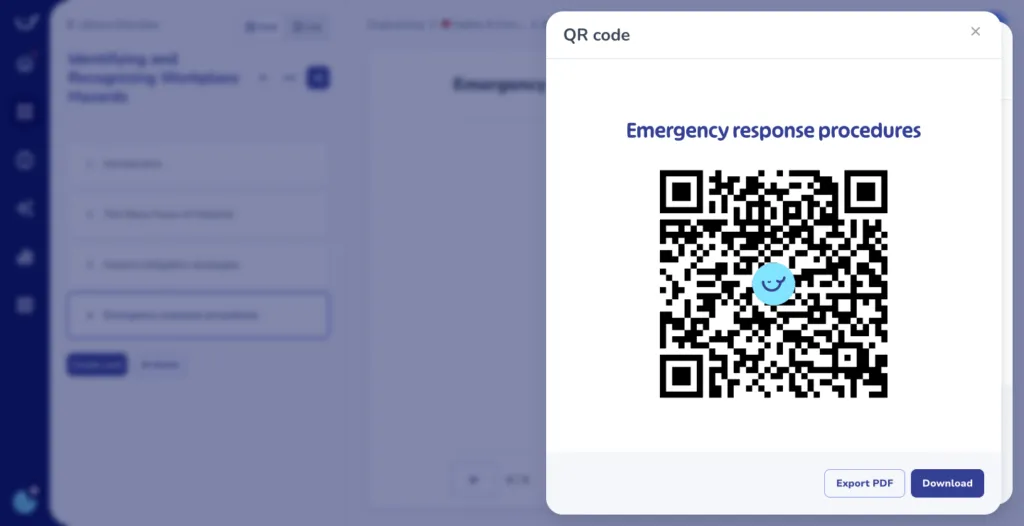
A printed QR code at a workstation can be a simple way to connect a physical task with a live procedure. Put the code on the machine, prep counter, loading dock or inside the van. The worker scans it and the current procedure opens.
The important part isn’t the QR code itself. It’s that the worker doesn’t have to search for the procedure.
The code points to the live procedure rather than a static file, so changes can be reflected without reprinting the physical sign.
One limitation is worth noting: an anonymous scan can show that a procedure was opened at a particular location, but not necessarily who read it. If you need an individual training record, that still requires the worker to be identified.
How to test it: give someone a procedure they’ve never seen and ask them to find one specific step on the device they’ll use at work.
Can they find it in under fifteen seconds?
If not, you have a training system, but not necessarily a useful reference system.
Step 4: Sequence the training by jobs to be done
Training is all about job readiness.
Don’t plan in modules. Plan around what someone should be able to do unsupervised, and by when. That gives you three stages, plus one that never ends:
- By the end of shift one: the non-negotiables. What could hurt them, hurt a customer, or breach compliance. Emergency procedures, PPE, the three things you never do. Nothing else. Short and verified, no exceptions.
- By the end of week one: the core loop, unsupervised. The part of the role that recurs every shift, which in most frontline jobs is the bulk of it. Not the edge cases. The target is that they can complete a normal shift without a colleague hovering.
- By day thirty: the exceptions and judgment calls. What to do when the delivery is short, the customer is angry, the reading is out of range. These only make sense once the core loop is automatic.
- Ongoing: changed procedures, targeted to the roles affected. When a process changes, the people who use it get reassigned and re-verified. Everyone else is left alone. No annual refresh for the whole workforce.
Write each stage as something you can watch someone do, for example “can complete a room turnover to standard, unassisted, in under X minutes.” Do that and the content you need becomes obvious: you document what it takes to get them there, and nothing else. It also gives shift leads a clear definition of done for a new hire, which most have never had.
Step 5: Structure peer training so it doesn’t cost you a shift
Most deskless training is actually delivered by whoever is nearest and most experienced. That person isn’t an instructional designer. They may not be paid to train but they’re probably the person who knows the most about the task at hand.
But training is usually an extra and they’re still responsible for their own work while a new employee follows them around.
Two experienced employees can therefore train two new hires in two completely different ways.
That doesn’t mean you should remove peer training.
Peer shadowing is still one of the fastest ways to learn physical work. The answer is simply to structure it.
- Give the trainer a sequenced path to follow. Each stage should have a clear outcome and verification step. Shadowing becomes “watch me, then do it while I check” rather than an unstructured fortnight.
- Capture their expertise once. Your best operators are already delivering your best training content verbally, several times a week. Record it and turn that knowledge into a reusable procedure.
- Let them answer each question once. When a procedure is searchable, “How do I do X?” can become a link instead of a ten-minute interruption.
- Recognize the training work. Completion tracking usually focuses on learners. Don’t overlook the employees who spend time getting new colleagues up to speed.
You can even quantify this.
Pick your three highest-interruption roles and estimate how many hours experienced workers spend answering repeat questions each week.
That number can become part of your business case for better documentation and training.
Step 6: Verify the training landed
Completion rates tell you a file was opened. You need to know that the training landed and that the procedure was followed.
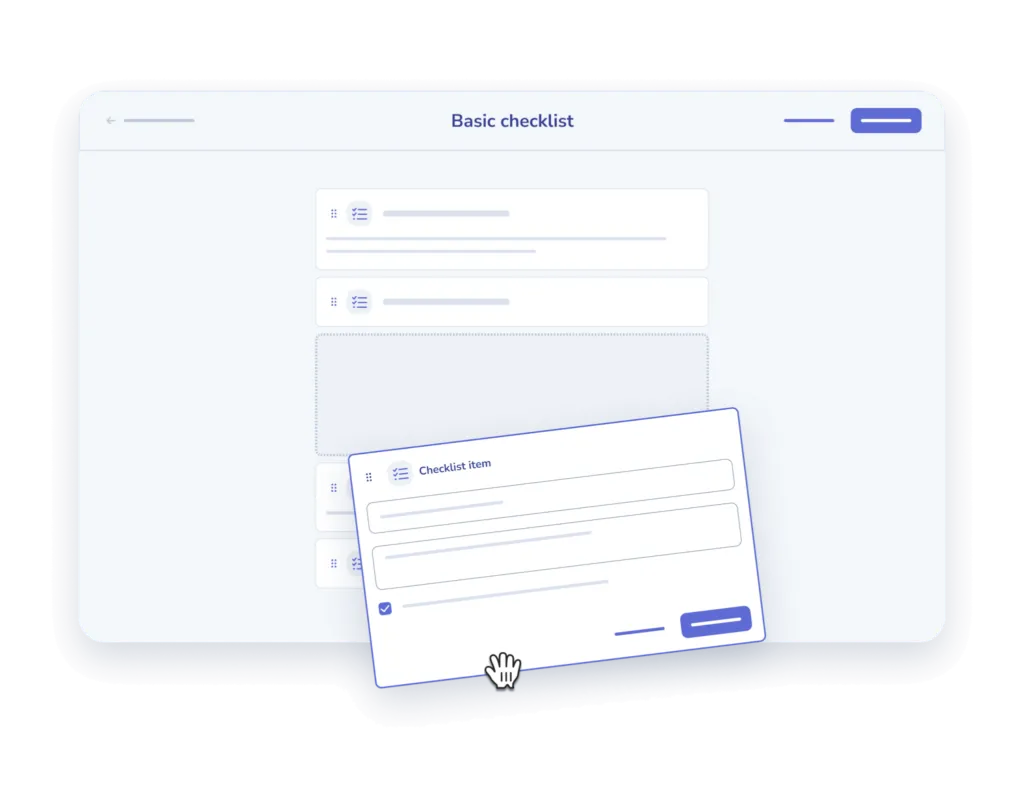
- Was the procedure followed? In manufacturing, logistics and construction, following procedure is essential. Use checklists to make sure that an exact process is followed when performing a task.
- Check understanding, not exposure. A short quiz generated from the procedure itself, so it stays in sync when the procedure changes. Two or three questions is enough; you’re catching people who clicked through, not running an exam.
- Stamp acknowledgements with a version. Not “Ana completed safety training” but “Ana read version 4 of the lockout procedure on 12 March and passed the check.” When the procedure changes, the old acknowledgement should stop counting.
- Watch what gets searched. Frequent lookups on a procedure a month after training is a signal that it didn’t stick, or that the process itself is confusing. It’s the most underused diagnostic available to you, and unlike completion it’s a leading indicator.
Then tie those to one or two operational metrics you can pull cleanly: time to independent productivity, rework or callback rate, first-time-right, incident count, or 90-day retention.
How to choose a deskless worker training platform
Mobile, offline, microlearning and analytics are table stakes and every vendor ticks all four. But make sure to ask vendors deeper questions, including:
| Question to ask | Why it separates vendors |
|---|---|
| Who creates the content, and how long does one procedure take? | If the answer is “your team writes it,” you’ve bought a delivery pipe and inherited the whole authoring project. Ask them to create one procedure from scratch, live, and time it. |
| Are the training material and the reference material the same document? | Two systems make version drift structural rather than a discipline problem. |
| Can a worker find one step in under fifteen seconds on a phone? | Tests whether it works mid-task or only pre-shift. Try it yourself. |
| What happens to acknowledgements when a procedure is updated? | Shows whether the audit trail is real or decorative. |
| Does it work offline, and what syncs on reconnection? | Basements, stockrooms, rural sites, vans. |
| Can it be deployed through our MDM onto managed rugged devices? | If workers can’t install apps themselves, this decides whether a rollout is possible at all. |
| On a shared device, can completion still be attributed to an individual? | Shared handhelds plus wiped sessions can quietly destroy your audit trail. |
| How does existing content get in? | You have PDFs, Word files and a shared drive. Migration effort is the most underestimated line in these projects. |
| Can procedures surface inside the tools people already use? | Adoption follows proximity. A separate destination gets visited once. |
| Can a procedure be opened from a printed code at the workstation, with no app and no login? | The cheapest way to reach shared-device and no-phone sites. Check whether the code stays pointed at the live version after edits. |
Ask for the first and third live, on a process you choose rather than a prepared demo library. The differences show up within ten minutes.
Deskless training software: where Whale fits in for deskless workers
The six steps above come down to a simple operational model:
Capture the knowledge, turn it into usable procedures, train from those procedures, make them available at the point of work, then verify understanding and execution.
Whale is a comprehensive solution for training deskless workers, with features like:
- Capture without writing: Step Recorder turns an on-screen process into a numbered, annotated guide as someone completes it. For physical work, teams can use video as source material for procedures. The person who actually does the job can contribute the knowledge without sitting down to write a manual.
- Turn procedures into training: Procedures can become training flows with AI-generated quizzes, while remaining searchable as reference material afterwards. The same source means the training and operational procedure don’t have to become two separate versions.
- Put procedures at the point of work: QR codes at the workstation let teams connect a physical location with a live procedure. A worker scans the code and gets the relevant information without having to search for it.
- Execute procedures with checklists: Checklists turn procedures into executable task lists. Teams can work through each step, capture photos as evidence and create a record of the task.
- Make knowledge mobile: The Whale mobile app gives deskless workers access to procedures and assigned training from iOS and Android devices, wherever the work happens.
- Keep knowledge accountable: Owners, review dates, version history and read-and-understood tracking help keep procedures current and provide a record of who has reviewed them.
Why this works for deskless teams: none of it assumes a worker has a company laptop or a spare half hour to sit through a course.
The knowledge is captured by the person who actually does the job, made available where the work happens, used as training and reference, and connected to verification.
That’s the real requirement for deskless training.
The technology matters, but only if it helps turn experience into something a new employee can actually use.
See how the Whale mobile app works for deskless and frontline teams
FAQs about training deskless workers
How long should deskless training sessions be?
Under five minutes for anything completed during a shift. But length is the wrong first question. Decide what someone must be able to do unsupervised and by when (step 4), then cut each piece down to what fits between tasks.
How do you document processes when the experts are always on the floor?
Have them record rather than write. Screen recording captures system processes automatically with annotated screenshots; a narrated phone video captures physical work on site in a few minutes. Structure the recording into a procedure afterwards. This is the difference between a documentation project that finishes and one that stalls.
What if our deskless workers don’t have phones?
Many don’t, and plenty of sites don’t allow them on the floor. Deskless teams are commonly issued shared rugged handhelds such as Zebra’s TC or MC series, rugged tablets, vehicle-mounted terminals or a single break-room kiosk. Get the per-site device list from IT before shortlisting a platform, and check two things specifically: whether it can be deployed through your mobile device management setup, and whether it can still attribute training completion to an individual when four people share one device across a shift. Where devices are the blocker, a printed QR code at the workstation is usually the cheapest route in, because it needs no app and no login to read.
What’s the difference between an LMS and an SOP platform for deskless teams?
An LMS delivers and tracks courses, which suits scheduled, sit-down learning. An SOP platform keeps procedures both trainable and consultable mid-task from one source. Deskless work usually needs the second, because the moment of learning and the moment of doing are the same moment.
How do you onboard deskless workers quickly?
Front-load only the non-negotiables before their first shift, then get them into supervised work on day one with a structured path their peer trainer can follow. Speed comes from cutting what a new hire has to absorb before being useful, not from compressing everything into a faster course.
How do you measure whether deskless training worked?
Track understanding via short checks generated from the procedure, version-stamped acknowledgements, and lookup patterns. Then connect those to one or two operational metrics: time to independent productivity, rework or callback rate, first-time-right, incidents, or 90-day retention.
Lisa Steingold is the Head of Content for Whale. With a history in tech, she's authored 4 books and is obsessed with helping teams unlock the next level of growth and productivity. (And riding her bike)